Introduction
Artificial intelligence has quickly become a practical part of everyday work. In 2026, people use AI to write articles, research topics, create images, build presentations, analyze documents, write code, organize projects, and automate repetitive tasks.
The real problem is no longer finding an AI tool. It’s choosing the right one. A student may need an AI tutor, while a developer needs coding assistance and a designer may care more about image generation and editing.
This guide compares some of the best AI tools in 2026, including their main strengths, limitations, ideal users, and practical use cases. Whether you’re a student, writer, developer, researcher, creator, freelancer, or business owner, you’ll find options worth considering.
⚠️ Disclaimer: AI tools, pricing, features, usage limits, and model capabilities can change frequently. Always verify important information on the provider’s official website before making a purchase or relying on AI-generated content.
Best AI Tools at a Glance
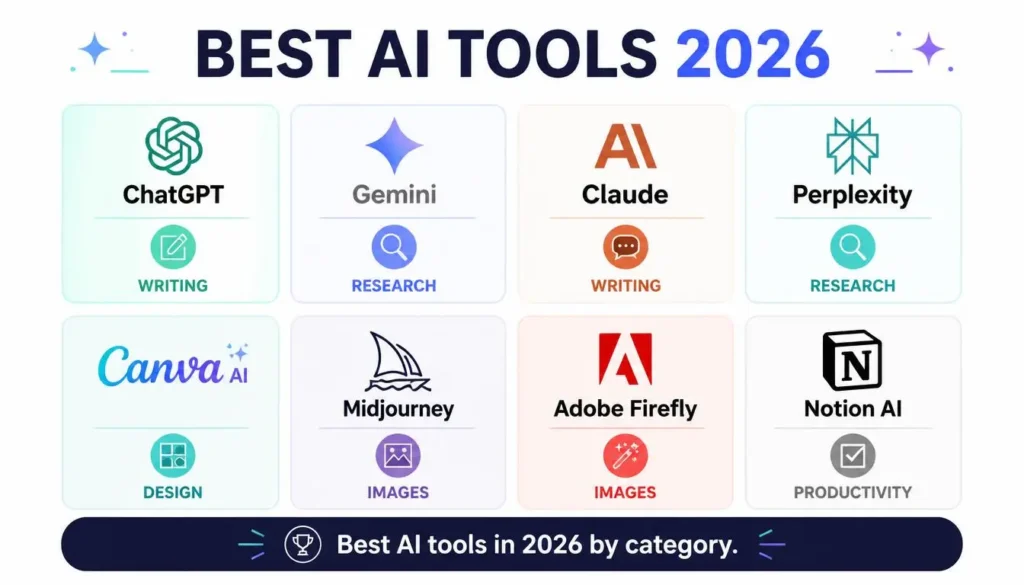
| AI Tool | Best For | Main Strength |
|---|---|---|
| ChatGPT | Writing & coding | Versatility |
| Google Gemini | Research & Google apps | Workspace integration |
| Claude | Documents & reasoning | Long-context work |
| Perplexity | Research | Source-focused search |
| Canva AI | Design | Templates and simplicity |
| Midjourney | AI images | Artistic image generation |
| Adobe Firefly | Professional design | Creative control |
| Notion AI | Productivity | Notes and organization |
What Makes a Great AI Tool?
Before choosing an AI platform, look beyond popularity. The best option depends on what you actually need.
Accuracy
Reliable answers matter, especially for research, business, education, and technical work. AI can still make mistakes, so important claims should be verified.
Ease of Use
A simple interface lets beginners start quickly and helps experienced users finish tasks faster.
Features
Strong AI platforms may offer file analysis, image generation, coding assistance, research tools, writing features, and productivity integrations.
Pricing
Most major platforms have free access alongside paid plans. Free versions can be enough for casual users, while frequent users may benefit from premium features.
Best Use Case
There is no single AI tool that dominates every category. Choosing based on your actual workflow usually produces better results.
Best AI Tools in 2026
1. ChatGPT — Best Overall
Best for: Writing, coding, learning, brainstorming, and general productivity.
ChatGPT remains one of the most versatile AI assistants. It can help with articles, emails, coding, explanations, brainstorming, file analysis, and creative tasks.
Its biggest advantage is flexibility. Instead of using separate tools for every small task, many users can handle different workflows from one platform.
Pros
- Excellent writing support
- Strong coding assistance
- Useful for learning
- Flexible across many tasks
- Natural conversational experience
Cons
- Some advanced features require paid access
- Important information still needs verification
OpenAI currently offers Free, Go, Plus, Pro, Business, and Enterprise options, with features and limits varying by plan. ChatGPT Plus is listed at $20/month.
2. Google Gemini — Best for Google Users
Best for: Research, productivity, and Google Workspace.
Gemini is particularly useful for people already working with Google’s ecosystem. Its integration with Google services can make everyday tasks more convenient.
Pros
- Strong Google integration
- Research assistance
- Document support
- Useful productivity features
Cons
- Some creative tasks may need additional editing
- Its biggest advantage is for users already invested in Google services
Google currently offers several AI plans with different levels of Gemini access and storage, depending on the market and subscription.
3. Claude — Best for Long Documents
Best for: Research, professional writing, reasoning, and lengthy documents.
Claude is particularly useful when a task involves a lot of information. Anthropic’s 2026 models emphasize coding, long-context reasoning, knowledge work, and professional tasks.
Pros
- Excellent document analysis
- Strong reasoning
- Clear professional writing
- Useful for complex tasks
Cons
- Not as broad in ecosystem features as some competitors
- Some workflows may benefit more from specialized tools
4. Perplexity AI — Best for Research
Best for: Web research and information discovery.
Perplexity is designed around AI-powered search and is particularly useful when you want answers supported by sources.
Pros
- Research-focused workflow
- Source-backed responses
- Fast information discovery
- Useful summaries
Cons
- Less suitable for creative design
- Not intended to replace dedicated productivity or image tools
5. Canva AI — Best for Beginners
Best for: Social media graphics, presentations, thumbnails, and everyday design.
Canva combines AI features with templates and a drag-and-drop editor. That makes it especially useful for people who want professional-looking designs without learning complicated software.
Pros
- Very beginner-friendly
- Large template library
- Fast content creation
- Excellent for social media
Cons
- Less advanced control than professional design software
6. Midjourney — Best for AI Images
Best for: Artistic and visually detailed image generation.
Midjourney is a strong option for creators who care primarily about AI-generated artwork, visual concepts, and distinctive artistic styles.
Pros
- High-quality visual results
- Strong artistic styles
- Excellent for creative concepts
Cons
- Primarily focused on image generation
- Getting consistent results can require prompt practice
7. Adobe Firefly — Best for Professional Design
Best for: Professional creative workflows and AI-assisted editing.
Firefly is closely connected to Adobe’s creative ecosystem and is designed for users who need more control over professional visual work.
Pros
- Advanced AI editing
- Creative Cloud integration
- Strong professional workflow
- Creative control
Cons
- Steeper learning curve
- More useful when you’re already familiar with Adobe tools
8. Notion AI — Best for Productivity
Best for: Notes, documentation, project organization, and team workflows.
Notion AI brings AI assistance into a workspace that already handles notes, documents, databases, and projects.
Pros
- Strong organization
- Writing assistance
- Documentation
- Collaboration
Cons
- Can take time to learn
- Most useful for people already using Notion
Best AI Tool by Category
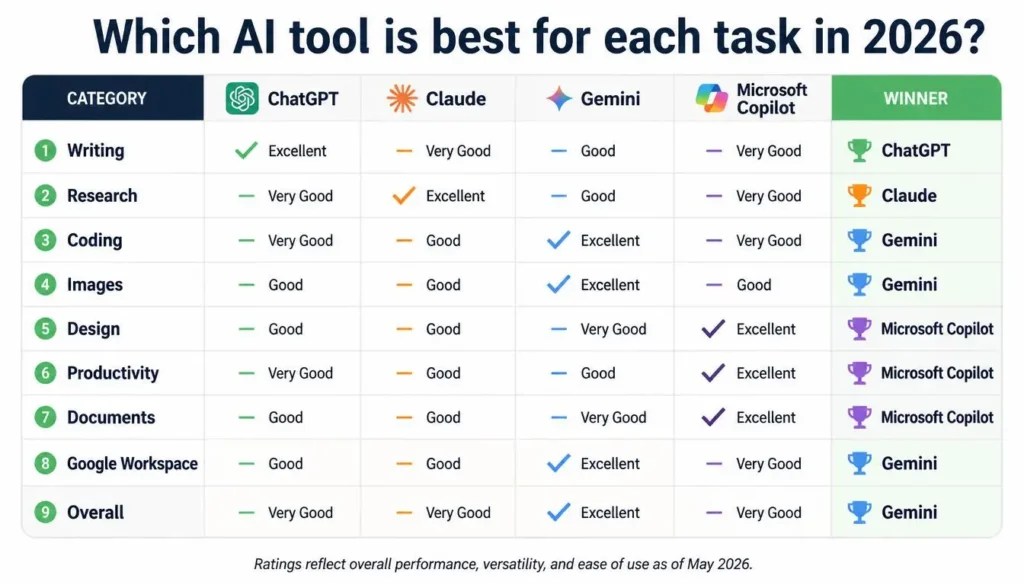
| Category | Winner |
|---|---|
| Overall AI Assistant | ChatGPT |
| Writing | ChatGPT |
| Research | Perplexity |
| Long Documents | Claude |
| AI Images | Midjourney |
| Beginner Design | Canva AI |
| Professional Design | Adobe Firefly |
| Productivity | Notion AI |
| Google Workspace | Gemini |
| Coding | ChatGPT |
Which AI Tool Is Best for You?
Your choice should depend on your primary task.
- Student → ChatGPT
- Writer → ChatGPT or Claude
- Researcher → Perplexity
- Developer → ChatGPT
- Designer → Adobe Firefly or Canva AI
- Content Creator → ChatGPT + Canva AI
- Business User → Notion AI
- Google Workspace User → Gemini
Instead of paying for several subscriptions immediately, start with the free versions and see which tool actually improves your workflow.
💡 Free vs Paid AI Tools
Free Plans Are Enough If You:
- Use AI occasionally
- Are learning how AI works
- Need basic writing help
- Have a limited budget
- Don’t need high usage limits
Consider Paid Plans If You:
- Use AI every day
- Create professional content
- Work with large files or documents
- Need advanced features
- Use AI for business or client work
The right subscription is the one that saves enough time or improves your work enough to justify its cost.
Frequently Asked Questions
What is the best AI tool in 2026?
There is no universal winner. ChatGPT is one of the strongest all-purpose options, while specialized tools can be better for research, images, design, or productivity.
Which AI is best for writing?
ChatGPT and Claude are both strong choices. ChatGPT offers broad flexibility, while Claude is particularly good for structured and professional writing.
Which AI tool is best for students?
ChatGPT is a strong all-around choice for explanations, study support, writing, coding, and brainstorming.
Which AI creates the best images?
Midjourney is a strong choice for artistic image generation. Adobe Firefly is particularly useful for professional creative workflows.
Are paid AI tools worth it?
They can be worth paying for if you use AI frequently and need higher limits or advanced capabilities. Casual users may find free plans sufficient.
Should I use more than one AI tool?
Yes. In many cases, combining tools works better than relying on one platform. For example, you might use ChatGPT for writing and Canva AI for visual content.
Final Verdict
The best AI tool in 2026 depends less on popularity and more on what you need to accomplish.
For an all-purpose assistant, ChatGPT remains the strongest overall recommendation because it covers writing, coding, learning, brainstorming, and many everyday tasks.
For research, Perplexity is a strong choice. For long documents and reasoning, Claude deserves attention. Creators can turn to Canva AI or Midjourney, while professional designers may prefer Adobe Firefly. For organized team workflows, Notion AI is a practical option.
Our Recommendations
- Best Overall: ChatGPT
- Best for Writing: ChatGPT
- Best for Research: Perplexity
- Best for Long Documents: Claude
- Best for Images: Midjourney
- Best for Beginners: Canva AI
- Best for Professional Design: Adobe Firefly
- Best for Productivity: Notion AI
- Best for Google Users: Gemini
The smartest approach isn’t necessarily choosing one winner. Use the tool that matches the task. That way, you can get better results without paying for features you don’t actually need.
Choose the Right AI Tool for Your Needs
There is no single AI tool that is best for everyone. Choose the tool based on what you actually need—writing, research, design, productivity, coding, or automation. The best tool is the one that fits your work and makes your tasks easier.
✍️ About the Author
Written by the NestAIHub Editorial Team
The NestAIHub Editorial Team covers AI tools, technology reviews, productivity software, and digital workflows. Our goal is to make rapidly changing technology easier to understand and more useful for everyday readers.
Editorial Note: AI models, pricing, features, and usage limits change frequently. Always verify current information through official sources before making purchasing or business decisions.