Introduction
Creating professional visuals no longer requires years of graphic-design experience. In 2026, AI tools can generate images, remove backgrounds, create layouts, edit photos, and speed up everyday design work.
Two of the most useful options are Canva AI and Adobe Firefly, but they are built around different workflows. Canva AI focuses on simplicity, templates, and fast content creation, while Firefly puts more emphasis on creative control, advanced editing, and Adobe’s professional ecosystem.
This Canva AI vs Adobe Firefly 2026 comparison looks at features, image generation, editing, pricing, pros and cons, and real-world use cases to help you choose the right tool.
⚠️ Disclaimer: AI features, pricing, usage limits, and licensing policies can change. Always check the official product pages before making a purchase or using AI-generated content commercially.
Quick Takeaways
| Category | Better Choice |
|---|---|
| Overall for Most Users | Canva AI |
| Beginners | Canva AI |
| Templates | Canva AI |
| Social Media | Canva AI |
| Image Generation | Adobe Firefly |
| Advanced Editing | Adobe Firefly |
| Creative Control | Adobe Firefly |
| Professional Design | Adobe Firefly |
| Ease of Use | Canva AI |
| Best Value for Most Beginners | Canva AI |
What Is Canva AI?
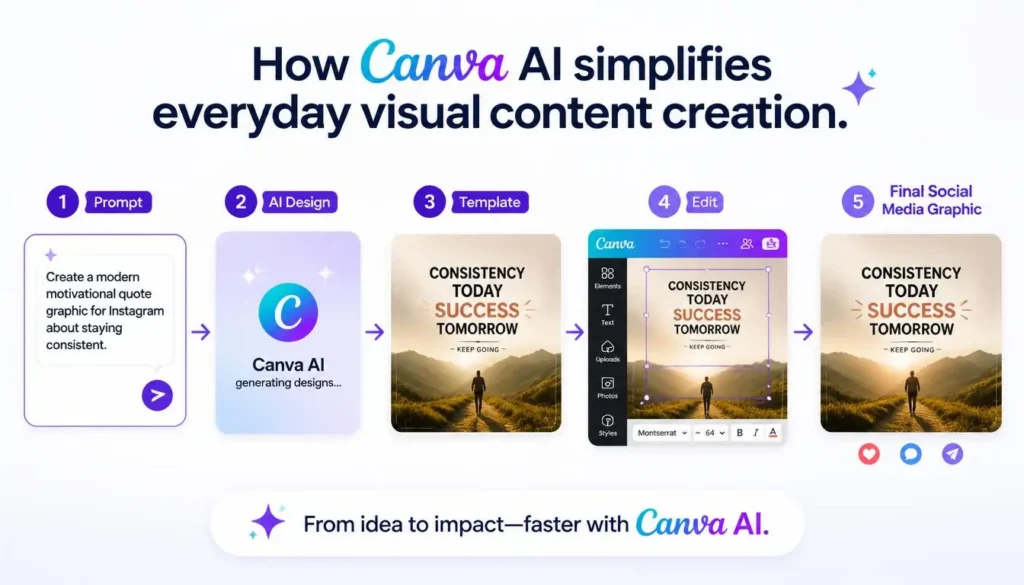
Canva AI is a collection of AI features built directly into Canva’s visual-design platform. Rather than working only as an image generator, it combines AI with Canva’s drag-and-drop editor and large template library.
Its Magic Studio tools support tasks such as text-to-image generation, AI writing, automatic layouts, background removal, image editing, presentations, and resizing.
That makes Canva particularly useful for people who want attractive results without learning complicated design software.
Best For
- Students
- Bloggers
- Content creators
- Social media managers
- Freelancers
- Small businesses
- Marketers
Main Advantage
Canva’s biggest strength is speed. You can start with a template, use AI to generate or modify elements, and finish a social post, presentation, thumbnail, or marketing graphic quickly.
What Is Adobe Firefly?
Adobe Firefly is Adobe’s generative AI platform designed for image, video, audio, vector, and creative-editing workflows.
Unlike Canva’s template-first approach, Firefly is closely connected to Adobe’s professional ecosystem, including tools such as Photoshop, Illustrator, and Adobe Express.
Its capabilities include Generative Fill, Generative Expand, text-to-image, text effects, vector generation, recoloring, and AI-assisted editing.
Best For
- Graphic designers
- Creative agencies
- Brand designers
- Digital artists
- Professional photographers
- Marketing teams
Main Advantage
Firefly provides more room for creative control and professional editing, especially when you’re already working inside Adobe’s ecosystem.
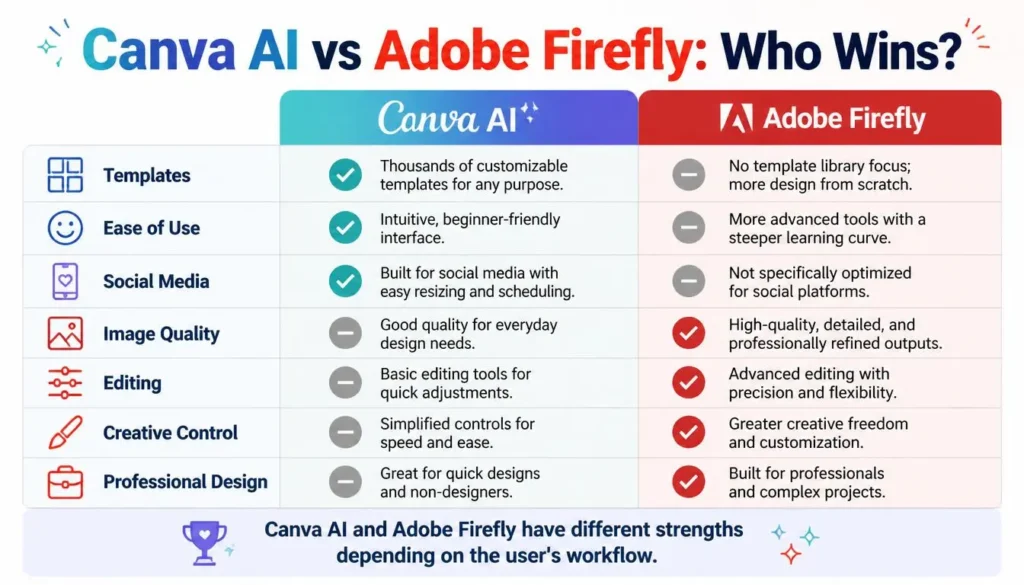
Canva AI vs Adobe Firefly: Feature Comparison
| Feature | Canva AI | Adobe Firefly | Winner |
| Image Generation | Very Good | Excellent | Firefly |
| Templates | Excellent | Limited | Canva |
| Ease of Use | Excellent | Very Good | Canva |
| Editing | Very Good | Excellent | Firefly |
| Creative Control | Good | Excellent | Firefly |
| Professional Tools | Good | Excellent | Firefly |
| Social Media Design | Excellent | Good | Canva |
| Collaboration | Excellent | Strong | Canva |
| Professional Workflow | Good | Excellent | Firefly |
AI Image Generation
Both platforms can turn text prompts into images.
Canva emphasizes quick, accessible results for presentations, social media, blogs, and marketing materials. Firefly generally gives creative professionals more control over the final result.
Winner: Adobe Firefly
Templates
This is where Canva has a major advantage. Its template-based workflow is useful for Instagram posts, YouTube thumbnails, presentations, flyers, resumes, posters, and infographics.
Winner: Canva AI
✏️ Editing & Creative Control
Canva is excellent for quick edits such as background removal, object removal, resizing, and AI-powered layouts.
Firefly goes further with features such as Generative Fill, Generative Expand, and object replacement, particularly when combined with Photoshop.
Winner: Adobe Firefly
Ease of Use
Canva remains easier for beginners. Most users can create polished designs without previous graphic-design experience.
Firefly itself is approachable, but its full potential becomes clearer when used with Adobe’s wider professional software ecosystem.
Winner: Canva AI
Pricing in 2026
Both platforms offer free access, but AI usage and premium features vary by plan.
Canva provides free access to Canva AI, while paid plans unlock additional features and resources.
Adobe Firefly currently has a free option with limited daily generations. Its paid plans include Firefly Standard at $9.99/month and Firefly Pro at $19.99/month, with higher tiers available for heavier users.
Canva AI & Plans
Adobe Firefly Plans
Which Offers Better Value?
Choose Canva AI if you want an affordable, easy-to-use design platform with templates and quick AI features.
Choose Firefly if you already use Adobe Creative Cloud or need advanced AI editing and professional creative control.
Pros and Cons
Canva AI
Pros
- Extremely beginner-friendly
- Large template library
- Fast workflow
- Strong collaboration
- Excellent for social media
- Good for small businesses
Cons
- Less creative control
- Some advanced features require paid access
- Not designed for highly complex professional workflows
Adobe Firefly
Pros
- Strong image generation
- Advanced AI editing
- Excellent Creative Cloud integration
- Greater creative control
- Strong professional workflow
Cons
- Steeper learning curve
- Adobe ecosystem can be more complex
- Advanced capabilities may require paid access
Which Tool Is Better for Different Users?
| User | Best Choice | Reason |
| Students | Canva AI | Presentations and projects |
| Bloggers | Canva AI | Blog graphics and social posts |
| YouTubers | Canva AI | Thumbnails and channel graphics |
| Social Media Managers | Canva AI | Fast, high-volume content |
| Beginners | Canva AI | Easier learning curve |
| Graphic Designers | Firefly | Advanced editing |
| Creative Agencies | Firefly | Professional workflows |
| Brand Designers | Firefly | Greater creative control |
💡 Pro Tip
Don’t choose based only on image quality. If you create 10 social posts a week, Canva’s speed and templates may save more time. If you’re editing detailed commercial artwork, Firefly’s professional controls may matter much more.
Frequently Asked Questions
Is Canva AI better than Adobe Firefly?
For beginners, marketers, and everyday content creation, Canva AI is usually the better choice. Firefly is stronger for advanced professional design and editing.
Which creates better AI images?
Adobe Firefly generally has the advantage when creative control and professional image generation matter.
Is Canva AI free?
Yes. Canva offers free access to Canva AI, while premium plans provide additional features and resources.
Is Adobe Firefly worth paying for?
It can be, especially for designers who already use Adobe products or need advanced AI-assisted editing and professional workflows.
Which is better for beginners?
Canva AI is the easier starting point because its template-driven interface requires less design experience.
Can AI-generated images be used commercially?
Both platforms provide commercial-use options, but licensing rules can differ by tool, feature, and model. Always review the latest terms before using generated assets commercially.
Final Verdict
Canva AI and Adobe Firefly are not direct replacements for each other. They solve different design problems.
For students, bloggers, social media managers, freelancers, marketers, and small businesses, Canva AI is the more practical choice because it combines AI, templates, collaboration, and easy editing.
For professional designers, agencies, photographers, and creative teams, Adobe Firefly is more compelling because of its advanced editing capabilities and deep Creative Cloud integration.
🏆 Final Recommendations
- Best for Beginners: Canva AI
- Best for Social Media: Canva AI
- Best for Templates: Canva AI
- Best for Professional Designers: Adobe Firefly
- Best for Creative Control: Adobe Firefly
- Best for Advanced Editing: Adobe Firefly
- Best Overall for Most Users: Canva AI
Ultimately, choose Canva AI for speed and simplicity and Adobe Firefly for professional control and deeper creative workflows.
Our Rating
Canva AI — 4.7/5 ⭐
Canva AI is an excellent choice for beginners, marketers, content creators, and anyone who wants to create designs quickly. Its biggest advantage is the combination of AI features, templates, editing tools, presentations, and other design features in one easy-to-use platform.
Adobe Firefly — 4.6/5 ⭐
Adobe Firefly is a powerful option for professional creators who need high-quality AI image generation, editing, and deeper creative control. Its integration with Adobe’s creative ecosystem is a major advantage, although it can feel more complex than Canva for beginners.
✍️ About the Author
Written by the NestAIHub Editorial Team
The NestAIHub Editorial Team covers AI tools, technology reviews, productivity software, and digital workflows, helping readers understand new technology and choose tools that fit their needs.
Editorial Note: Pricing, AI capabilities, usage limits, and licensing policies can change. Verify current details on the official product pages before subscribing or using generated content commercially.