10 Best AI Tools for Students in 2026: Study Smarter & Save Time
Introduction
Artificial intelligence (AI) has transformed the way students learn, study, and complete academic work. In 2026, AI is no longer just a technology for businesses or developers—it has become an everyday learning companion for school, college, and university students.
Whether you’re preparing for exams, writing assignments, organizing class notes, solving math problems, or creating presentations, AI tools can help you complete tasks more efficiently while improving your understanding of difficult topics.
However, with hundreds of AI applications available today, choosing the right one can be challenging. Some tools specialize in writing, while others focus on research, organization, mathematics, or visual design.
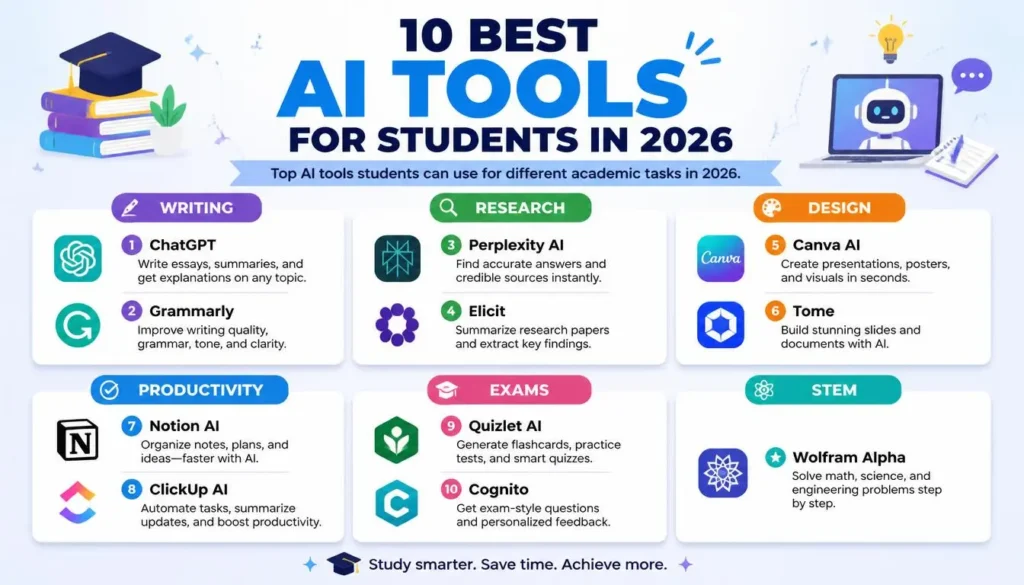
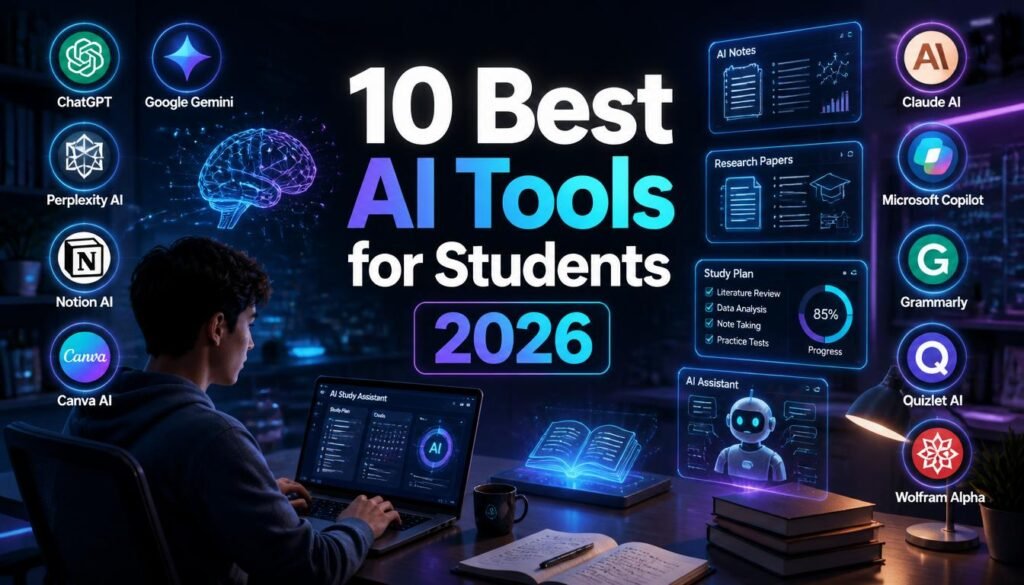
This guide compares the 10 best AI tools for students in 2026, highlighting their features, strengths, pricing, and ideal use cases. By the end of this article, you’ll know which AI tools are worth trying and how to use them responsibly to support your learning.
What Should Students Look for in AI Tools?
Before choosing an AI tool, students should consider several important factors rather than simply downloading the most popular option.
Accuracy
An AI tool should provide reliable explanations and helpful suggestions. Since AI can occasionally make mistakes, students should always verify important facts using trusted academic sources.
Ease of Use
A simple interface helps students spend more time learning instead of figuring out how the software works.
Learning Support
The best AI tools explain concepts clearly instead of simply providing answers. This helps students develop understanding rather than relying entirely on AI-generated content.
Affordability
Many excellent AI tools offer free plans. Students should compare free and premium features before deciding whether a paid subscription is necessary.
Privacy
Choose platforms with clear privacy policies, especially if you’re uploading assignments, research papers, or personal notes.
1.ChatGPT
Useful Features
Depending on your needs, useful features may include:
- Writing assistance
- Research support
- Note organization
- Flashcards
- Image creation
- Presentation design
- Coding help
- Mathematical problem-solving
Best For
- Learning explanations
- Essay writing
- Coding help
- Brainstorming
- Homework assistance
What Is ChatGPT?
ChatGPT is one of the most versatile AI assistants available today. It helps students understand difficult topics, generate ideas, improve writing, summarize information, and even learn programming.
Main Features
- Explains complex concepts in simple language
- Creates outlines and study notes
- Assists with coding
- Brainstorms ideas
- Summarizes long articles
- Helps practice interview and exam questions
How Students Can Use It
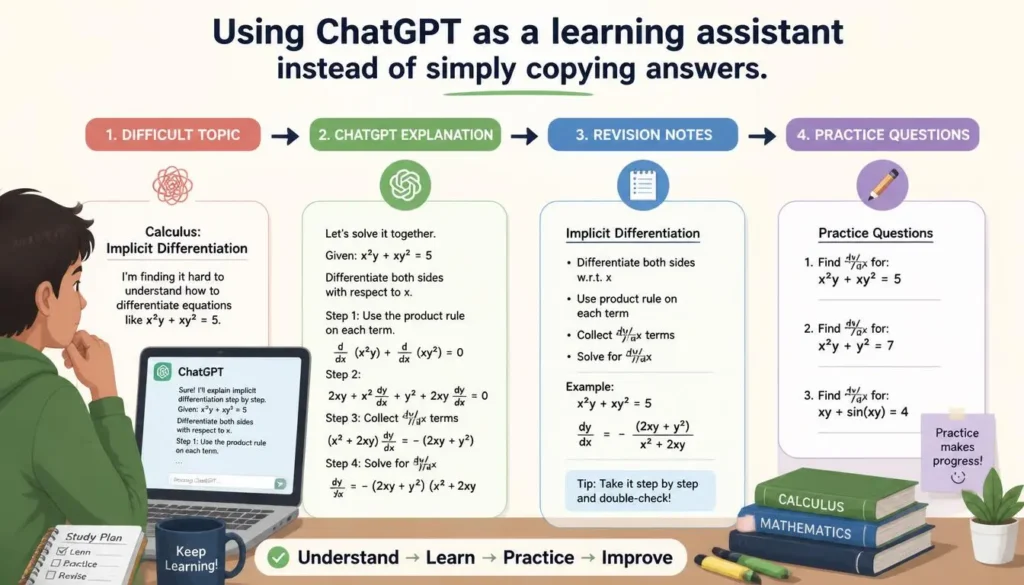
Students can ask ChatGPT to explain scientific concepts, solve programming problems, create revision notes, or improve essays. Rather than copying answers directly, it’s best used as a learning assistant.
Pricing
- Free plan available
- Premium subscription available with additional features and higher usage limits
- Click here (Pricing)
Pros
- Excellent explanations
- Supports many subjects
- Strong writing assistance
- Helpful for coding
Cons
- Information should always be verified
- Some advanced features require a subscription
2. Google Gemini 
Best For
- Academic research
- Google Workspace users
- Information gathering
- Productivity
What Is Google Gemini?
Google Gemini is Google’s AI assistant that integrates with services like Gmail, Google Docs, Sheets, and Drive. Students already using Google’s ecosystem may find it especially convenient.
Main Features
- Research assistance
- Document summaries
- Writing support
- Workspace integration
- Study planning
How Students Can Use It
Students can summarize research material, draft assignments, organize documents, and streamline collaborative group projects.
Pricing
- Free version available
- Premium plan available with advanced capabilities
Pros
- Excellent Google integration
- Easy collaboration
- Helpful for research
Cons
- Some advanced features require payment
- Creative writing may need editing
3. Perplexity AI 
Best For
- Research
- Finding sources
- Quick fact-checking
What Is Perplexity AI?
Perplexity AI combines conversational AI with search capabilities, making it useful for finding information quickly while pointing users toward supporting sources.
Main Features
- Research-focused answers
- Source-backed responses
- Fast summaries
- Easy follow-up questions
How Students Can Use It
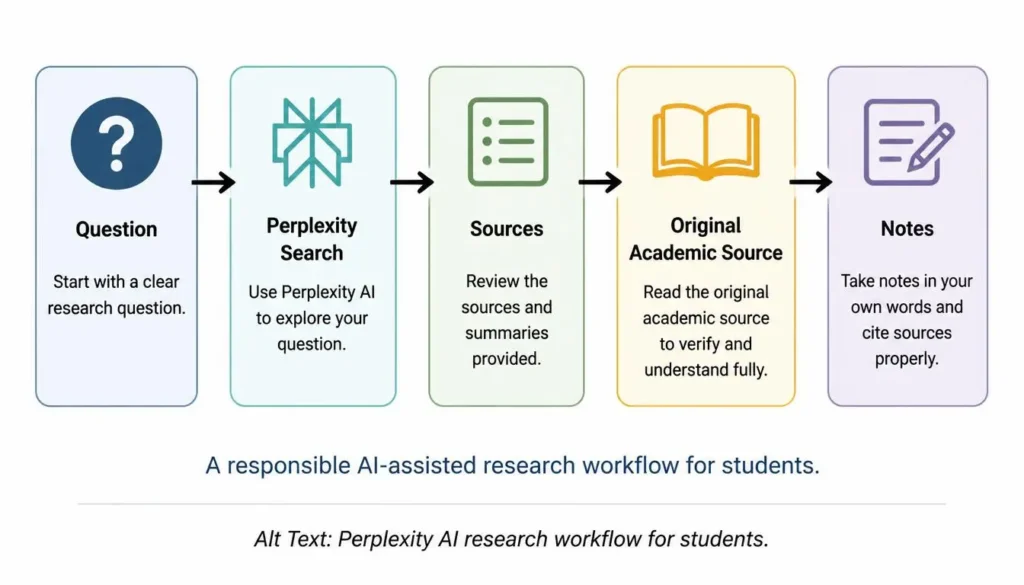
Students can begin research projects, gather background information, and explore different viewpoints before consulting original academic sources.
Pricing
- Free version available
- Premium subscription available
Pros
- Fast research
- Helpful source references
- Simple interface
Cons
- Not designed primarily for creative writing
- Source quality should still be evaluated
4. Notion AI
Best For
- Note-taking
- Study planning
- Organization
- Productivity
What Is Notion AI?
Notion AI adds intelligent writing and organization features to the popular Notion workspace, helping students keep notes, assignments, and projects in one place.
Main Features
- AI writing assistance
- Note summaries
- Task management
- Meeting and lecture notes
- Knowledge organization
How Students Can Use It
Students can organize class notes, create study schedules, summarize lectures, and manage assignments from a single dashboard.
Pricing
- Free plan available
- Premium AI features available through paid plans
Pros
- Excellent organization
- Strong productivity features
- Useful for long-term study planning
Cons
- Learning curve for beginners
- AI features require paid access for full functionality
5. Canva AI
Best For
- Presentations
- Posters
- Visual projects
- Social media graphics
What Is Canva AI?
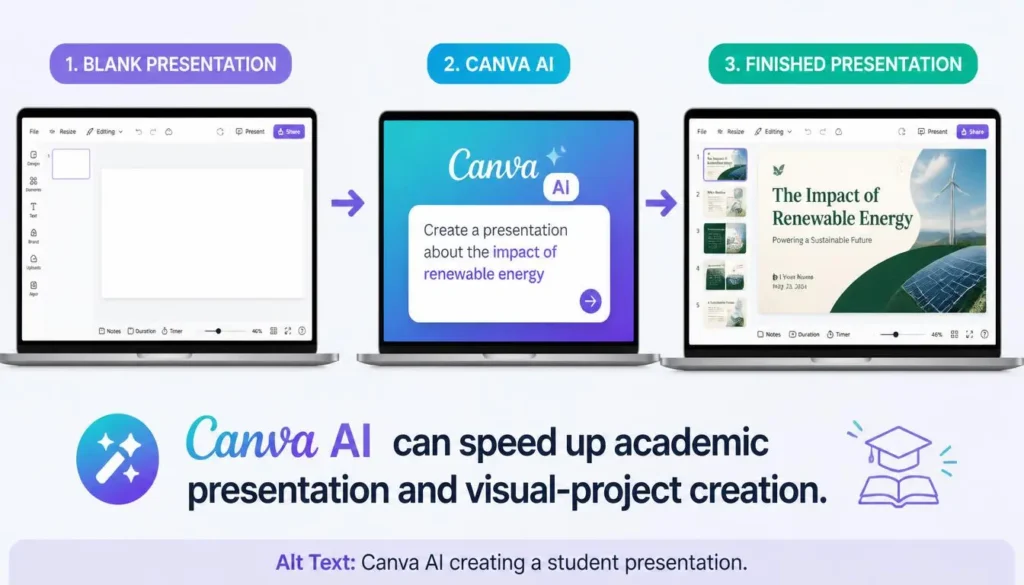
Canva AI combines design templates with AI-powered tools, making it easy for students to create attractive academic presentations and creative projects.
Main Features
- AI presentation generation
- Image creation
- Magic Design
- Background removal
- Ready-made templates
How Students Can Use It
Students can design classroom presentations, infographics, project posters, resumes, and visual reports without needing professional design experience.
Pricing
- Free plan available
- Canva Pro unlocks additional AI tools and premium templates
Pros
- Beginner-friendly
- Huge template library
- Fast project creation
- Excellent for presentations
Cons
- Some premium assets require a subscription
- Advanced design control is limited compared to professional software
6. Claude AI
Best For
- Long documents
- Detailed explanations
- Professional writing
- Research assistance
What Is Claude AI?
Claude AI, developed by Anthropic, is designed to understand large amounts of text and provide thoughtful, well-structured responses. It is especially useful for students working on research papers, lengthy assignments, or complex reading materials.
Main Features
- Long document analysis
- Clear explanations
- Writing assistance
- Research support
- Text summarization
How Students Can Use It
Students can upload lengthy articles or notes for summaries, ask Claude to explain difficult topics, or improve essays while maintaining a clear writing style.
Pricing
- Free plan available
- Premium subscription available with higher usage limits and additional features
Pros
- Excellent with long documents
- Clear and organized responses
- Strong reasoning abilities
Cons
- Some advanced features require a paid plan
- Not focused on image generation
7. Grammarly AI
Best For
- Grammar correction
- Essay improvement
- Academic writing
- Professional communication
What Is Grammarly AI?
Grammarly AI is an AI-powered writing assistant that checks grammar, spelling, punctuation, tone, and clarity while suggesting ways to improve your writing.
Main Features
- Grammar checking
- Sentence rewriting
- Tone suggestions
- Plagiarism checker (selected plans)
- Writing assistance
How Students Can Use It
Students can proofread assignments, improve essays, write emails, and submit cleaner academic work with fewer language mistakes.
Pricing
- Free plan available
- Premium plan with advanced writing features
Pros
- Easy to use
- Improves writing quality
- Helpful for non-native English speakers
Cons
- Limited AI features on the free plan
- Not a research or learning tool
8. Microsoft Copilot
Best For
- Productivity
- Microsoft Office users
- Documents
- Presentations
What Is Microsoft Copilot?
Microsoft Copilot integrates AI into Word, Excel, PowerPoint, Outlook, and other Microsoft 365 applications, helping students work more efficiently.
Main Features
- AI writing
- Presentation creation
- Spreadsheet assistance
- Email drafting
- Document summarization
How Students Can Use It
Students can draft reports in Word, create presentations in PowerPoint, organize data in Excel, and manage emails more efficiently.
Pricing
- Limited free access
- Additional features available with Microsoft subscriptions
Pros
- Excellent Microsoft integration
- Saves time
- Great for productivity
Cons
- Best experience requires Microsoft 365
- Less useful outside the Microsoft ecosystem
9. Quizlet AI
Best For
- Flashcards
- Exam preparation
- Memorization
- Practice quizzes
What Is Quizlet AI?
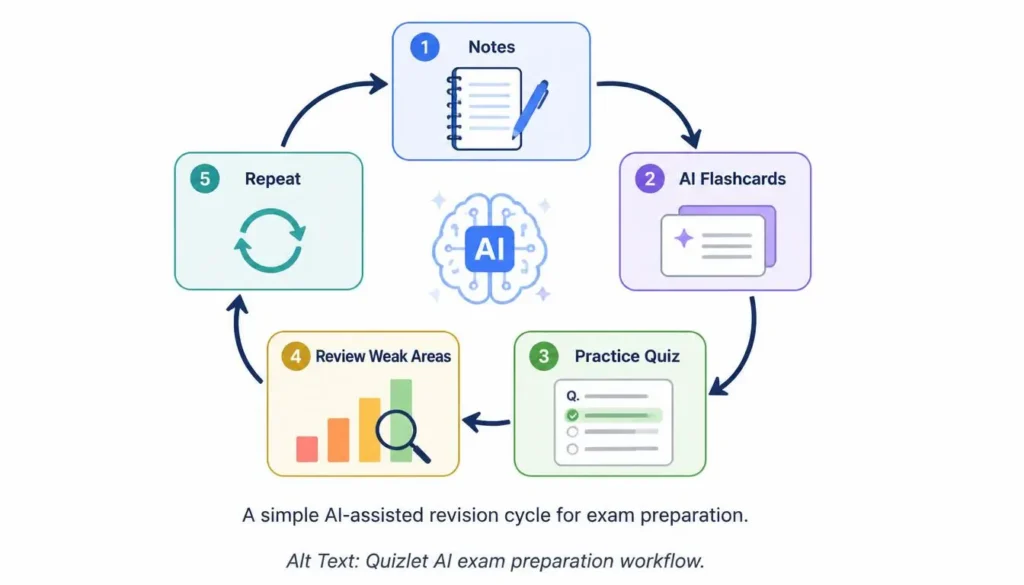
Quizlet AI helps students learn through AI-generated flashcards, quizzes, and personalized study sessions.
Main Features
- AI flashcards
- Practice tests
- Smart learning mode
- Study sets
- Progress tracking
How Students Can Use It
Students can prepare for exams, memorize definitions, practice vocabulary, and review important concepts efficiently.
Pricing
- Free version available
- Quizlet Plus unlocks additional features
Pros
- Excellent for exam preparation
- Interactive learning
- Easy to use
Cons
- Limited free features
- Best for memorization rather than deep learning
10. Wolfram Alpha
Best For
- Mathematics
- Engineering
- Physics
- Scientific calculations
What Is Wolfram Alpha?
Wolfram Alpha is a computational knowledge engine that solves mathematical and scientific problems while showing step-by-step solutions for many topics.
Main Features
- Mathematical calculations
- Formula solving
- Graph generation
- Scientific data
- Engineering support
How Students Can Use It
Students can solve equations, verify homework, understand mathematical concepts, and explore scientific calculations with detailed explanations.
Pricing
- Free version available
- Premium features available through paid plans
Pros
- Excellent for STEM subjects
- Accurate calculations
- Step-by-step solutions for many problems
Cons
- Limited usefulness outside technical subjects
- Interface may feel advanced for beginners
AI Tools Comparison Table
| AI Tool | Best For | Free Plan | Student Use | Rating |
|---|---|---|---|---|
| ChatGPT | Writing, learning, coding | ✅ Yes | Homework, explanations, brainstorming | ⭐⭐⭐⭐⭐ |
| Google Gemini | Research, productivity | ✅ Yes | Google Docs, research, collaboration | ⭐⭐⭐⭐☆ |
| Perplexity AI | Research | ✅ Yes | Finding sources, quick answers | ⭐⭐⭐⭐☆ |
| Notion AI | Notes, organization | ✅ Limited | Study planning, note management | ⭐⭐⭐⭐☆ |
| Canva AI | Presentations, design | ✅ Yes | Projects, slides, posters | ⭐⭐⭐⭐☆ |
| Claude AI | Long documents | ✅ Yes | Essay improvement, summaries | ⭐⭐⭐⭐☆ |
| Grammarly AI | Writing improvement | ✅ Yes | Grammar and proofreading | ⭐⭐⭐⭐☆ |
| Microsoft Copilot | Productivity | ✅ Limited | Documents, presentations | ⭐⭐⭐⭐☆ |
| Quizlet AI | Exam preparation | ✅ Yes | Flashcards and revision | ⭐⭐⭐⭐☆ |
| Wolfram Alpha | Mathematics | ✅ Yes | Math and science problem solving | ⭐⭐⭐⭐⭐ |
Best AI Tools by Student Needs
Best for Writing
🏆 Winner: ChatGPT
Its natural writing style, brainstorming capabilities, and learning support make it an excellent writing companion.
Best for Research
🏆 Winner: Perplexity AI
It helps students find information quickly while pointing them toward supporting sources for further reading.
Best for Mathematics
🏆 Winner: Wolfram Alpha
Its ability to solve equations and explain mathematical concepts makes it invaluable for STEM students.
Best for Notes and Organization
🏆 Winner: Notion AI
Students managing multiple courses can organize notes, assignments, and study plans in one workspace.
Best for Presentations
🏆 Winner: Canva AI
Canva AI makes it easy to design professional-looking presentations, infographics, and project posters without advanced design skills.
Free vs. Paid AI Tools for Students
When Free AI Tools Are Enough
A free AI plan is often sufficient if you:
- Study occasionally with AI
- Need help understanding concepts
- Write essays once in a while
- Create basic presentations
- Have a limited budget
Popular free options include ChatGPT, Google Gemini, Perplexity AI, Canva AI, and Quizlet AI.
When Paid AI Tools Make Sense
Consider upgrading if you:
- Use AI every day
- Work on research-intensive projects
- Need advanced writing or coding support
- Create presentations frequently
- Want faster responses and higher usage limits
For many students, starting with free plans and upgrading only when necessary is the most cost-effective approach.
Frequently Asked Questions
1. What is the best AI tool for students in 2026?
ChatGPT is one of the best all-around AI tools because it supports learning, writing, brainstorming, coding, and research.
2. Are AI tools free for students?
Many AI tools offer free plans with enough features for everyday study. Premium plans provide higher limits and additional capabilities.
3. Can students use ChatGPT for studying?
Yes. ChatGPT can explain concepts, generate practice questions, summarize notes, and help students understand difficult topics. It should be used to support learning rather than replace independent study.
4. Is AI allowed for assignments?
This depends on your school or university’s academic integrity policy. Always follow your institution’s guidelines and cite AI assistance if required.
5. Which AI tool is best for research?
Perplexity AI is excellent for finding information and exploring sources, while ChatGPT and Claude AI can help explain research topics.
6. Which AI tool helps with math?
Wolfram Alpha is one of the strongest AI-powered tools for mathematics, engineering, and scientific calculations.
7. Are paid AI tools worth it for students?
If you rely on AI daily for coursework, research, or writing, a paid subscription may improve productivity. Casual users often find free plans sufficient.
Final Verdict
Artificial intelligence has become an important learning companion for students in 2026. From explaining difficult concepts to organizing notes, improving writing, solving math problems, and creating presentations, AI tools can help students study more efficiently and save valuable time.
However, AI works best when it supports learning rather than replaces it. Students should use AI to understand concepts, generate ideas, and improve productivity while continuing to develop critical thinking, research skills, and subject knowledge.
Our Recommendations
- Best Overall AI Tool for Students: ChatGPT — A versatile assistant for writing, coding, learning, and brainstorming.
- Best Free AI Tool: Google Gemini — A capable free option with strong integration into Google’s productivity ecosystem.
- Best AI Tool for Research: Perplexity AI — Excellent for finding information and exploring reliable sources.
- Best AI Tool for Writing: Grammarly AI — Ideal for improving grammar, clarity, and academic writing quality.
- Best AI Tool for Productivity: Notion AI — Great for organizing notes, managing projects, and planning study schedules.
The right AI tool depends on your goals. Many students will benefit from combining multiple tools—for example, using ChatGPT for learning, Perplexity AI for research, Grammarly AI for editing, Canva AI for presentations, and Notion AI for organization. This balanced approach helps you get the most out of AI while building strong study habits and independent learning skills.


0 Comments