Introduction
AI has moved far beyond simple chatbots. In 2026, ChatGPT has developed into a broader AI workspace that can assist with writing, coding, research, data analysis, images, documents, and multi-step tasks.
For students, bloggers, developers, and professionals, the real question is no longer whether ChatGPT is useful, but which features are worth using and whether a paid plan makes sense.
This ChatGPT Review 2026 examines its main features, practical uses, pricing, advantages, limitations, and alternatives so you can decide which option fits your needs.
⚠️ Educational Disclaimer: This article is for educational and informational purposes only. AI tools can sometimes produce inaccurate information, so important claims should be independently verified before making medical, legal, financial, or other high-stakes decisions.
Key Takeaways
| Key Aspect | Details |
|---|---|
| Best Overall | ChatGPT |
| Best For | Students, creators, developers & professionals |
| Free Plan | Available |
| Plus Plan | $20/month according to the supplied source |
| Main Strength | Versatility across writing, coding, research & data |
| Main Weakness | Can still produce incorrect information |
| Best Alternative for Google Users | Gemini |
| Best for Source-Based Research | Perplexity |
What Is ChatGPT?
ChatGPT is a conversational AI developed by OpenAI. It uses large language model technology to understand prompts and generate context-aware responses.
It can assist with writing, research, coding, summarization, translation, brainstorming, and many other everyday tasks.
How ChatGPT Works
At its core, ChatGPT uses deep-learning neural networks trained on large datasets. It predicts and generates responses based on patterns learned during training while using reasoning capabilities for more complex tasks.
For users, the process is simple:
- Enter a clear prompt describing what you need.
- Review the response and identify anything that needs correction.
- Ask follow-up questions to improve or refine the result.
- Fact-check important information before using it publicly.
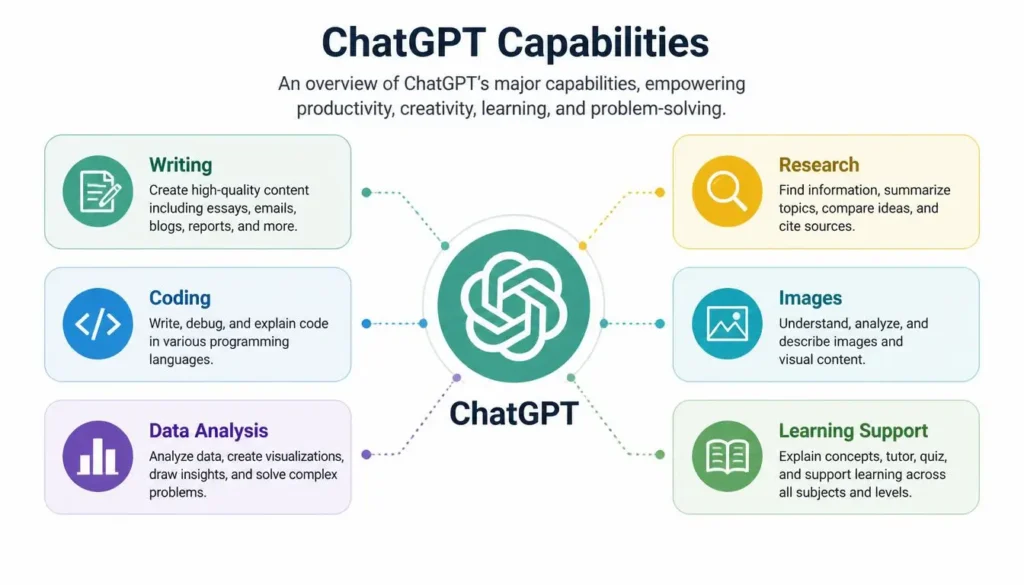
ChatGPT Main Features
1. Advanced AI Conversations
ChatGPT supports natural, multi-turn conversations and can maintain context across a discussion.
2. Content Writing
It can create blog outlines, social media captions, reports, emails, and other forms of structured content in different tones and styles.
3. Coding Assistance
ChatGPT can assist developers with code generation, debugging, refactoring, and explaining programming concepts across languages such as Python, JavaScript, C++, Rust, and SQL.
4. Learning & Study Support
Students can use it to simplify difficult concepts, generate quizzes, create practice questions, and work through mathematical problems step by step.
5. Data Analysis
Users can upload spreadsheets and datasets for calculations, data cleaning, statistical analysis, and visualizations.
6. Image & Document Understanding
ChatGPT can analyze uploaded images and documents, explain visual information, extract text, and assist with tasks based on those files.
7. Multi-Step Tasks
The supplied source also highlights agent-style capabilities that can handle multi-step workflows across connected applications.
How Students Can Use ChatGPT
Students can use ChatGPT as a study assistant rather than a shortcut. Useful applications include:
- Explaining difficult subjects in simpler language
- Summarizing study material
- Creating quizzes and flashcards
- Organizing research ideas
- Building assignment outlines
- Practicing exam questions
💡 Pro Tip: Don’t simply copy an AI-generated answer into your assignment. Ask ChatGPT to explain the concept, test your understanding, and help you improve your own work.
How Content Creators Can Use ChatGPT
For bloggers, marketers, and social media creators, ChatGPT can reduce repetitive content work.
It can help with:
- Blog outlines and drafts
- Content ideas
- Social media captions
- Email campaigns
- Landing-page copy
- Content repurposing
For example, a long blog post can be transformed into a LinkedIn post, social media caption, or short-form content idea.
ChatGPT Pricing in 2026
According to the supplied source, OpenAI’s pricing structure includes several tiers.
| Plan | Price | Best For |
|---|---|---|
| Free | $0/month | Beginners & casual users |
| ChatGPT Go | $8/month | Higher-volume budget users |
| ChatGPT Plus | $20/month | Creators & professionals |
| ChatGPT Pro | $100–$200/month | Power users & developers |
| Business/Team | ~$20–$25/seat/month | Teams & businesses |
Which Plan Should You Choose?
- Free: Choose it if you use ChatGPT occasionally or want to test its capabilities.
- Plus: Consider it if you use AI regularly for writing, coding, research, or productivity.
- Pro: It is mainly aimed at users who consistently need much higher usage limits.
- Business: Suitable for organizations that need shared workspaces and administrative controls.
Note: Pricing and feature availability can change, so verify the current plan details before purchasing.
ChatGPT Pros and Cons
Pros
- Highly versatile: Handles writing, coding, images, documents, and data.
- Strong reasoning: Useful for technical and multi-step problems.
- Time-saving: Can reduce repetitive research and writing work.
- Custom assistants: Supports tailored AI workflows.
- Easy interface: Accessible to beginners while offering advanced capabilities.
Cons
- Possible hallucinations: It can still produce incorrect information.
- Usage limits: Some plans have usage restrictions.
- Over-reliance: Excessive dependence can weaken independent thinking.
- Privacy considerations: Users should understand how their data is handled.
⚠️ Common Mistake: Never assume that a confident-sounding AI answer is automatically correct. Always verify important facts using trustworthy sources.
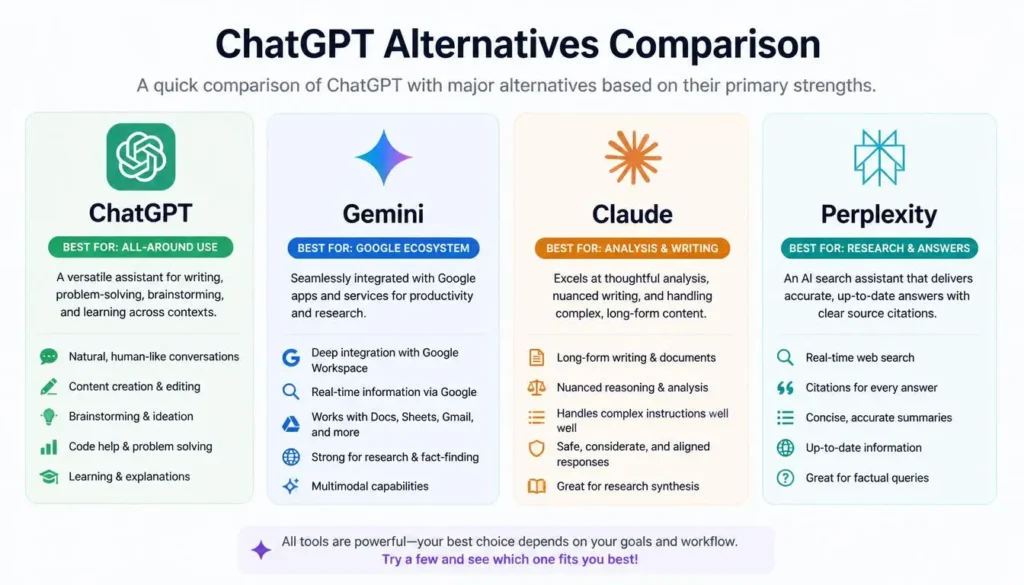
ChatGPT vs Top Alternatives
| Tool | Best For | Main Advantage |
|---|---|---|
| ChatGPT | General AI assistance | Versatility |
| Google Gemini | Google ecosystem | Workspace integration |
| Claude AI | Writing & coding | Natural writing |
| Perplexity AI | Research | Source citations |
Frequently Asked Questions (FAQs)
Is ChatGPT free to use?
Yes. The supplied source lists a Free plan with basic conversational AI access, although usage limits apply.
Is ChatGPT accurate?
ChatGPT can be highly useful, but it is not 100% accurate and may occasionally generate incorrect information. Important claims should always be fact-checked.
Can ChatGPT write blog posts?
Yes. It can create outlines, organize sections, and draft complete blog posts. However, human editing, fact-checking, originality, and personal experience are still important for quality content.
Is ChatGPT Plus worth it?
For users who rely on ChatGPT regularly for writing, coding, research, or data analysis, the supplied source considers Plus at $20/month a worthwhile upgrade.
Can ChatGPT replace human writers?
No. It can accelerate research and drafting, but human creativity, experience, judgment, and strategic thinking remain essential.
Which ChatGPT alternative is best for research?
Perplexity AI is particularly suited to users who prioritize source citations, while Gemini is useful for people heavily invested in Google’s ecosystem.
Final Conclusion & Actionable Verdict
ChatGPT has evolved into much more than a basic chatbot. Its combination of writing, coding, learning, data analysis, image understanding, and task assistance makes it one of the most versatile AI tools for 2026.
For students, it can act as a personal tutor and study assistant. For content creators, it can speed up research, brainstorming, writing, and repurposing. For developers and professionals, its coding and data capabilities can reduce repetitive work.
If you’re new to ChatGPT, start with the Free plan and explore the features you actually need. If you use it every day and regularly reach its limits, a paid plan may provide better value.
The key is to use ChatGPT as an intelligent assistant—not a replacement for human judgment.
Our Rating
ChatGPT — 4.8/5 ⭐
ChatGPT is one of the most versatile AI tools available today. It can help with writing, research, coding, brainstorming, data analysis, image generation, and many everyday tasks. Its wide range of features makes it a strong all-purpose AI assistant, although the quality of results can still depend on the task and how clearly you prompt it.
About the Author
Written by the NestAIHub Editorial Team, technology researchers and content editors specializing in artificial intelligence, AI tools, and digital productivity. Our goal is to provide practical, easy-to-understand technology guides that help readers make informed decisions.

9 Comments
10 Best AI Tools for Students in 2026 (Free & Paid) - NestAIHub · August 5, 2026 at 10:26 pm
[…] 1. ChatGPT […]
15 Best AI Tools for YouTube Creators in 2026 - NestAIHub · August 6, 2026 at 1:16 pm
[…] ChatGPT has become one of the most valuable AI assistants for YouTube creators. It helps generate id… […]
Claude AI Review 2026: Features, Pricing, Pros & Cons · August 10, 2026 at 8:20 am
[…] deciding between services, a detailed Claude AI vs ChatGPT comparison can be useful alongside our ChatGPT Review 2026 and Google Gemini Review […]
ChatGPT vs DeepSeek 2026: Features, Performance & Pricing - NestAIHub · August 13, 2026 at 11:10 pm
[…] ChatGPT and DeepSeek have taken very different routes to becoming serious AI assistants. ChatGPT is a broad consumer and business platform built around OpenAI’s model family, tools, agents, research features and multimodal experiences. DeepSeek has built its reputation around capable, cost-efficient models and a more open approach to model releases. […]
Best AI Tools for Exam Preparation in 2026 (Free & Paid) · August 15, 2026 at 1:28 am
[…] 1. ChatGPT — Best Overall AI Study Assistant […]
How to Use AI for Excel and Data Analysis in 2026 · August 17, 2026 at 9:13 am
[…] ChatGPT […]
Perplexity AI Review 2026: Features, Pricing, Pros & Cons (Complete Guide) - NestAIHub · August 23, 2026 at 4:03 pm
[…] pricing, advantages, limitations, and practical uses. We’ll also compare Perplexity with ChatGPT and Google Gemini to help you decide which AI tool best fits your […]
ChatGPT vs Claude 2026: Which AI Is Better? - NestAIHub · August 24, 2026 at 12:48 am
[…] Read our ChatGPT Review […]
Best AI Tools for Freelancers in 2026: Earn More With AI - NestAIHub · August 27, 2026 at 12:32 am
[…] For a detailed review, see our ChatGPT Review. […]