Introduction
Managing classes, assignments, research, presentations, and exams can be overwhelming. The right AI tools for students can reduce repetitive work, explain difficult concepts, organize study material, and help students use their time more effectively.
However, every tool has a different purpose. Some are better for research, while others focus on writing, design, organization, or lecture transcription.
Features and pricing can vary by country and plan.
Why Students Need AI Tools in 2026
Students often spend significant time researching, organizing notes, preparing presentations, and editing assignments. AI can reduce some of this repetitive work and leave more time for actual learning.
Students commonly use AI to:
- Research unfamiliar topics
- Summarize lengthy material
- Explain difficult concepts
- Improve writing
- Create presentations
- Organize coursework
- Generate practice questions
- Transcribe lectures
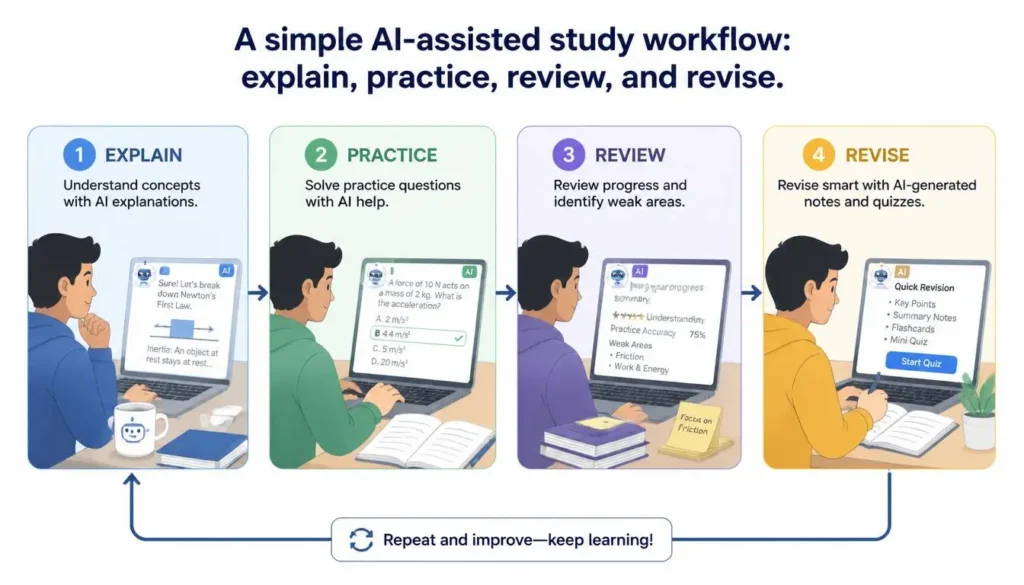
The goal should be to use AI as a study assistant, not a replacement for reading, practice, or critical thinking.
💡 Pro Tip: Choose an AI tool based on your biggest academic problem instead of subscribing to every popular platform.
1. ChatGPT — Best Overall AI Tool for Students
ChatGPT is a versatile AI assistant that can help students understand concepts, brainstorm ideas, summarize provided material, practice questions, code, and plan study sessions.
Main Features
- Concept explanations
- Brainstorming
- Summarization
- Coding assistance
- Study planning
- Practice questions
How Students Can Use It
Ask ChatGPT to explain a difficult concept step by step, create a quiz from your notes, or build a revision schedule.
Pros
- Versatile and easy to use
- Supports many subjects
- Excellent for explanations
Cons
- Can occasionally provide incorrect information
- Important facts should be verified
Pricing
A Free plan is available, with paid plans offering additional capabilities and higher access.
Best For: Students wanting an all-purpose AI study assistant.
Our Rating: 4.5/5 ⭐
Ease of Use: ⭐⭐⭐⭐⭐
Features: ⭐⭐⭐⭐½
Performance: ⭐⭐⭐⭐½
Value for Money: ⭐⭐⭐⭐
Overall: 4.5/5
2. Google Gemini — Best for Google Users
Google Gemini is useful for students who already use Google’s ecosystem.
It can assist with research, writing, brainstorming, and document-related tasks, while Google’s AI plans can integrate with services such as Gmail, Docs, and Drive, depending on availability.
Main Features
- Research assistance
- Writing support
- Brainstorming
- Document understanding
- Google integration
Pros
- Strong Google ecosystem
- Useful for research
- Convenient for Workspace users
Cons
- Some advanced features require paid access
Pricing
Free access is available, with paid plans providing additional capabilities.
Best For: Students who regularly use Google Workspace.
Our Rating: 4/5 ⭐
Ease of Use: ⭐⭐⭐⭐⭐
Features: ⭐⭐⭐⭐½
Performance: ⭐⭐⭐⭐½
Value for Money: ⭐⭐⭐⭐
Overall: 4/5
3. Perplexity — Best for Academic Research
Perplexity combines AI answers with web search and source references, making it particularly useful for research.
Students can use it to discover sources, understand unfamiliar subjects, and identify material for deeper research.
Main Features
- AI-powered search
- Source references
- Research assistance
- Follow-up questions
- File analysis on supported plans
Pros
- Research-focused
- Useful source discovery
- Easy to explore topics
Cons
- Advanced features are limited on free access
- Sources still require verification
Pricing
Free and paid plans are available, including an education-focused option in eligible regions.
Best For: Students working on research-heavy assignments.
Perplexity AI — Our Rating: 4.6/5 ⭐
One of the strongest choices for AI-powered research, especially when users want quick answers with sources.
⚠️ Common Mistake: Never copy an AI citation without opening the original source. Verify the author, date, claim, and context before using it academically.
4. Notion AI — Best for Notes & Organization
Notion AI combines AI features with a workspace for notes, tasks, databases, and projects.
Students can create course pages, organize lecture notes, track assignments, and summarize study material.
Pros
- Excellent organization
- Flexible workspace
- Useful for multiple courses
Cons
- Can take time to learn
- AI availability varies by plan
Pricing
Notion offers free workspace options, while AI features and usage depend on the plan.
Best For: Students managing multiple courses and deadlines.
Notion AI — Our Rating: 4.5/5 ⭐
A strong productivity assistant for users who want to organize notes, summarize information, and work faster inside Notion.
5. Canva AI — Best for Presentations
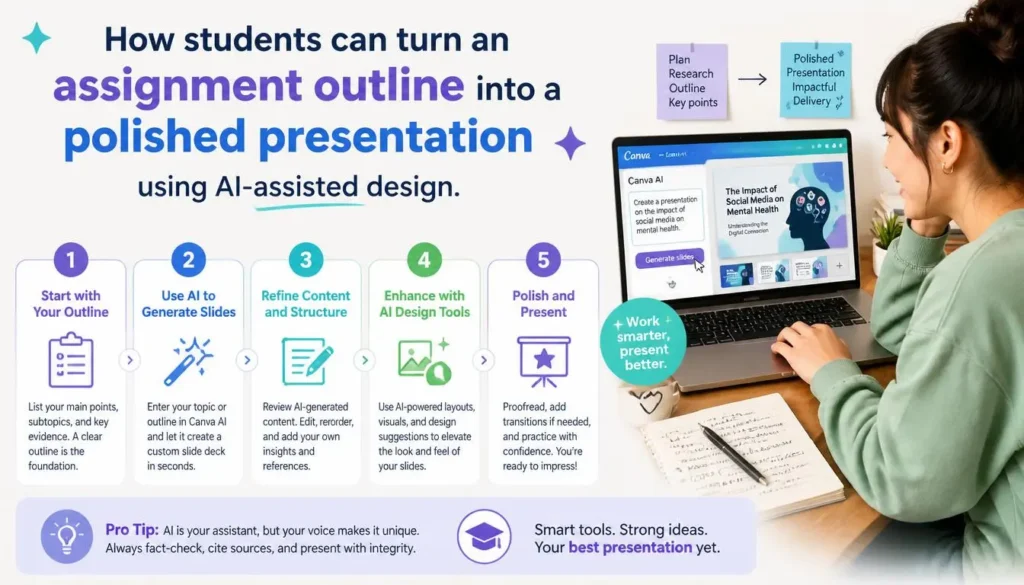
Canva helps students create presentations, posters, infographics, diagrams, and other visual projects without advanced design skills.
Main Features
- AI-assisted design
- Presentation creation
- Templates
- Image generation
- Infographics
Pros
- Beginner-friendly
- Fast design workflow
- Large template selection
Cons
- Some premium assets require payment
Pricing
A free plan is available, with Pro providing additional design and AI features.
Best For: Students creating presentations and visual assignments.
Canva AI — Our Rating: 4.7/5 ⭐
An excellent option for creating designs, presentations, social media graphics, and other visual content with AI.
6. Grammarly — Best for Academic Writing
Grammarly helps students improve grammar, spelling, clarity, tone, and overall writing quality.
It works particularly well after you’ve written your own draft and want to polish it.
Main Features
- Grammar correction
- Spelling checks
- Clarity suggestions
- Tone assistance
- AI writing support
Pros
- Easy to use
- Strong grammar support
- Useful writing suggestions
Cons
- Advanced features require payment
- Suggestions should be reviewed
Pricing
Grammarly offers free access and paid plans with additional features.
Best For: Essays, assignments, and academic communication.
Grammarly — Our Rating: 4.5/5 ⭐
A reliable writing assistant for improving grammar, clarity, tone, and overall writing quality.
7. QuillBot — Best for Paraphrasing
QuillBot focuses on paraphrasing, summarization, grammar checking, and writing refinement.
Students can use it to improve sentence structure and readability while working on their own drafts.
Pros
- Simple interface
- Useful paraphrasing
- Helpful summarizer
Cons
- Free usage is limited
- Paraphrasing does not replace citations
Pricing
Free and Premium options are available.
Best For: Students in writing-intensive courses.
QuillBot — Our Rating: 4.3/5 ⭐
Useful for paraphrasing, rewriting, summarizing, and improving written content, particularly for students and writers.
💡 Pro Tip: Never use paraphrasing to hide copied material. Understand the source, write in your own words, and cite it when required.
8. Gamma — Best for AI Presentations
Gamma can create presentations, documents, and other visual content from prompts.
Students can generate an initial project presentation and then edit, fact-check, and personalize it.
Main Features
- AI presentation generation
- Smart layouts
- Templates
- Document creation
- Collaboration
Pros
- Saves design time
- Modern layouts
- Easy editing
Cons
- Generated content needs review
- Advanced options may require payment
Pricing
Free and paid plans are available.
Best For: Students preparing seminars and project presentations.
Gamma — Our Rating: 4.4/5 ⭐
A convenient AI presentation tool that can turn ideas and text into polished presentations quickly.
9. Microsoft Copilot — Best for Microsoft 365
Microsoft Copilot is useful for students who work with Word, PowerPoint, Excel, and other Microsoft services.
How Students Can Use It
- Draft: Start the assignment or presentation in Microsoft 365.
- Assist: Use Copilot for ideas, organization, or document tasks.
- Verify: Check facts, calculations, and important information.
- Personalize: Review and rewrite the final work yourself.
Pros
- Strong Microsoft integration
- Convenient Office workflow
- Productivity-focused
Cons
- Advanced features depend on account and plan
Pricing
Free access and paid Microsoft plans are available, depending on the feature required.
Best For: Students who rely heavily on Microsoft 365.
Microsoft Copilot — Our Rating: 4.4/5 ⭐
A capable AI assistant, especially useful for people already working with Microsoft products and services.
10. Otter.ai — Best for Lecture Transcription
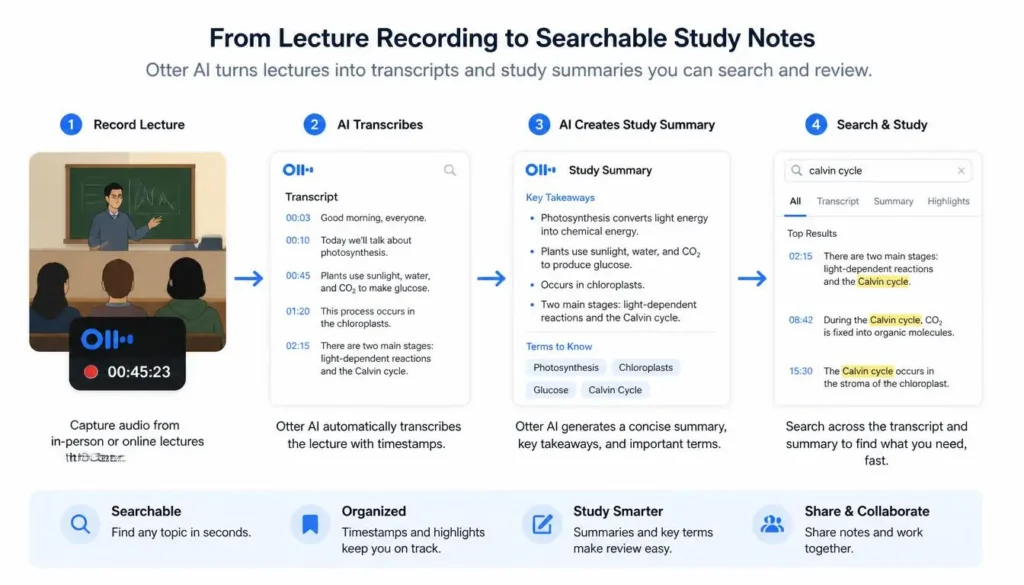
Otter.ai can record and transcribe permitted lectures or online classes, making later review easier.
Main Features
- Live transcription
- Speaker identification
- Searchable transcripts
- AI summaries
- Lecture recording
Pros
- Saves note-taking time
- Easy transcript search
- Useful summaries
Cons
- Accuracy depends on audio quality
- Recording may require instructor permission
Pricing
A free plan is available, with paid plans offering additional transcription capabilities.
Best For: Students who attend lectures and online classes.
Otter.ai — Our Rating: 4.3/5 ⭐
A practical choice for automatically transcribing meetings, interviews, lectures, and conversations.
Best AI Tools for Students: Comparison
| Tool | Best For | Main Strength | Free |
| ChatGPT | General study | Explanations | Yes |
| Gemini | Research | Google integration | Yes |
| Perplexity | Research | Sources | Yes |
| Notion AI | Organization | Notes | Limited |
| Canva AI | Design | Presentations | Yes |
| Grammarly | Writing | Grammar | Yes |
| QuillBot | Paraphrasing | Rewriting | Yes |
| Gamma | Presentations | AI slides | Yes |
| Copilot | Office work | Microsoft 365 | Limited |
| Otter.ai | Lectures | Transcription | Yes |
How to Choose the Right AI Tool: Our Experience
For Research
Choose Perplexity for source discovery or Gemini for Google-based research workflows.
For General Studying
ChatGPT is a strong choice for explanations, brainstorming, quizzes, and study planning.
For Writing
Use Grammarly for grammar and clarity, while QuillBot can help refine sentence structure.
For Organization
Choose Notion AI if you need one place for notes, assignments, and deadlines.
For Presentations
Choose Canva AI for visual flexibility or Gamma for quickly generating presentation structures.
For Lectures
Otter.ai is useful when transcription and searchable lecture notes are important.
Frequently Asked Questions (FAQs)
What are the best AI tools for students in 2026?
The top options include ChatGPT, Gemini, Perplexity, Notion AI, Canva AI, Grammarly, QuillBot, Gamma, Copilot, and Otter.ai. The best choice depends on your academic needs.
Are free AI tools enough for students?
Yes. Free plans can handle many everyday study, writing, research, and organization tasks. Paid plans mainly provide higher limits and advanced features.
Can AI improve grades?
AI can improve productivity, organization, and understanding, but it cannot guarantee better grades. Learning still requires studying, practice, and critical thinking.
Is it okay to use AI for homework?
It depends on your institution and instructor. Follow academic-integrity rules and never submit AI-generated work as your own when that use is prohibited.
Which AI tool is best for research?
Perplexity is particularly useful for source discovery and research. However, important sources should always be opened and verified.
Which AI tool is best for presentations?
Canva AI is excellent for visual design, while Gamma is useful for quickly creating presentation structures.
Conclusion
The best AI tools for students in 2026 are those that solve real problems without replacing independent learning.
For an all-purpose study assistant, ChatGPT is a strong choice. Perplexity is useful for research, while Gemini fits students already using Google’s ecosystem. Grammarly and QuillBot support writing, Notion AI helps with organization, and Canva AI and Gamma simplify presentations. Copilot works well for Microsoft 365 users, while Otter.ai can make lecture review easier.
You don’t need ten subscriptions. For most students, two or three complementary tools are enough.
Use AI to learn better, not simply finish faster. Verify important information, respect academic-integrity policies, and make sure your final work reflects your own understanding.
About the Author
Written by the NestAIHub Editorial Team, technology researchers and content editors specializing in artificial intelligence, digital productivity, and practical technology guides. Our goal is to explain AI tools clearly so readers can make informed decisions..

0 Comments