15 Best AI Tools for YouTube Creators in 2026 (Create Videos Faster)

Introduction
Creating successful YouTube videos in 2026 is no longer just about having a great camera or editing skills. With millions of videos uploaded every day, creators need smarter ways to plan content, edit videos, optimize for search, and stay consistent. That’s where artificial intelligence comes in.
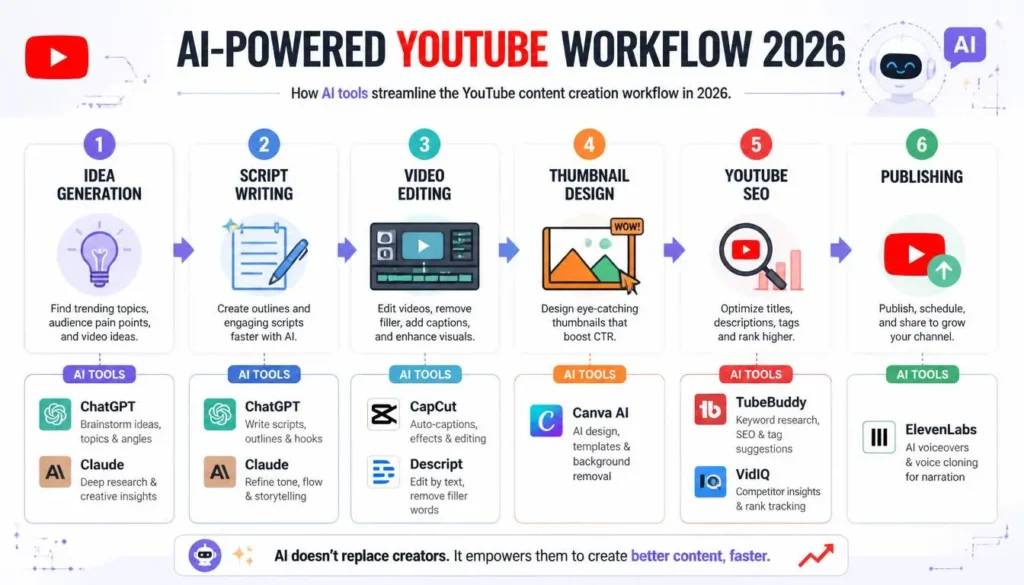
The Best AI Tools for YouTube Creators help streamline almost every stage of content production. From brainstorming video ideas and writing engaging scripts to generating realistic voiceovers, editing footage, creating eye-catching thumbnails, and improving YouTube SEO, AI has become an essential part of the modern creator’s toolkit.
Whether you’re starting your first YouTube channel, managing multiple clients as a freelancer, or growing an established brand, the right AI video tools can save hours of work every week while improving the quality of your content. Instead of spending your time on repetitive tasks, you can focus on storytelling, creativity, and building a stronger connection with your audience.
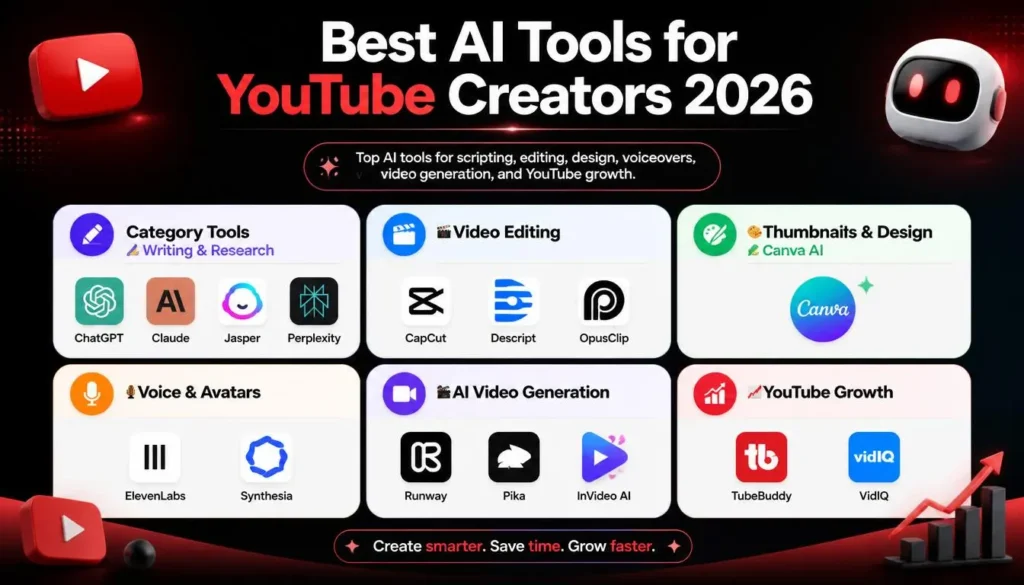
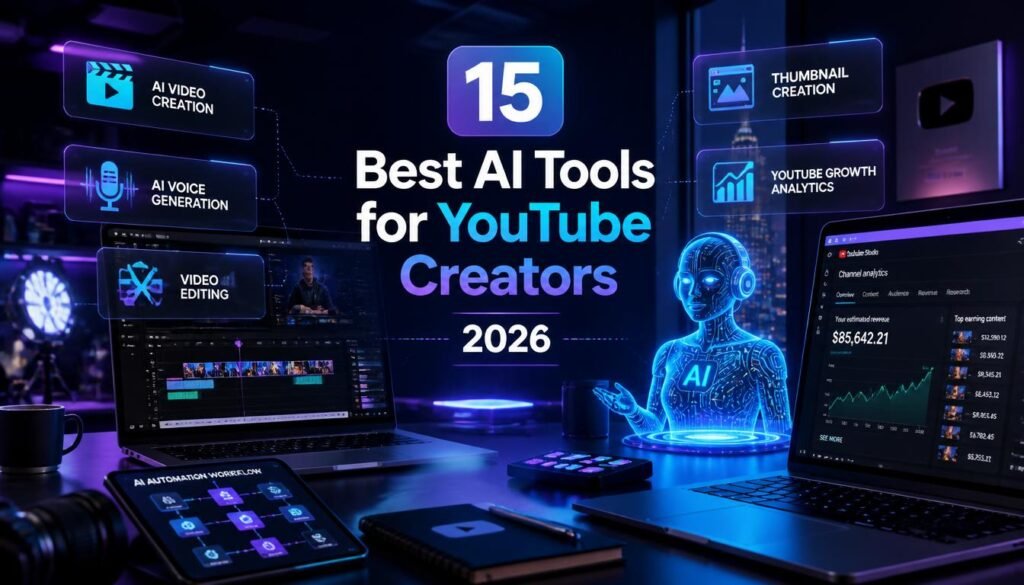
In this guide, we’ll explore the 15 Best AI Tools for YouTube Creators in 2026, covering their features, pricing, advantages, drawbacks, and the types of creators who benefit from each one. By the end, you’ll know exactly which tools deserve a place in your content creation workflow.
What to Look for in AI Tools for YouTube Creators
Not every AI tool is worth your investment. Some excel at editing, while others are designed for scripting, research, or YouTube optimization. Before choosing one, consider these important factors.
Ease of Use
A powerful tool should also be beginner-friendly. If it takes weeks to learn, it may slow down your workflow instead of improving it. Look for clean interfaces, simple controls, and helpful tutorials.
Video Quality
For AI editing and video generation tools, output quality matters. High-resolution exports, natural-looking visuals, smooth transitions, and realistic audio can make a noticeable difference in viewer retention.
Pricing
Many AI content creation tools offer free plans with limited features. As your channel grows, upgrading to a paid plan may unlock higher-quality exports, more AI credits, and advanced automation.
AI Features
Different creators have different needs. Some want AI-generated scripts, while others need thumbnail creation, voice cloning, background removal, or automatic subtitles. Choose tools that solve your biggest workflow challenges.
Workflow Improvement
The best AI tools don’t replace your creativity—they remove repetitive work. A good AI assistant should help you create, edit, publish, and optimize videos faster without sacrificing quality.
15 Best AI Tools for YouTube Creators in 2026
1. ChatGPT
Overview
Instead of staring at a blank page, creators can quickly turn a simple topic into a complete video outline.
Key AI Features
- Video script generation
- Title and headline suggestions
- SEO-friendly video descriptions
- Video idea brainstorming
- Audience Q&A generation
- Content calendar planning
How YouTubers Can Use It
Imagine you’re launching a tech channel. Instead of spending an hour researching topics, you can ask ChatGPT to generate ten trending video ideas, create a detailed script, suggest thumbnail text, and write an optimized description within minutes.
Best For
- Beginners
- Educational creators
- Tech channels
- Business creators
- Scriptwriting
Pricing
- Free Plan: Yes
- Paid: ChatGPT Plus
Pros
- Saves hours of planning
- Excellent writing quality
- Supports multiple content formats
- Easy to use
Cons
- Requires fact-checking
- Doesn’t create videos directly
2. Claude AI
Overview
Claude AI is known for handling long-form writing and detailed research. It’s particularly useful for YouTubers creating documentaries, educational videos, product reviews, and deep-dive content.
Its ability to organize large amounts of information makes scriptwriting much easier.
Key AI Features
- Long-form script creation
- Research assistance
- Content summarization
- Outline generation
- Brainstorming
How YouTubers Can Use It
A history creator making a 20-minute documentary can use Claude AI to organize research into a structured script, saving hours of manual writing.
Best For
- Documentary channels
- Educational content
- Research-heavy videos
Pricing
- Free Plan: Yes
- Paid: Claude Pro
Pros
- Excellent long-form writing
- Strong reasoning abilities
- Great for research
Cons
- Limited multimedia capabilities
- May require edits for conversational tone
3. Canva AI
Overview
An attractive thumbnail often determines whether someone clicks on your video. Canva AI makes it easy to design professional YouTube thumbnails, channel banners, social media graphics, and promotional images without advanced design skills.
Key AI Features
- AI image generation
- Magic Design
- Background removal
- AI writing assistance
- Brand kit
- One-click resizing
How YouTubers Can Use It
Suppose you’re uploading a travel vlog. Canva AI can generate a vibrant thumbnail layout, remove distracting backgrounds, improve text placement, and create matching Instagram posts in just a few minutes.
Best For
- Thumbnail design
- Branding
- Social media graphics
Pricing
- Free Plan: Yes
- Paid: Canva Pro
Pros
- Extremely beginner-friendly
- Thousands of templates
- Fast thumbnail creation
- Cloud-based collaboration
Cons
- Advanced AI features require Pro
- Limited compared to professional design software
4. CapCut AI
Overview
CapCut has evolved from a simple mobile editor into one of the most powerful AI editing tools for YouTube creators. Its AI-powered editing features reduce editing time while maintaining professional-looking results.
Key AI Features
- Auto captions
- AI video enhancement
- Background removal
- Smart cut
- AI effects
- Object tracking
- Noise reduction
How YouTubers Can Use It
A daily vlogger can upload raw footage, automatically generate subtitles, remove pauses, enhance video quality, and apply transitions—all within a single editing session.
Best For
- Vlogs
- Shorts
- Tutorials
- Lifestyle creators
Pricing
- Free Plan: Yes
- Paid: CapCut Pro
Pros
- Fast editing workflow
- Excellent subtitle generation
- Beginner-friendly interface
- Works on desktop and mobile
Cons
- Some premium features are locked
- Export limitations on free plan
5. Descript
Overview
Descript completely changes how video editing works. Instead of editing clips on a traditional timeline, you edit the transcript, and the software automatically updates the video.
For creators producing interviews, podcasts, or educational content, this approach can dramatically reduce editing time.
Key AI Features
- Text-based editing
- Automatic transcription
- AI voice correction
- Filler word removal
- Screen recording
- Studio-quality audio enhancement
How YouTubers Can Use It
If you accidentally say “um” or repeat a sentence several times, Descript automatically identifies those sections so you can remove them with a few clicks.
Best For
- Podcasts
- Interviews
- Tutorials
- Talking-head videos
Pricing
- Free Plan: Yes
- Paid: Premium subscriptions available
Pros
- Revolutionary editing workflow
- Highly accurate transcription
- Excellent audio cleanup
- Saves significant editing time
Cons
- Learning curve for first-time users
- Heavy cloud processing for some features
6. ElevenLabs
Overview
ElevenLabs produces some of the most realistic AI-generated voices available today. Many creators use it for narration, multilingual content, explainer videos, and audiobook-style storytelling.
Key AI Features
- Natural AI voices
- Voice cloning
- Multilingual speech
- Emotion control
- Text-to-speech
How YouTubers Can Use It
A finance creator can generate clear, professional narration without recording audio manually, making it easier to produce consistent content even while traveling.
Best For
- Narration
- Faceless YouTube channels
- Educational videos
- Explainer content
Pricing
- Free Plan: Yes
- Paid: Multiple premium plans
Pros
- Industry-leading voice quality
- Supports many languages
- Saves recording time
- Consistent audio quality
Cons
- Voice cloning should be used responsibly
- Free usage limits apply
7. Runway AI
Overview
Runway AI is one of the most advanced AI video tools available in 2026. It allows creators to generate videos from text prompts, remove objects, replace backgrounds, and apply cinematic effects that previously required professional editing software.
Key AI Features
- Text-to-video generation
- Video expansion
- Object removal
- Background replacement
- Motion tracking
- AI-powered visual effects
How YouTubers Can Use It
Instead of filming every scene, a creator making a sci-fi short film can generate cinematic backgrounds, enhance visual effects, and quickly produce concept footage using simple text prompts.
Best For
- Creative storytelling
- Short films
- Visual effects
- Marketing videos
Pricing
- Free Plan: Limited
- Paid: Subscription plans available
Pros
- Cutting-edge AI video generation
- High-quality visual effects
- Powerful editing capabilities
- Continually improving models
Cons
- Requires experimentation for best results
- Premium plans can become expensive
8. Pika AI
Overview
Pika AI focuses on creating engaging short-form videos and eye-catching visual effects. It helps creators transform static ideas into animated content with minimal effort, making it especially useful for YouTube Shorts and social media clips.
Key AI Features
- Text-to-video
- AI animation
- Motion effects
- Image-to-video conversion
- Creative visual generation
How YouTubers Can Use It
A gaming creator can animate promotional scenes, while a marketing channel can create visually engaging intros without hiring a motion graphics designer.
Best For
- YouTube Shorts
- Animated videos
- Creative storytelling
- Social media content
Pricing
- Free Plan: Yes (limited)
- Paid: Premium plans available
Pros
- Fast content generation
- Great for short-form videos
- Creative animations
- Easy to learn
Cons
- Longer videos may require additional editing
- Premium credits are consumed quickly
9. TubeBuddy
Overview
TubeBuddy is one of the most trusted YouTube automation tools for creators looking to improve their channel’s visibility. Rather than creating videos, it focuses on optimizing your content for YouTube’s search algorithm. From keyword research to thumbnail testing, TubeBuddy helps creators make data-driven decisions that can lead to more views and subscribers.
Key AI Features
- AI-powered keyword research
- SEO score analysis
- Title suggestions
- Thumbnail A/B testing
- Bulk video updates
- Tag recommendations
How YouTubers Can Use It
Imagine you’ve finished editing a video but aren’t sure which title or keywords will perform best. TubeBuddy analyzes search trends and competition to recommend SEO-friendly titles, tags, and descriptions that increase your chances of ranking in YouTube search.
Best For
- YouTube SEO
- Small and growing channels
- Content optimization
- Channel management
Pricing
- Free Plan: Yes
- Paid: Monthly subscription with advanced SEO features
Pros
- Excellent keyword research
- Saves time managing videos
- Helps improve search rankings
- Easy browser integration
Cons
- Advanced features require a paid plan
- Primarily focused on YouTube optimization rather than content creation
10. VidIQ
Overview
VidIQ is another leading platform for YouTube growth. It combines AI insights with analytics to help creators discover trending topics, analyze competitors, and identify high-performing keywords before producing videos.
For creators serious about channel growth, VidIQ can become an invaluable planning tool.
Key AI Features
- AI video idea generator
- Keyword research
- Competitor analysis
- Channel audits
- Trend alerts
- Daily content recommendations
How YouTubers Can Use It
Suppose you run a gaming channel. VidIQ can identify trending games, estimate search demand, and recommend video topics before they become highly competitive, helping you publish content at the right time.
Best For
- Growing YouTube channels
- Keyword research
- Content planning
- Competitive analysis
Pricing
- Free Plan: Yes
- Paid: Pro and Boost plans
Pros
- Excellent growth insights
- Beginner-friendly dashboard
- Valuable trend analysis
- Useful AI recommendations
Cons
- Some analytics can feel overwhelming for new creators
- Premium features are subscription-based
11. Jasper AI
Overview
Jasper AI is a dedicated AI writing assistant designed for marketers, bloggers, and content creators. While ChatGPT is highly versatile, Jasper focuses on producing polished marketing copy, making it useful for YouTube scripts, descriptions, promotional emails, and social media posts.
Key AI Features
- Script writing
- YouTube descriptions
- Title generation
- Social media content
- Marketing copy
- Brand voice customization
How YouTubers Can Use It
A business creator launching a new tutorial series can use Jasper to write engaging introductions, compelling calls to action, and SEO-friendly descriptions that encourage viewers to subscribe.
Best For
- Marketing channels
- Business creators
- Educational content
- Brand-focused YouTubers
Pricing
- Free Trial: Available
- Paid: Subscription plans
Pros
- High-quality writing
- Consistent brand voice
- Fast content generation
- Great for promotional content
Cons
- Paid plans are relatively expensive
- Less versatile than general-purpose AI assistants
12. InVideo AI
Overview
InVideo AI makes video production accessible by transforming text prompts into complete videos. It automatically selects visuals, transitions, voiceovers, music, and captions, allowing creators to produce content even without advanced editing skills.
Among today’s AI video tools, it’s one of the easiest for beginners.
Key AI Features
- Text-to-video generation
- AI voiceovers
- Stock media integration
- Automatic subtitles
- Video templates
- AI scene generation
How YouTubers Can Use It
For example, if you’re creating a “Top 10 Travel Destinations” video, simply enter your script or prompt. InVideo AI can assemble stock footage, add transitions, generate voice narration, and produce a polished draft within minutes.
Best For
- Beginners
- List-style videos
- Marketing content
- Educational channels
Pricing
- Free Plan: Yes
- Paid: Premium subscription
Pros
- Extremely easy to use
- Fast video production
- Large stock media library
- Ideal for creators with limited editing experience
Cons
- AI-generated scenes may require manual adjustments
- Free plan includes export limitations
13. Synthesia
Overview
Synthesia specializes in AI-generated presenter videos. Instead of appearing on camera, creators can use realistic digital avatars that deliver scripts in multiple languages.
This makes it particularly useful for businesses, online educators, software tutorials, and corporate training channels.
Key AI Features
- AI avatars
- Text-to-video
- Multilingual voiceovers
- Professional presentation templates
- Screen recording integration
How YouTubers Can Use It
A software educator can create product tutorials using an AI presenter without needing cameras, lighting equipment, or recording sessions, making content production much faster.
Best For
- Training videos
- Educational channels
- Business presentations
- Corporate YouTube content
Pricing
- Free Demo: Available
- Paid: Subscription plans
Pros
- Professional-looking presenters
- Supports multiple languages
- No camera required
- Excellent for instructional content
Cons
- Less suitable for entertainment content
- Premium pricing may not suit beginners
14. OpusClip
Overview
Repurposing long-form content into short videos has become one of the fastest ways to grow on YouTube. OpusClip uses AI to automatically identify engaging moments from longer videos and converts them into vertical clips optimized for YouTube Shorts.
Key AI Features
- Automatic highlight detection
- Short-form video creation
- AI captions
- Auto reframing
- Viral clip scoring
- Social media optimization
How YouTubers Can Use It
Suppose you upload a 45-minute podcast. Instead of manually editing several short clips, OpusClip can automatically create multiple YouTube Shorts featuring the most engaging moments, complete with captions and optimized framing.
Best For
- Podcasts
- Interviews
- Long-form creators
- YouTube Shorts
Pricing
- Free Plan: Limited
- Paid: Monthly subscription
Pros
- Massive time saver
- Excellent caption generation
- Helps maximize existing content
- Great for multi-platform publishing
Cons
- AI may occasionally miss the best moments
- Some clips require manual refinement
15. Perplexity AI
Overview
High-quality videos start with accurate information. Perplexity AI combines conversational AI with web-based research, making it an excellent companion for creators producing educational, technology, finance, or news-related content.
Rather than simply generating text, it provides referenced answers that help creators verify facts before publishing.
Key AI Features
- AI-powered research
- Summarization
- Topic discovery
- Question answering
- Source-backed information
How YouTubers Can Use It
If you’re creating a video about the latest AI developments, Perplexity AI can quickly summarize recent information, helping you build an informative and up-to-date script.
Best For
- Research-heavy videos
- Educational creators
- Technology channels
- News commentary
Pricing
- Free Plan: Yes
- Paid: Perplexity Pro
Pros
- Fast and reliable research
- Source-backed answers
- Saves hours of manual searching
- Great for script preparation
Cons
- Not a video editing tool
- Important information should still be verified before publication
Comparison Table
| Tool | Best For | Free Plan | Paid Plan | Main Feature |
|---|---|---|---|---|
| ChatGPT | Scripts & content ideas | Yes | Yes | AI writing assistant |
| Claude AI | Research & long scripts | Yes | Yes | Long-form content generation |
| Canva AI | Thumbnails & graphics | Yes | Yes | AI-powered design |
| CapCut AI | Video editing | Yes | Yes | AI editing and captions |
| Descript | Podcast & talking-head editing | Yes | Yes | Text-based video editing |
| ElevenLabs | Voiceovers | Yes | Yes | Natural AI voices |
| Runway AI | AI video creation | Limited | Yes | Text-to-video generation |
| Pika AI | Creative video effects | Limited | Yes | AI animation |
| TubeBuddy | YouTube SEO | Yes | Yes | Keyword optimization |
| VidIQ | Channel growth | Yes | Yes | Analytics & keyword research |
| Jasper AI | Marketing content | Trial | Yes | AI content creation |
| InVideo AI | Text-to-video | Yes | Yes | Automated video production |
| Synthesia | AI presenter videos | Demo | Yes | Digital AI avatars |
| OpusClip | YouTube Shorts | Limited | Yes | Automatic clip generation |
| Perplexity AI | Research | Yes | Yes | AI-powered information gathering |
How AI Helps YouTube Creators Grow Faster
Artificial intelligence isn’t just about saving time—it enables creators to focus on producing better content consistently. Here are some of the biggest ways AI is transforming YouTube workflows.
Faster Scriptwriting
Instead of spending hours brainstorming and drafting scripts, AI assistants can generate outlines, introductions, talking points, and complete first drafts in minutes. This allows creators to publish more frequently without sacrificing quality.
Example: A tech reviewer can generate a structured script for a smartphone review, then personalize it with hands-on experience and opinions.
Better Thumbnails
Your thumbnail is often the first thing viewers notice. AI-powered design tools simplify the process of creating visually appealing thumbnails by suggesting layouts, improving images, removing backgrounds, and generating attention-grabbing text.
A stronger thumbnail can significantly improve click-through rates, especially when paired with a compelling title.
Improved YouTube SEO
Discoverability is one of the biggest challenges for new creators. Tools like TubeBuddy and VidIQ help optimize titles, descriptions, keywords, and tags based on search trends and competition.
Using these YouTube automation tools effectively can improve your chances of appearing in search results and recommended videos.
More Consistent Uploads
Consistency remains one of YouTube’s most important ranking factors. By automating repetitive tasks such as editing, subtitle generation, research, and content planning, creators can maintain a regular upload schedule without feeling overwhelmed.
This is especially valuable for solo creators managing every aspect of production themselves.
Better Audience Engagement
AI can also help creators better understand their audience. By analyzing comments, identifying popular topics, suggesting community posts, and recommending future video ideas, AI tools make it easier to create content that resonates with viewers.
More engaging videos often lead to higher watch time, stronger audience loyalty, and increased subscriber growth.
Frequently Asked Questions (FAQs)
What is the best AI tool for YouTube creators?
There isn’t a single tool that’s best for everyone because different creators have different needs. However, ChatGPT is one of the most versatile AI tools for brainstorming video ideas, writing scripts, creating titles, and drafting descriptions. If your focus is video editing, CapCut AI and Descript are excellent choices. For YouTube SEO and channel growth, TubeBuddy and VidIQ remain among the top options.
Many successful creators combine several AI tools instead of relying on just one.
Can AI create YouTube videos?
Yes. Modern AI video tools can generate videos from text prompts, create realistic voiceovers, add subtitles, edit footage, remove backgrounds, and even produce AI presenter videos.
However, AI works best as a creative assistant rather than a complete replacement for human creativity. The most engaging YouTube videos still rely on original ideas, storytelling, personal experiences, and authentic opinions.
Are AI tools free?
Many of the Best AI Tools for YouTube Creators offer free plans or free trials. For example:
- ChatGPT offers a free version for writing and brainstorming.
- Canva AI includes several AI features in its free plan.
- CapCut AI provides powerful editing tools without any upfront cost.
- Perplexity AI offers free research capabilities.
- TubeBuddy and VidIQ both include free plans for basic YouTube optimization.
Paid plans generally unlock advanced AI features, faster processing, higher usage limits, and premium templates. If you’re just starting your YouTube journey, the free versions are usually enough to learn the basics before upgrading.
Can AI help grow a YouTube channel?
Absolutely. While AI cannot guarantee viral success, it can improve many of the factors that contribute to channel growth.
AI can help you:
- Discover trending content ideas
- Write better video scripts
- Design more clickable thumbnails
- Improve YouTube SEO
- Generate subtitles automatically
- Repurpose long videos into Shorts
- Maintain a consistent upload schedule
- Save hours on editing and repetitive tasks
For example, a creator who previously uploaded one video each week may be able to publish two or three high-quality videos using AI-assisted workflows. Increased consistency, combined with optimized titles and thumbnails, often leads to better visibility and audience growth over time.
Final Thoughts
Creating YouTube content has never been more competitive, but it has also never been more accessible. Thanks to today’s AI content creation tools, creators of all experience levels can produce professional-quality videos faster and with less effort.
The Best AI Tools for YouTube Creators aren’t designed to replace creativity—they’re designed to eliminate repetitive work so you can focus on what matters most: telling great stories, educating your audience, and building a loyal community.
If you’re a beginner, start with a few versatile tools such as ChatGPT, Canva AI, and CapCut AI. These three can help you with scripting, thumbnail design, and video editing without requiring a large budget.
As your channel grows, consider expanding your toolkit with TubeBuddy or VidIQ for SEO, ElevenLabs for professional voiceovers, Descript for faster editing, and OpusClip to transform long-form videos into engaging YouTube Shorts. Creators producing educational or business content may also benefit from Synthesia, while Runway AI and Pika AI open exciting possibilities for AI-generated visuals and cinematic effects.
The biggest advantage of AI isn’t that it creates content for you—it’s that it helps you create better content in less time. When used thoughtfully, AI becomes a powerful creative partner that improves productivity without replacing your unique voice or perspective.
As AI continues to evolve throughout 2026 and beyond, creators who embrace these technologies while maintaining authenticity will be in the strongest position to grow their channels and stand out in an increasingly competitive YouTube landscape.
Whether you’re launching your first video or managing a successful channel with thousands of subscribers, investing time in learning these AI tools today can give you a significant advantage tomorrow.
0 Comments