Introduction
Managing notes, projects, documents, and research across multiple apps can quickly become frustrating. Notion AI brings artificial intelligence directly into the Notion workspace, helping users write, summarize, organize information, and complete repetitive tasks without constantly switching between tools.
But with so many AI productivity tools available in 2026, is Notion AI still worth using?
In this Notion AI Review 2026, we’ll examine its main features, pricing, real-world uses, advantages, limitations, and alternatives. Whether you’re a student, freelancer, content creator, entrepreneur, or business professional, this guide will help you decide whether Notion AI fits your workflow.
⚠️ Disclaimer: This article is for educational and informational purposes only. AI features, pricing, and plan availability may change over time or by region. Check the official Notion website before making a purchase decision.
Key Takeaways
| Key Aspect | Details |
|---|---|
| Best For | Students, writers, teams and knowledge workers |
| Main Strength | AI integrated directly into the Notion workspace |
| Useful For | Writing, summaries, organization and documentation |
| Free Option | Available with limitations |
| Paid Plans | Better suited to regular and team users |
| Overall Verdict | Excellent for Notion-based workflows |
What Is Notion AI?
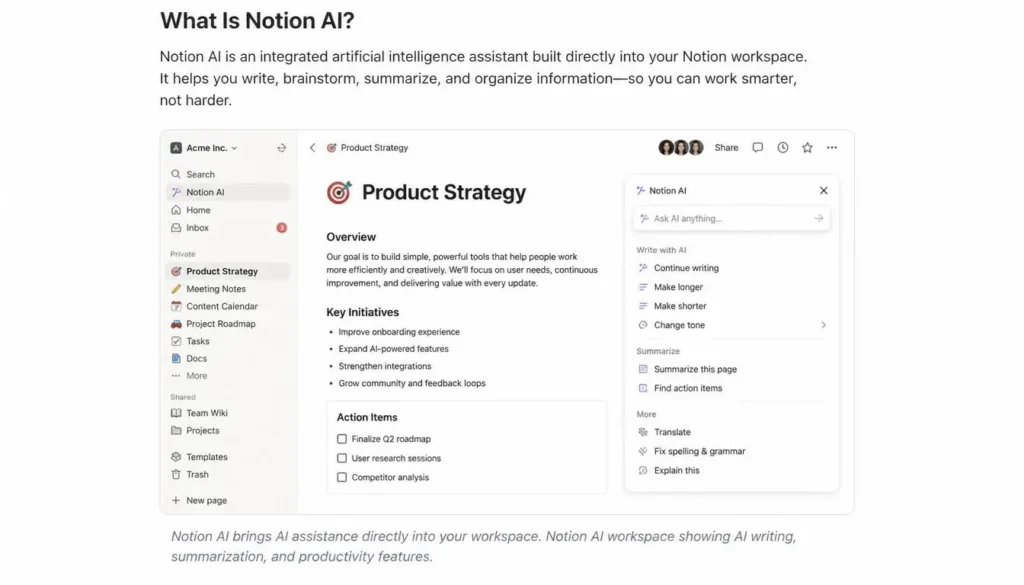
Notion AI is an AI assistant integrated directly into the Notion workspace. Instead of moving information into a separate chatbot, users can work with AI inside their pages, documents, databases, and notes.
It can help users:
- Write and rewrite content
- Summarize documents
- Brainstorm ideas
- Organize information
- Create action items
- Improve notes
- Translate content
- Support project documentation
The biggest advantage is integration. Your information and AI assistance can remain within the same workspace.
Notion AI Main Features
AI Writing Assistant
Notion AI can draft reports, blog content, emails, documentation, and other written material.
It can also rewrite, shorten, expand, simplify, and improve existing text. This makes it useful for professionals and students who regularly edit documents.
Content Ideas and Brainstorming
Notion AI can generate ideas for:
- Blog posts
- YouTube videos
- Newsletters
- Marketing campaigns
- Products
- Projects
It’s particularly useful when you need several ideas quickly before deciding which direction to pursue.
Document Summaries
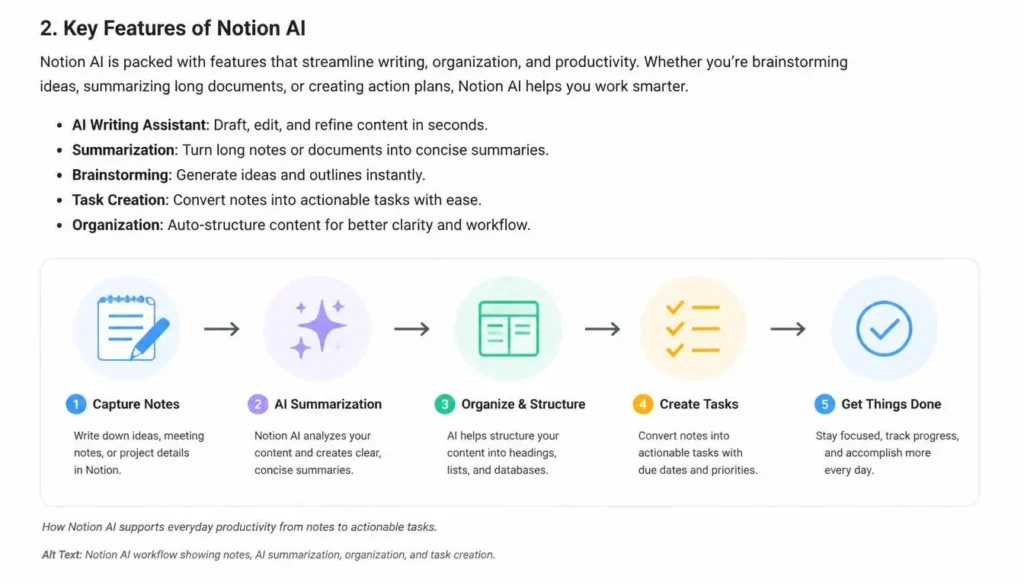
Long documents and meeting notes can be difficult to review. Notion AI can summarize content and highlight the most important information.
This is useful for research notes, reports, documentation, and meeting records.
Action Items
Notion AI can turn meeting discussions or notes into actionable tasks.
It can help identify tasks, responsibilities, decisions, and follow-ups, reducing the amount of manual organization required after meetings.
Meeting Notes
Teams can use Notion AI to clean up raw meeting notes, organize discussions, summarize decisions, and identify next steps.
This makes documentation easier to maintain and search later.
Knowledge Organization
This is one of Notion AI’s biggest strengths. Users can manage company wikis, SOPs, research, project information, and personal knowledge bases in one environment.
Translation
Notion AI can translate content into different languages, which can be useful for international teams and general communication. Important technical or professional translations should still be reviewed manually.
Productivity Assistance
Notion AI can reduce repetitive work by helping users create structured notes, generate templates, rewrite information, and summarize pages.
How Students Can Use Notion AI
Students can use Notion AI to organize coursework and study materials more efficiently.
Useful applications include:
- Summarizing lecture notes
- Creating study plans
- Organizing research
- Brainstorming assignment ideas
- Improving writing
- Creating revision material
AI should support learning rather than replace independent thinking or original academic work.
How Content Creators Can Use Notion AI
For content creators, Notion AI can become part of an editorial workflow.
It can help with:
- Blog outlines
- Video ideas
- Content calendars
- Social media concepts
- Research organization
- Drafting and editing
Keeping ideas, drafts, and publishing plans inside Notion can make content production easier to manage.
How Professionals and Businesses Can Use It
Professionals can use Notion AI for documentation, meeting notes, project planning, and internal reports.
Businesses can also create:
- Knowledge bases
- Employee onboarding material
- SOPs
- Project documentation
- Internal wikis
- Team resources
For organizations that already use Notion, this integration can be particularly valuable.
Notion AI Pricing
Notion offers a free workspace alongside paid plans. AI availability and limits depend on the current plan and subscription structure, so users should check the latest Notion pricing before subscribing.
Free Option
The free option is suitable for users who want to explore Notion and use AI occasionally.
It’s a reasonable starting point for:
- Beginners
- Students
- Personal organization
- Light productivity needs
Paid Plans
Paid plans are better suited to users who need more extensive AI capabilities alongside additional workspace and collaboration features.
They’re particularly useful for:
- Teams
- Businesses
- Professionals
- Frequent Notion users
- Heavy content creators
Is the Upgrade Worth It?
Upgrade if Notion is already an important part of your daily workflow and you regularly use AI for writing, documentation, summaries, or organization.
If you rarely use Notion, a standalone AI assistant may provide better value.
Pros and Cons
Pros
- AI built directly into Notion
- Strong knowledge management
- Useful writing assistance
- Effective document summarization
- Excellent for documentation
- Good collaboration environment
- Helps reduce repetitive tasks
Cons
- Extensive AI use may require a paid plan
- Notion has a learning curve for beginners
- Less conversational than dedicated AI chatbots
- AI-generated content may require editing
- Not a complete replacement for advanced automation platforms
💡 Pro Tip: Notion AI works best when you give it clear instructions and useful context. Always review important AI-generated content before publishing or using it professionally.
Notion AI vs Alternatives
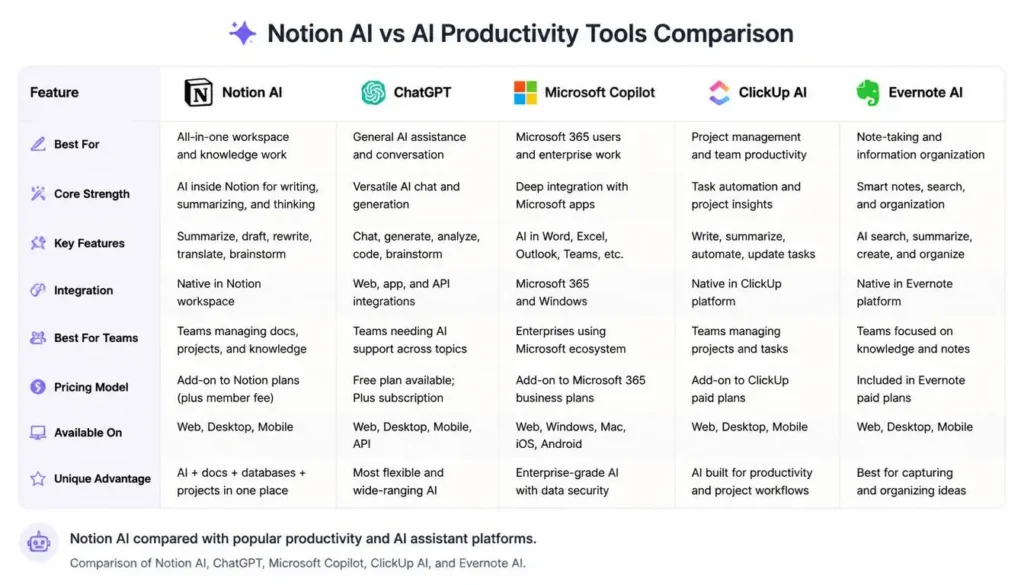
| Tool | Best For | Main Strength |
|---|---|---|
| Notion AI | Knowledge management | AI inside workspace |
| ChatGPT | General AI assistance | Writing, research and coding |
| Microsoft Copilot | Microsoft users | Office productivity |
| ClickUp AI | Project management | Tasks and workflows |
| Evernote AI | Note-taking | Notes and organization |
Is Notion AI Worth It in 2026?
For users who already depend on Notion, yes. Its biggest advantage isn’t simply the AI itself; it’s the fact that AI assistance is built into the same workspace where your documents, projects, notes, and knowledge already exist.
Choose Notion AI if you:
- Use Notion every day
- Manage projects or documentation
- Write frequently
- Maintain a knowledge base
- Work with a team
Consider another tool if you only need a general-purpose chatbot, advanced coding assistance, or occasional AI writing.
Frequently Asked Questions (FAQs)
Is Notion AI free?
Notion provides a free workspace, while AI access and usage can depend on the current plan and available limits. Check Notion’s latest pricing before subscribing.
Is Notion AI better than ChatGPT?
They serve different purposes. ChatGPT is better suited to general AI conversations, while Notion AI is particularly useful for working directly with information inside Notion.
Can Notion AI write articles?
Yes. It can generate outlines, introductions, drafts, summaries, and other written content. Human editing is recommended for accuracy and originality.
Is Notion AI useful for students?
Yes. Students can use it to organize notes, summarize information, brainstorm ideas, and create study materials.
Does Notion AI save time?
It can. Summarization, rewriting, brainstorming, and action-item extraction can reduce repetitive work and make information easier to manage.
Is Notion AI worth paying for?
For people who use Notion heavily for work, study, or team collaboration, paid AI features can provide meaningful value. Casual users may not need them.
Conclusion
Notion AI remains one of the most useful AI productivity tools in 2026, particularly for people who already use Notion as their main workspace.
Students can organize their study materials, content creators can manage ideas and editorial workflows, and businesses can improve documentation and knowledge sharing.
Its biggest advantage is integration. Instead of moving information between a productivity app and an external chatbot, users can access AI assistance directly where their work already happens.
Overall, this Notion AI Review 2026 finds that Notion AI is a strong choice for anyone seeking an integrated AI-powered workspace. If your daily workflow already revolves around Notion, it’s worth trying. If you only need a general-purpose AI assistant, however, alternatives such as ChatGPT may be a better fit.
Our Rating
Notion AI — 4.5/5 ⭐
Notion AI is a strong productivity tool, especially for users who already use Notion for notes, documents, projects, and team collaboration. It can help with writing, summarizing, research, workspace search, meeting notes, and organizing information.
About the Author
Written by the NestAIHub Editorial Team, researchers and technology content editors covering AI tools, productivity software, and emerging digital technologies.

0 Comments