
Introduction
Running a business often means spending too much time on repetitive work—sending emails, updating CRMs, preparing reports, organizing documents, and moving data between apps. These tasks may seem small individually, but together they can consume hours every week.
That is where AI automation tools can make a real difference. Modern platforms can connect your apps, automate workflows, organize information, and assist with everyday business tasks without requiring advanced coding skills.
In this guide, we’ll explore the 10 best AI automation tools for business in 2026, explain what each platform does best, compare their strengths, and show you how to choose the right tool for your workflow.
Key Takeaways
| AI Tool | Best For | Free Option |
|---|---|---|
| Zapier AI | Simple workflow automation | Yes |
| Make | Complex visual workflows | Yes |
| Power Automate | Microsoft users | Limited |
| UiPath | Enterprise automation | Community option |
| HubSpot AI | CRM & marketing | Yes |
| Notion AI | Knowledge management | Limited |
| ClickUp AI | Project management | Yes |
| ChatGPT | General business assistance | Yes |
| Salesforce Einstein | Enterprise CRM | No |
| Bardeen | Browser automation | Yes |
Plans, features, and availability can change, so check the provider’s official website before purchasing.
What Are AI Automation Tools?
AI automation tools use artificial intelligence, integrations, and workflow automation to reduce repetitive business work.
Instead of manually transferring information between applications or performing the same task every day, businesses can create workflows that handle these processes automatically.
Common examples include:
- Sending automated emails
- Updating CRM records
- Creating reports
- Organizing documents
- Managing leads
- Syncing business data
- Creating tasks from messages
- Automating customer support workflows
The goal isn’t to automate everything. The goal is to remove unnecessary manual work while keeping humans in control of important decisions.
💡 Pro Tip: Don’t start by automating your entire business. Choose one repetitive process, measure how much time it consumes, and automate that workflow first.
1. Zapier AI — Best Overall
Zapier connects thousands of applications and lets businesses create automated workflows without traditional programming.
Best For
Small businesses, marketers, freelancers, and teams that want straightforward automation.
Key Features
- AI-assisted workflow creation
- App integrations
- CRM automation
- Email workflows
- Data synchronization
Pros & Cons
Pros: Easy to use, flexible, huge integration ecosystem.
Cons: Costs can increase as task volume grows.
Rating: 4.7/5
Zapier is particularly useful when your business repeatedly moves information between different apps.
2. Make — Best for Complex Workflows
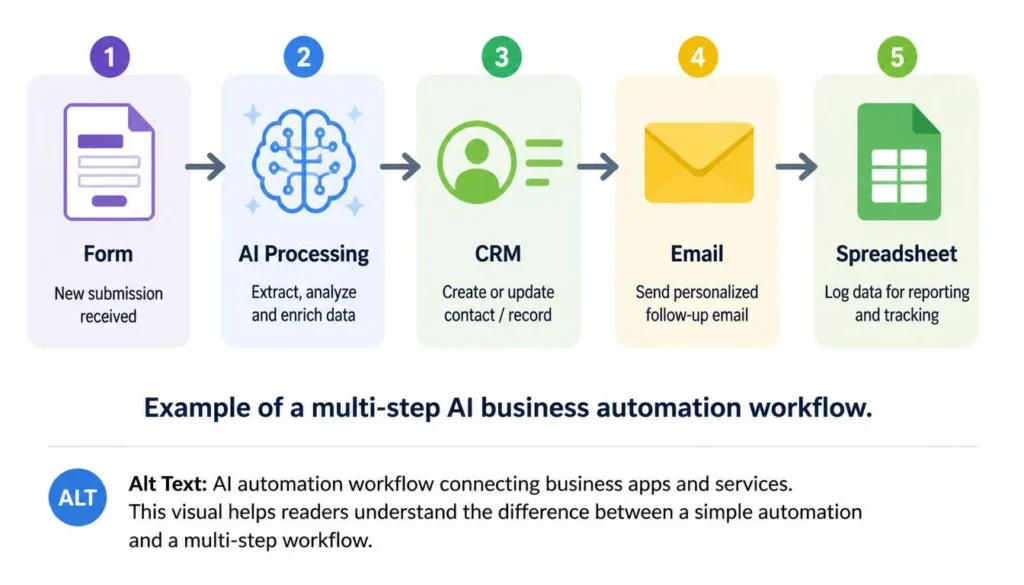
Make uses a visual workflow builder that gives users detailed control over multi-step automations.
Best For
Businesses that need custom and complex workflows.
Key Features
- Visual automation builder
- Multi-step scenarios
- App integrations
- AI-assisted automation
Pros: Powerful and highly customizable.
Cons: Advanced workflows can take time to learn.
Rating: 4.6/5
3. Microsoft Power Automate — Best for Microsoft Users
Microsoft Power Automate is designed to automate processes across Microsoft 365 and connected applications.
It supports capabilities such as AI Builder, robotic process automation, document processing, and approvals.
Best For
Businesses already using Microsoft 365.
Pros: Strong Microsoft integration and business-process automation.
Cons: Some advanced capabilities require premium licensing.
Rating: 4.5/5
If your company already relies on Outlook, Excel, Teams, and other Microsoft services, Power Automate can fit naturally into existing workflows.
4. UiPath — Best for Enterprise Automation
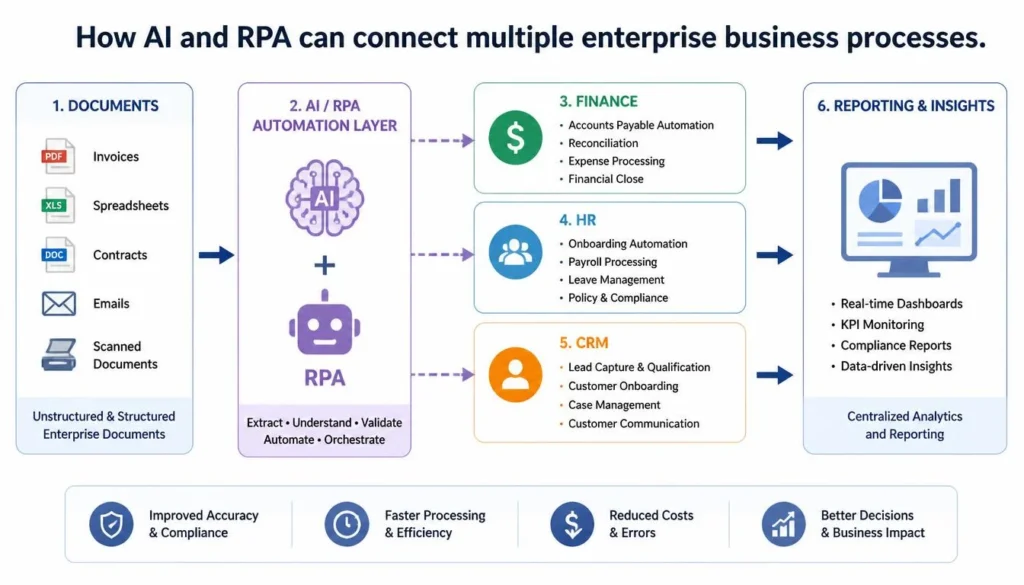
UiPath combines AI with robotic process automation (RPA) for large-scale business processes.
Businesses can automate repetitive operations involving invoices, finance, HR, documents, and data entry.
Best For
Large organizations with complex automation requirements.
Pros: Powerful, scalable, enterprise-focused.
Cons: More difficult for beginners.
Rating: 4.6/5
5. HubSpot AI — Best for CRM & Marketing
HubSpot combines AI with CRM, marketing, sales, and customer-service workflows.
Businesses can automate lead management, follow-ups, customer records, emails, and marketing tasks.
Best For
Growing businesses focused on CRM and marketing.
Pros: Strong CRM integration and useful automation.
Cons: Advanced capabilities can require paid plans.
Rating: 4.4/5
It’s particularly useful when marketing and sales data already live inside the HubSpot ecosystem.
6. Notion AI — Best for Team Knowledge
Notion combines documentation, project organization, and AI assistance in one workspace.
Teams can summarize meetings, organize company information, create documents, and manage tasks.
Best For
Teams that need knowledge management and productivity.
Pros: Clean interface and strong documentation capabilities.
Cons: Large workspaces can take time to organize properly.
Rating: 4.5/5
7. ClickUp AI — Best for Project Management
ClickUp adds AI assistance to project and task management.
Teams can generate task lists, summarize information, plan projects, and organize deadlines.
Best For
Teams managing projects, tasks, and deadlines.
Pros: Strong project-management features.
Cons: New users may need time to learn the platform.
Rating: 4.5/5
ClickUp AI is most useful when automation and project management need to exist inside the same workspace.
8. ChatGPT — Best for General Business Assistance
ChatGPT can assist businesses with emails, reports, brainstorming, documentation, research, data analysis, and many other tasks.
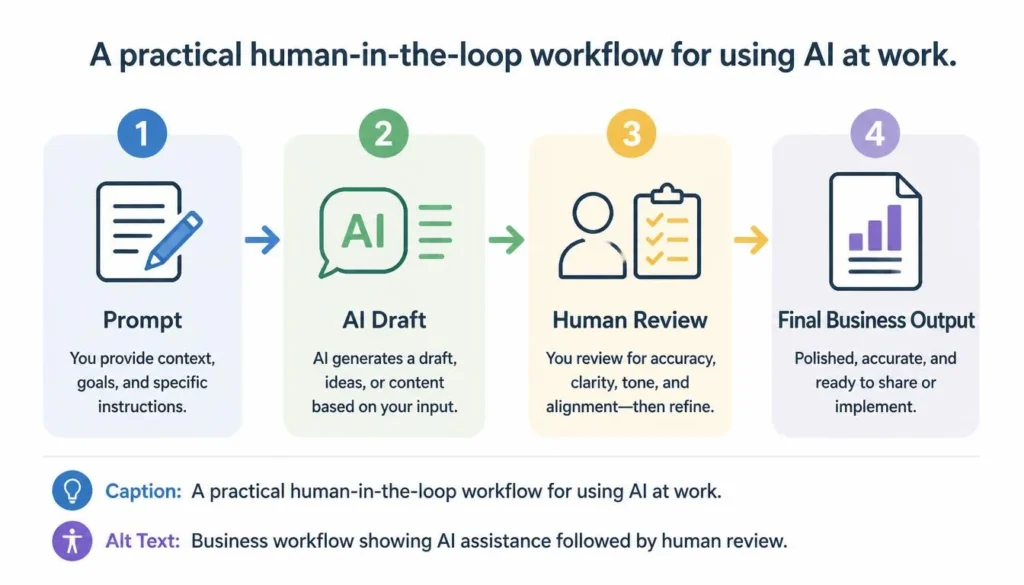
A Simple Business Workflow
- Draft: Ask AI to create the first version.
- Improve: Request a clearer structure or tone.
- Verify: Check important facts and business information.
- Finalize: Add human judgment before using the output.
Pros: Extremely versatile and easy to use.
Cons: Important outputs should be reviewed.
Rating: 4.8/5
9. Salesforce Einstein — Best for Enterprise CRM
Salesforce integrates Einstein AI into its CRM ecosystem for sales, customer service, forecasting, and business insights.
Companies can use AI for lead scoring, predictions, customer information, and CRM workflows.
Best For
Organizations already using Salesforce.
Pros: Powerful CRM integration and advanced analytics.
Cons: Can be expensive for smaller businesses.
Rating: 4.5/5
10. Bardeen — Best for Browser Automation
Bardeen focuses on automating repetitive browser-based tasks.
It can assist with web research, lead collection, data extraction, CRM updates, and spreadsheet workflows.
Best For
Sales teams, researchers, and businesses performing repetitive online tasks.
Pros: Easy to use and useful for browser-based workflows.
Cons: More specialized than general automation platforms.
Rating: 4.5/5
AI Automation Tools Comparison
| Tool | Best For | Key Strength | Rating |
|---|---|---|---|
| Zapier AI | Workflows | App integrations | 4.7/5 |
| Make | Complex automation | Visual workflows | 4.6/5 |
| Power Automate | Microsoft | AI + RPA | 4.5/5 |
| UiPath | Enterprise | AI + RPA | 4.6/5 |
| HubSpot AI | CRM | Sales & marketing | 4.4/5 |
| Notion AI | Knowledge | Documentation | 4.5/5 |
| ClickUp AI | Projects | Task management | 4.5/5 |
| ChatGPT | General assistance | Writing & analysis | 4.8/5 |
| Salesforce Einstein | CRM | Predictive AI | 4.5/5 |
| Bardeen | Browser tasks | Web automation | 4.5/5 |
Editorial Note: These ratings are based on overall usefulness, flexibility, ease of use, and practical value for business workflows. A lower score doesn’t mean a tool is poor; the best option depends on your specific requirements.
How to Choose the Right AI Automation Tool
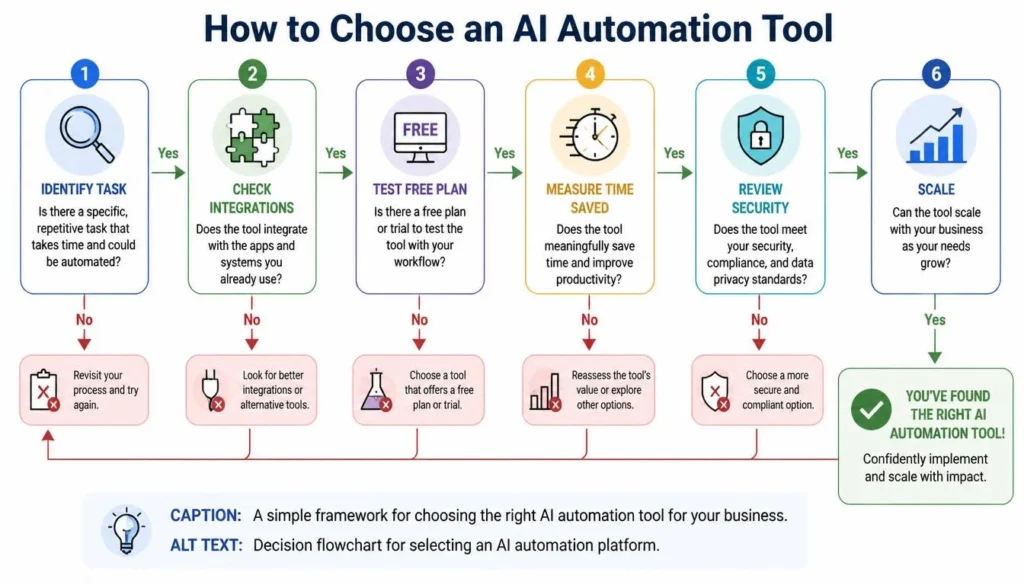
Before paying for an automation platform, ask five simple questions:
- What repetitive task am I trying to eliminate?
- Does the tool integrate with my existing software?
- How much time will the automation actually save?
- Can I start with a free or low-cost plan?
- What data and permissions will the tool require?
Start with one workflow and measure the result. If it saves meaningful time without creating new problems, expand gradually.
⚠️ Common Mistakes: Don’t automate a poorly designed process, give unnecessary access to sensitive information, or assume AI outputs are always correct. Test important workflows before putting them into regular use.
Frequently Asked Questions
What are the best AI automation tools for businesses?
Popular options include Zapier, Make, Power Automate, UiPath, HubSpot, ClickUp, and ChatGPT. The right choice depends on your business processes, integrations, budget, and technical requirements.
Can AI automate repetitive business tasks?
Yes. AI and automation platforms can assist with emails, CRM updates, reporting, documents, customer support, data synchronization, and other repetitive processes.
Are AI automation tools free?
Many providers offer free or limited plans. Advanced integrations, higher usage limits, and enterprise capabilities generally require paid plans.
Which AI automation tool is best for small businesses?
Zapier AI is a strong starting point because it’s relatively easy to use and connects a wide range of business applications without traditional coding.
Final Verdict
AI automation can help businesses save time, reduce repetitive work, and improve operational efficiency. But choosing the right platform is more important than simply choosing the tool with the most features.
Zapier AI is a strong choice for straightforward workflows, while Make offers greater flexibility for complex processes. Microsoft-focused businesses may prefer Power Automate, enterprises can consider UiPath, and CRM-heavy organizations may benefit from HubSpot or Salesforce Einstein. For general business assistance, ChatGPT remains highly versatile.
The smartest approach is simple: start small, measure the result, and scale what works. AI should remove repetitive work while keeping people responsible for important decisions, quality control, and customer relationships.
Our Recommendations
- Best Overall: ChatGPT
- Best Workflow Automation: Zapier AI
- Best for Complex Workflows: Make
- Best for Microsoft Users: Power Automate
- Best Enterprise Automation: UiPath
- Best for CRM & Marketing: HubSpot AI
About the Author
Written by the NestAIHub Editorial Team — technology researchers and content editors covering AI tools, automation, digital productivity, and emerging business technologies. Our content focuses on practical use cases, clear comparisons, and beginner-friendly guidance to help readers make informed technology decisions.

0 Comments