
Introduction
Running a business in 2026 means handling customers, emails, marketing, reports, meetings, and daily operations at the same time. Repetitive work can quickly consume hours that could be better spent on growth and strategic decisions.
The right AI automation tools for business can reduce this workload by handling routine tasks, organizing information, generating content, and improving workflows. Instead of replacing employees, AI works best as a productivity assistant that supports human expertise and decision-making.
In this guide, we’ll explore 10 practical ways businesses can use AI to save time, along with popular tools, their best uses, benefits, limitations, and practical steps for getting started.
Key Takeaways
| Key Aspect | Recommendation |
|---|---|
| Best Overall | ChatGPT |
| Best Workflow Automation | Zapier AI |
| Best for Microsoft Users | Microsoft Copilot |
| Best for CRM | HubSpot AI |
| Best for Design | Canva AI |
| Best for Enterprise CRM | Salesforce Einstein AI |
| Main Benefit | Reduces repetitive manual work |
What Is AI Automation for Businesses?
AI automation uses artificial intelligence to perform routine business activities with little manual effort. Unlike traditional automation, AI can understand natural language, summarize information, recognize patterns, generate content, and provide recommendations.
Businesses can use AI to automate:
- Customer support
- Email communication
- Marketing content
- Data analysis
- Scheduling
- Document management
- CRM updates
- Repetitive workflows
For example, a traditional customer-support process may require an employee to read an email, write a response, update the CRM, create a follow-up task, and notify a team member. An AI-assisted workflow can automate much of this process, reducing manual effort and improving response times.
💡 Pro Tip: Don’t automate everything at once. Start with one repetitive process, measure the results, and expand gradually.
10 Ways Businesses Can Use AI to Save Time
1. Automate Customer Support
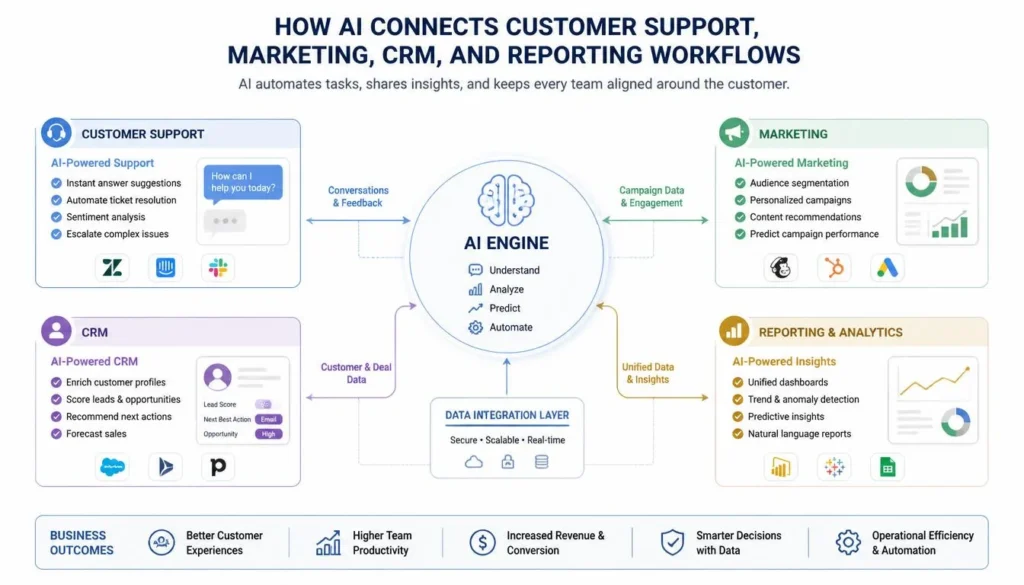
AI chatbots and virtual assistants can answer frequently asked questions, track orders, schedule appointments, and route support tickets.
This allows human agents to focus on complex customer problems while routine questions are handled faster.
Best for: Customer service teams.
2. Create Marketing Content Faster
AI can create first drafts for blog outlines, product descriptions, email campaigns, social media posts, and advertising copy.
Human editing remains important for accuracy and brand voice, but AI can significantly speed up the creative process.
Best for: Marketing teams and small businesses.
3. Manage Emails and Communication
AI assistants can draft replies, summarize long conversations, prioritize important messages, translate communications, and schedule follow-ups.
This can reduce administrative work and make busy inboxes easier to manage.
Best for: Business owners and office teams.
4. Automate Social Media
Businesses can use AI for content ideas, captions, hashtags, content calendars, posting schedules, and campaign planning.
Marketing teams can maintain a consistent online presence without spending as much time on repetitive content tasks.
Best for: Social media and marketing teams.
5. Generate Reports and Analyze Data
AI can summarize sales performance, identify customer trends, prepare financial summaries, and highlight important metrics.
Instead of manually preparing every report, managers can review AI-generated insights and spend more time making decisions.
Best for: Managers and data-heavy businesses.
6. Schedule Meetings and Tasks
AI scheduling tools can find available meeting times, manage calendars, send reminders, assign tasks, and help prioritize daily work.
This reduces scheduling conflicts and unnecessary back-and-forth communication.
Best for: Teams with frequent meetings.
7. Improve Sales Processes
Sales teams can use AI for lead scoring, CRM updates, sales forecasting, personalized follow-ups, and customer insights.
Automating repetitive sales tasks gives representatives more time to focus on prospects and customer relationships.
Best for: Sales teams.
8. Manage Documents and Information
Businesses create contracts, reports, proposals, meeting notes, and internal documents every day. AI can summarize, organize, search, and document this information.
This makes it easier for employees to find important information when they need it.
Best for: Documentation-heavy businesses.
9. Create Designs and Presentations
AI design platforms can help create marketing graphics, presentations, product images, social media visuals, and promotional materials.
Instead of starting from scratch, teams can generate a first draft and customize it.
Best for: Marketing and creative teams.
10. Automate Repetitive Daily Tasks
Workflow automation tools can handle repetitive activities such as updating CRM records, moving files, sending notifications, processing forms, and syncing customer information.
Even small improvements can save significant time over weeks and months.
Best for: Businesses with repetitive administrative workflows.
Best AI Automation Tools for Business
ChatGPT
Best for: Writing, brainstorming, documentation, analysis, and general business assistance.
ChatGPT can help draft emails, summarize documents, generate ideas, and support everyday business tasks.
Pros: Versatile and easy to use.
Cons: Important outputs require human verification.
Microsoft Copilot
Best for: Microsoft 365 businesses.
Copilot can assist with documents, spreadsheets, presentations, emails, meetings, and other Microsoft workflows.
Pros: Strong Microsoft integration.
Cons: Advanced capabilities depend on the plan.
Google Gemini
Best for: Google Workspace users.
Gemini can help with documents, emails, research, and collaboration within Google’s ecosystem.
Pros: Convenient Workspace integration.
Cons: Features vary by plan and availability.
Zapier AI
Best for: Workflow automation.
Zapier connects business applications and automates repetitive processes without traditional coding.
Pros: Flexible app integrations.
Cons: Higher usage can increase costs.
Canva AI
Best for: Business design and marketing.
Canva AI helps teams create presentations, graphics, and marketing visuals quickly.
Pros: Beginner-friendly.
Cons: Some advanced features require payment.
HubSpot AI
Best for: CRM and marketing.
HubSpot AI can support lead management, marketing, customer communication, and sales workflows.
Pros: Strong CRM integration.
Cons: Advanced features may require paid plans.
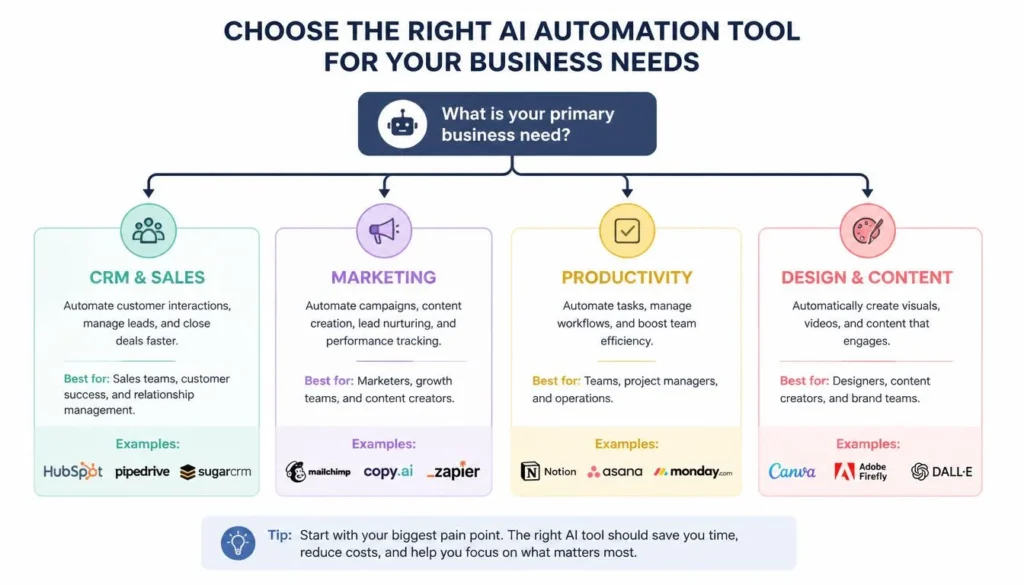
AI Automation Tools Comparison
| Tool | Best For | Main Benefit |
|---|---|---|
| ChatGPT | Productivity | Writing & analysis |
| Microsoft Copilot | Microsoft 365 | Office assistance |
| Google Gemini | Workspace | Research & collaboration |
| Zapier AI | Automation | App connections |
| Canva AI | Design | Visual creation |
| Notion AI | Organization | Documentation |
| HubSpot AI | CRM | Lead automation |
| Grammarly AI | Writing | Editing |
| Adobe Firefly | Creative work | Image generation |
| Salesforce Einstein | Enterprise CRM | Sales automation |
The supplied source identifies these tools as business-focused options for writing, productivity, automation, CRM, design, and enterprise workflows.
How to Start Using AI in Your Business
- Identify repetitive tasks: Find activities that consume significant time every week.
- Choose the right tool: Select software that matches the specific workflow.
- Start small: Automate one process before changing multiple systems.
- Measure results: Track time saved, errors, productivity, and costs.
- Review security: Understand how the platform handles business information.
- Expand gradually: Automate additional processes after the first workflow proves reliable.
⚠️ Common Mistakes: Don’t automate a poorly designed process, blindly trust AI output, or provide unnecessary access to sensitive business information. Human review remains important.
Free vs Paid AI Tools for Business
Free Tools Are Useful For
- Freelancers
- Startups
- Small teams
- Basic content creation
- Simple workflows
- Testing AI tools
Paid Tools Make More Sense For
- Higher usage limits
- Advanced features
- Team collaboration
- Business integrations
- Enterprise security
- Complex automation
The right choice depends on how much work you need to automate and whether the productivity gains justify the subscription cost.
Frequently Asked Questions (FAQs)
How can AI save time for businesses?
AI can automate customer support, emails, marketing, reporting, scheduling, document management, and repetitive workflows, allowing employees to focus on higher-value work.
What are the best AI tools for business?
Popular options include ChatGPT, Microsoft Copilot, Google Gemini, Zapier AI, HubSpot AI, Canva AI, and Salesforce Einstein AI.
Can AI replace business employees?
AI is best treated as a productivity assistant. Human judgment, creativity, expertise, and customer relationships remain essential.
Are AI automation tools expensive?
Many platforms provide free or limited plans. Paid plans generally offer higher limits, advanced capabilities, integrations, and business features.
How can small businesses start using AI?
Start with one repetitive task, such as email management, content creation, scheduling, customer support, or document organization, and measure the results.
Final Conclusion & Actionable Verdict
AI automation has become a practical way for businesses to save time, reduce repetitive work, and improve productivity. The goal isn’t simply to automate more tasks; it’s to give employees more time for customers, strategy, creativity, and business growth.
For general business assistance, ChatGPT is a flexible starting point. Zapier AI is useful for connecting workflows, while Microsoft Copilot and Google Gemini work naturally within their respective productivity ecosystems. Businesses focused on CRM can consider HubSpot AI or Salesforce Einstein, while creative teams can benefit from Canva AI and Adobe Firefly.
The smartest approach is simple: identify one repetitive problem, choose an appropriate tool, test the workflow, measure the results, and expand gradually.
About the Author
Written by the NestAIHub Editorial Team, technology researchers and content editors specializing in artificial intelligence, automation, and digital productivity. Our goal is to provide practical, easy-to-understand technology guidance for modern businesses.


0 Comments