
Introduction
AI assistants have evolved far beyond basic chatbots. In 2026, tools like Claude can help users write, research, analyze documents, code, summarize information, and manage complex projects.
Developed by Anthropic, Claude has become a strong competitor to ChatGPT, Gemini, and Perplexity, particularly for writing, long documents, coding, and professional workflows.
But is Claude worth paying for when so many capable AI assistants are available? This Claude AI Review 2026 examines its key features, pricing, strengths, weaknesses, and the users who can benefit most from it.
What Is Claude AI?
Claude AI is an AI assistant developed by Anthropic. It became publicly available in 2023 and has since expanded from a conversational chatbot into a broader productivity platform.
Claude can assist with writing, research, document analysis, coding, brainstorming, summarization, and business tasks. Its ecosystem also includes Claude Code, Projects, and tools designed for professional workflows.
Anthropic is also known for emphasizing AI safety and developing its models around principles intended to make AI systems more reliable and steerable.
Claude AI Features in 2026
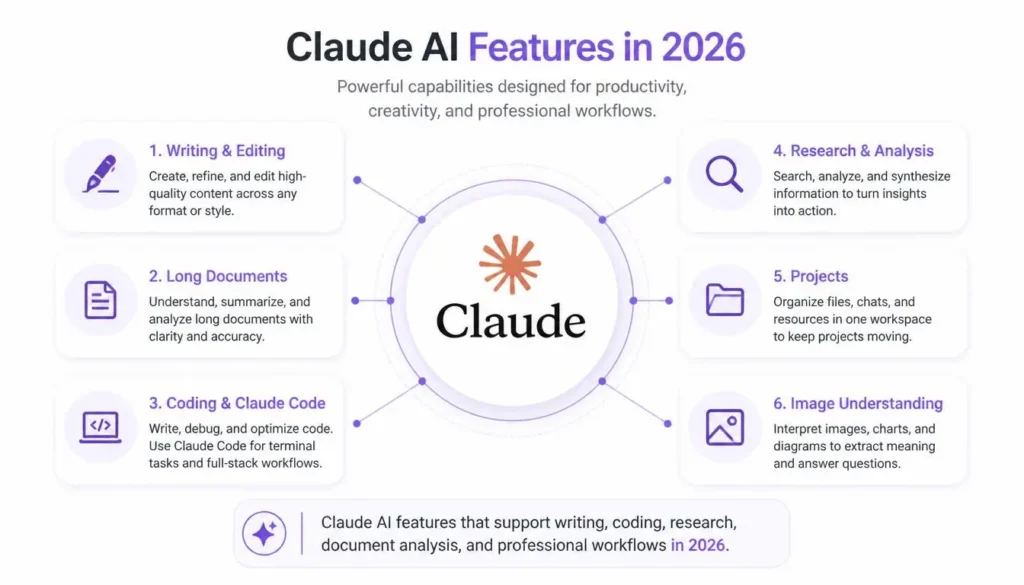
Advanced Writing
Writing remains one of Claude’s strongest areas. It can help create and improve:
- Blog posts and articles
- Emails and reports
- Proposals
- Scripts
- Summaries
- Product descriptions
- Creative writing
Claude is particularly useful for improving structure, clarity, tone, and organization. Writers can provide rough notes and turn them into a more polished draft while retaining human editing and judgment.
Long-Document Analysis
Claude is well suited to working with large amounts of information. Users can upload documents and ask questions, summarize material, compare information, or extract important details.
This can be useful for:
- Research papers
- Business reports
- Documentation
- Notes
- Spreadsheets
- Technical files
For students and professionals dealing with information-heavy projects, this capability can save considerable time.
Coding Assistance
Claude has become a serious coding assistant for developers. It can help with:
- Writing code
- Debugging
- Refactoring
- Code reviews
- Documentation
- Testing
- Understanding codebases
Claude Code extends these capabilities into development workflows, making Claude especially attractive to programmers working on larger projects.
Research and Analysis
Claude can summarize information, analyze documents, compare sources, organize findings, and help users understand complicated topics.
It can be useful for students, researchers, marketers, and professionals who need to process large amounts of information quickly. However, important claims should still be independently verified.
Claude Projects
Projects provide dedicated workspaces where users can keep conversations, instructions, and relevant files together.
For example, you could create a project for a research assignment and upload notes, documents, and outlines. Claude can then use that information throughout the project.
This makes Claude more useful as an ongoing workspace rather than just a question-and-answer tool.
Image Understanding
Claude can also analyze uploaded images, screenshots, charts, and diagrams. A user could upload a chart and ask for an explanation or provide a software screenshot for troubleshooting.
However, Claude is not primarily an image-generation platform, so dedicated image tools may be better for creating artwork.
How to Use Claude AI
For Students
Students can use Claude to summarize research papers, explain difficult concepts, create study guides, generate practice questions, and organize notes.
The best approach is to use it as a learning assistant, not as a replacement for understanding the subject.
For Writers
Writers can use Claude for brainstorming, outlines, editing, rewriting, and organizing research. It is especially useful when improving an existing draft.
For YouTubers
YouTubers can use Claude to develop video ideas, scripts, titles, descriptions, research notes, and content calendars.
For Developers
Developers can use Claude for debugging, code reviews, documentation, software planning, and development through Claude Code.
For Businesses
Businesses can use Claude for reports, research, customer-support drafts, internal documentation, meeting summaries, and marketing content.
Claude AI Pricing in 2026
| Plan | Price | Best For |
|---|---|---|
| Free | $0 | Occasional users |
| Pro | $20/month or $200/year | Regular users |
| Max 5x | $100/month | Heavy users |
| Max 20x | $200/month | Very heavy users |
| Team Standard | $25/user/month | Teams |
| Team Premium | $125/user/month | Heavy team users |
Pricing can vary by region and may change, so check Anthropic’s current pricing before subscribing.
One important point is that Claude API usage is billed separately from consumer subscriptions.
Claude AI Pros and Cons
| Pros | Cons |
|---|---|
| Excellent writing | Usage limits |
| Strong document handling | Higher plans are expensive |
| Powerful coding assistance | Not ideal for every task |
| Useful Projects feature | Outputs require verification |
| Clean interface | API is separately billed |
Pros
Claude’s biggest strengths are writing quality, long-context work, coding, document analysis, and professional workflows. It is particularly useful when a task involves lengthy instructions or substantial source material.
Cons
Heavy users may find the higher subscription tiers expensive. Some users may also prefer competitors when they need specialized features such as broader multimedia capabilities or specific ecosystem integrations.
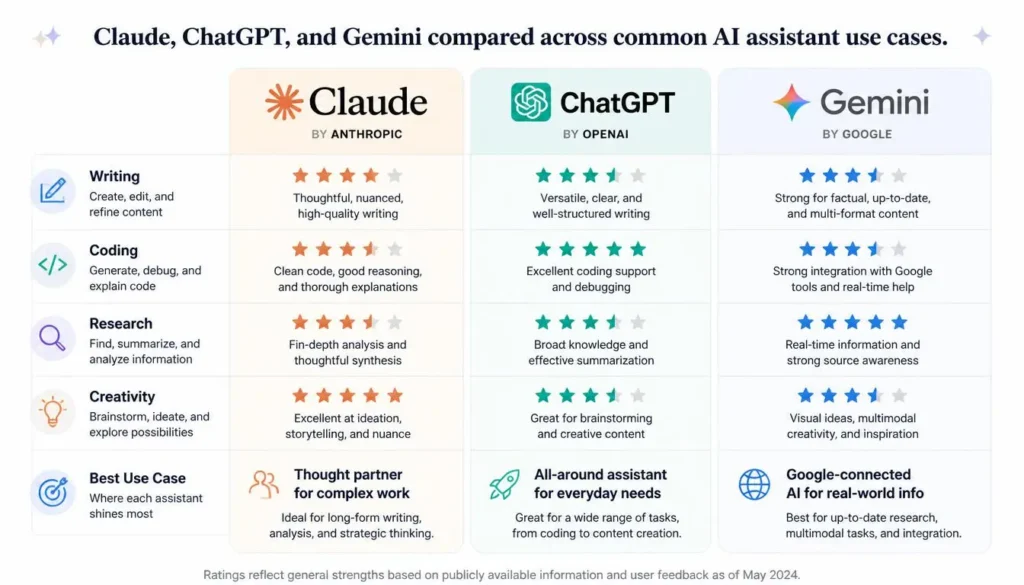
Claude AI vs ChatGPT vs Gemini
| Feature | Claude | ChatGPT | Gemini |
|---|---|---|---|
| Writing | Excellent | Excellent | Very Good |
| Coding | Excellent | Excellent | Very Good |
| Research | Very Good | Excellent | Excellent |
| Creativity | Excellent | Excellent | Very Good |
| Free Plan | Yes | Yes | Yes |
| Strongest Use | Writing, coding, long projects | General AI | Google ecosystem |
There is no universal winner. Your choice should depend on the tasks you perform most frequently.
Who Should Use Claude AI?
Claude is particularly useful for:
- Students working with research and notes
- Writers creating and editing long-form content
- Developers working with code and software projects
- Researchers analyzing documents
- Content creators planning scripts and content
- Businesses handling documentation and professional workflows
If you only need occasional basic questions, the free version may be enough.
Is Claude AI Worth It in 2026?
For many users, yes.
Claude’s combination of strong writing, document analysis, coding, Projects, and professional workflows makes it one of the most capable AI assistants available.
The free plan is the best starting point. If you use Claude frequently and regularly hit usage limits, Pro may provide better value. Heavy users should carefully consider whether the Max plans justify their significantly higher cost.
Claude isn’t automatically better than ChatGPT, Gemini, or Perplexity. Each platform has different strengths, so the best option depends on your workflow.
FAQs
Is Claude AI free?
Yes. Claude offers a free plan with limited usage. Paid plans provide higher usage and additional capabilities.
Is Claude better than ChatGPT?
Neither is universally better. Claude is particularly strong for writing, long documents, and coding, while ChatGPT offers a broad range of features and integrations.
Can Claude write articles?
Yes. Claude can create outlines, drafts, rewrites, summaries, and other written content. Human editing and fact-checking remain important.
Can Claude help with coding?
Yes. Claude can generate, explain, debug, review, and improve code, while Claude Code supports more advanced development workflows.
Final Verdict
Claude has developed from a simple chatbot into a powerful AI productivity and professional work platform. Its strongest capabilities include writing, long-document analysis, coding, research, Projects, and complex workflows.
For students, writers, developers, researchers, and professionals, Claude is certainly worth trying in 2026.
Start with the free plan and upgrade only when your usage justifies the cost. If your daily work involves writing, analyzing information, or coding, Claude can become a genuinely valuable AI assistant.
Is Claude AI Review Worth It?
Claude is worth considering if your work involves long-form writing, coding, detailed analysis, or working with large amounts of information. Its newer models have continued to improve in coding, reasoning, tool use, and professional workflows.
Our take
Claude isn’t necessarily the best choice for every user. If you mainly need an AI for writing, coding, research, or complex tasks, it can be a very strong option. But before paying for a plan, try the free version and see whether its results actually fit your workflow.
✍️ About the Author
NestAIHub Editorial Team covers AI tools, productivity software, emerging technology, and online business. Our content focuses on practical, easy-to-understand reviews and guides that help readers choose and use AI tools effectively.