10 Best AI Research Tools for Students in 2026

Published by nestaihub@gmail.com on

Introduction

Research is an essential part of learning, but finding accurate information can take a lot of time. Students often need to search through multiple websites, books, and academic papers before finding useful answers. Fortunately, AI research tools are making this process much faster and more efficient.

Modern AI-powered research assistants can summarize lengthy articles, explain difficult concepts, recommend reliable sources, and organize research notes in just a few minutes. Instead of spending hours searching for information, students can focus more on understanding topics and developing their own ideas.

However, AI should be used as a learning assistant rather than a replacement for critical thinking. Students should always verify important facts, read original sources, and follow their school’s academic integrity guidelines.

In this guide, we’ll explore the 10 best AI research tools for students in 2026, comparing their features, pricing, strengths, and limitations to help you choose the right tool for your studies.


What Are AI Research Tools?

AI research tools use artificial intelligence to help users find, understand, summarize, and organize information more efficiently.

Unlike traditional search engines that simply display a list of links, AI research tools can understand questions, analyze multiple sources, summarize complex information, and provide easy-to-read explanations.

How AI Helps in Research

AI can support research in many ways:

  • Summarize long research papers
  • Explain difficult topics in simple language
  • Suggest reliable academic sources
  • Organize notes and references
  • Compare different viewpoints
  • Answer follow-up questions

Many tools also provide citations or direct links to supporting sources, making it easier for students to verify information.

Benefits for Students

Using AI research tools can help students:

  • Save research time
  • Understand complex topics faster
  • Stay organized
  • Improve assignment quality
  • Discover reliable sources
  • Learn more efficiently

Why Traditional Research Methods Are Changing

Traditional research often involves opening dozens of browser tabs, reading long articles, and manually organizing notes. AI reduces much of this repetitive work by helping students quickly locate relevant information and summarize it into manageable sections.

While AI speeds up research, students should still read original sources and think critically before using information in assignments.


1. Perplexity AI

Best For

  • Academic research
  • Finding reliable sources
  • Quick factual answers
  • Literature reviews

What Is Perplexity AI?

Perplexity AI is an AI-powered search and research assistant that provides direct answers along with links to supporting sources. It combines conversational AI with web search, making it one of the most useful tools for students.

Main Features

  • AI-powered search
  • Source citations
  • Research summaries
  • Follow-up questions
  • Web search integration
  • File analysis

How Students Can Use It

Students can ask research questions, explore unfamiliar topics, summarize articles, and quickly locate supporting references for assignments.

Pricing

  • Free plan available
  • Paid Pro plan offers advanced AI models and higher usage limits

Pros

  • Excellent research accuracy
  • Includes source references
  • Easy-to-understand explanations
  • Fast search results

Cons

  • Some advanced models require a subscription
  • Students should still verify cited information

2. Google Gemini

Best For

  • Research
  • Google Workspace users
  • Productivity
  • Learning

What Is Google Gemini?

Google Gemini is Google’s AI assistant that integrates with Search, Docs, Gmail, and other Workspace apps. It helps students research topics, summarize documents, and generate ideas more efficiently.

Main Features

  • AI research assistance
  • Document summaries
  • Google Workspace integration
  • Writing support
  • Image understanding
  • Multi-step reasoning

How Students Can Use It

Students can summarize research materials, brainstorm assignment ideas, organize information, and work directly inside Google Docs and Google Drive.

Pricing

  • Free version available
  • Advanced features available with premium Google AI plans

Pros

  • Strong Google integration
  • Easy collaboration
  • Helpful for research and productivity
  • User-friendly interface

Cons

  • Some premium features require payment
  • Responses should be verified for academic work

3. ChatGPT

Best For

  • Understanding concepts
  • Brainstorming
  • Research support
  • Writing assistance

What Is ChatGPT?

ChatGPT is a conversational AI assistant that helps students learn, write, brainstorm ideas, and understand complex subjects through interactive discussions.

Main Features

  • Natural conversations
  • Topic explanations
  • Writing assistance
  • Coding help
  • Brainstorming
  • Study support

How Students Can Use It

Students can ask questions about difficult topics, summarize information, create study notes, generate research ideas, and improve their writing.

Pricing

  • Free version available
  • Paid plans provide access to more advanced models and additional features

Pros

  • Excellent explanations
  • Very easy to use
  • Supports many academic subjects
  • Great learning companion

Cons

  • May not always include citations automatically
  • Important facts should be verified

4. Consensus AI

Best For

  • Scientific research
  • Evidence-based answers
  • Academic papers

What Is Consensus AI?

Consensus AI is a research tool that searches scientific literature instead of general websites. It helps students find evidence-based answers from published academic studies.

Main Features

  • Scientific paper search
  • AI summaries
  • Evidence-based answers
  • Research filtering
  • Citation support

How Students Can Use It

Students working on science, psychology, health, or social science assignments can quickly locate relevant academic research without manually searching hundreds of papers.

Pricing

  • Free version available
  • Premium features available for advanced research needs

Pros

  • Focuses on academic research
  • High-quality evidence
  • Saves research time
  • Excellent for university students

Cons

  • Less useful for non-academic topics
  • Some advanced features require payment

5. Elicit

Best For

  • Literature reviews
  • Academic research
  • Research paper analysis

What Is Elicit?

Elicit is an AI-powered research assistant designed to help researchers and students analyze academic papers, summarize findings, and identify relevant studies for literature reviews.

Main Features

  • Literature review assistance
  • AI paper summaries
  • Research comparison
  • Citation discovery
  • Question answering
  • Academic search

How Students Can Use It

Students can use Elicit to find relevant studies, compare research findings, summarize papers, and organize literature for essays, dissertations, and research projects.

Pricing

  • Free plan available
  • Premium subscription for additional features and higher usage

Pros

  • Excellent for academic research
  • Saves hours during literature reviews
  • Easy paper comparison
  • Helpful summaries

Cons

  • Best suited for research-heavy subjects
  • Some advanced capabilities require a paid plan

6. Semantic Scholar

Best For

  • Academic paper searches
  • Scientific research
  • Literature reviews

What Is Semantic Scholar?

Semantic Scholar is an AI-powered academic search engine that helps students discover high-quality research papers across a wide range of subjects. Developed by the Allen Institute for AI, it uses machine learning to rank relevant papers and highlight influential research.

Main Features

  • AI-powered paper search
  • Citation analysis
  • Research recommendations
  • Author profiles
  • Topic filtering
  • Paper summaries

How Students Can Use It

Students can search for peer-reviewed papers, discover influential publications, and build a strong reference list for essays and research projects.

Pricing

  • Free to use

Pros

  • Large academic database
  • Excellent search filters
  • Reliable research papers
  • Completely free

Cons

  • Focuses mainly on scholarly publications
  • Some papers may require publisher access

7. Scite AI

Best For

  • Checking research credibility
  • Citation analysis
  • Academic writing

What Is Scite AI?

Scite AI helps students understand how research papers have been cited. Instead of simply showing citation counts, it identifies whether later studies support, mention, or challenge previous research.

Main Features

  • Smart citation analysis
  • Research verification
  • AI paper summaries
  • Citation reports
  • Browser extension

How Students Can Use It

Students can verify whether a research paper is widely supported before using it as a source in assignments or academic projects.

Pricing

  • Free trial available
  • Paid plans unlock full citation analysis

Pros

  • Improves research quality
  • Helps evaluate sources
  • Excellent for university research
  • Easy to understand

Cons

  • Premium subscription required for full access
  • Primarily designed for academic research

8. Connected Papers

Best For

  • Literature reviews
  • Discovering related research
  • Research visualization

What Is Connected Papers?

Connected Papers visually maps relationships between academic papers, making it easier to discover influential studies and explore how research topics have evolved over time.

Main Features

  • Research maps
  • Paper relationship visualization
  • Citation discovery
  • Literature exploration
  • Topic analysis

How Students Can Use It

Students can quickly identify important papers connected to their research topic and explore related publications without manually searching through dozens of references.

Pricing

  • Free plan available
  • Paid plans offer additional searches

Pros

  • Unique visual interface
  • Great for literature reviews
  • Easy to discover related work
  • Saves research time

Cons

  • Not intended for general web searches
  • Free plan includes limited searches

9. NotebookLM

Best For

  • Research notes
  • Document summaries
  • Personalized study materials

What Is NotebookLM?

NotebookLM is Google’s AI-powered research notebook that allows users to upload documents, PDFs, lecture notes, and other sources. It answers questions using only the materials you provide, making it especially useful for studying.

Main Features

  • Document summaries
  • Question answering
  • AI study notes
  • Source-based responses
  • Research organization

How Students Can Use It

Students can upload lecture slides, research papers, or textbooks and ask NotebookLM to summarize content, explain concepts, or create revision notes.

Pricing

  • Free version available
  • Additional capabilities may be included with certain Google AI plans

Pros

  • Works with your own documents
  • Excellent summaries
  • Organized workspace
  • Helpful for revision

Cons

  • Best results require uploaded materials
  • Some advanced features depend on Google AI subscriptions

10. Research Rabbit

Best For

  • Finding research papers
  • Research discovery
  • Academic exploration

What Is Research Rabbit?

Research Rabbit is an AI-powered discovery platform that helps students uncover related academic papers, authors, and research trends through interactive visual networks.

Main Features

  • Research discovery
  • Paper recommendations
  • Author tracking
  • Citation networks
  • Collection management

How Students Can Use It

Students can build collections of research papers, discover influential authors, and explore related publications for essays and dissertations.

Pricing

  • Free to use

Pros

  • Excellent research discovery
  • Interactive visualization
  • Easy collection management
  • Ideal for university students

Cons

  • Focused only on academic literature
  • Learning curve for first-time users

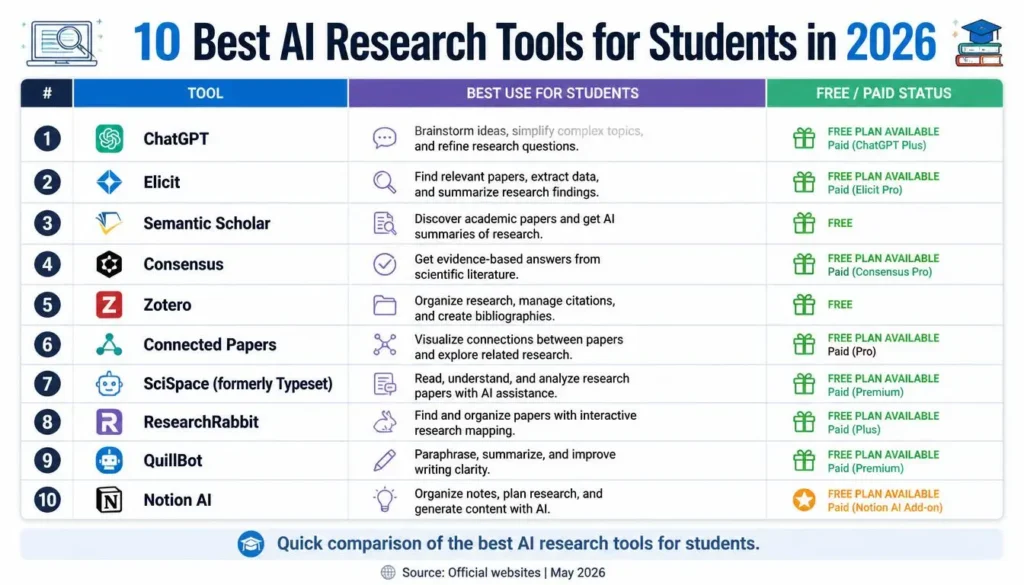
AI Research Tools Comparison Table

ToolBest ForKey FeaturesFree PlanRating
Perplexity AIResearch & sourcesAI search, citations, summaries✅ Yes⭐⭐⭐⭐⭐
Google GeminiProductivityAI research, Workspace integration✅ Yes⭐⭐⭐⭐☆
ChatGPTLearning & writingExplanations, brainstorming, writing✅ Yes⭐⭐⭐⭐⭐
Consensus AIScientific researchEvidence-based answers✅ Yes⭐⭐⭐⭐☆
ElicitLiterature reviewsPaper summaries, research analysis✅ Yes⭐⭐⭐⭐☆
Semantic ScholarAcademic papersAI paper search, citations✅ Yes⭐⭐⭐⭐⭐
Scite AICitation analysisSmart citations, verificationTrial⭐⭐⭐⭐☆
Connected PapersLiterature mappingResearch visualization✅ Yes⭐⭐⭐⭐☆
NotebookLMResearch notesDocument summaries, Q&A✅ Yes⭐⭐⭐⭐⭐
Research RabbitResearch discoveryPaper recommendations✅ Yes⭐⭐⭐⭐☆

Best AI Research Tools for Different Needs

Best Overall Research Tool

🏆 Winner: Perplexity AI

Perplexity AI combines conversational AI with source-backed answers, making it one of the most balanced tools for everyday student research.


Best for Academic Papers

🏆 Winner: Semantic Scholar

Semantic Scholar offers access to millions of scholarly publications and powerful search filters, making it ideal for academic research.


Best for Finding Sources

🏆 Winner: Consensus AI

Consensus AI focuses on evidence-based answers from published studies, helping students locate trustworthy academic sources.


Best Free AI Research Tool

🏆 Winner: NotebookLM

NotebookLM allows students to upload their own documents and interact with them through AI, making it a powerful free study companion.


Best for Summarizing Documents

🏆 Winner: ChatGPT

ChatGPT can simplify complex research papers, explain technical concepts, and generate concise summaries that are easier to understand.


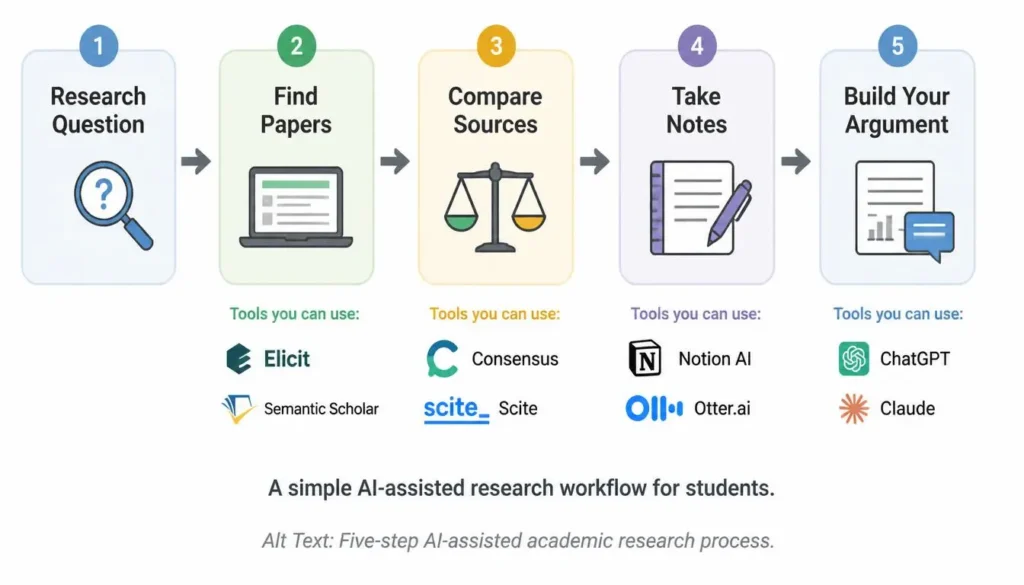
How Students Can Use AI Research Tools Effectively

Find Reliable Information

Choose AI tools that provide citations or links to trusted sources whenever possible. Always compare information across multiple references.

Summarize Research Papers

Use AI to identify the main arguments, findings, and conclusions of lengthy papers before reading them in full.

Create Research Notes

Organize important ideas, quotations, and references into structured notes that are easier to review later.

Understand Difficult Concepts

Ask AI to explain technical terms, formulas, or theories using simple language and practical examples.

Organize References

Keep track of books, journal articles, and websites as you research to make citation and bibliography creation easier.


Mistakes to Avoid When Using AI for Research

Trusting AI Blindly

AI can occasionally misunderstand information or generate incorrect answers. Always confirm important facts using reliable academic sources.

Not Checking Sources

Even when AI provides citations, students should open and review the original source before using it in assignments.

Copying AI Answers

Avoid submitting AI-generated text without understanding it. Rewrite ideas in your own words and follow your institution’s academic integrity policies.

Ignoring Original Thinking

AI should support your research process—not replace your own analysis, creativity, or critical thinking.


Free vs Paid AI Research Tools

When Free Tools Are Enough

Free AI research tools are suitable if you:

  • Need help with homework
  • Conduct occasional research
  • Summarize articles
  • Learn new topics
  • Have a limited budget

For most school and undergraduate students, free plans provide enough functionality for everyday academic work.


When Premium Features Are Useful

A paid plan may be worthwhile if you:

  • Conduct research frequently
  • Analyze many academic papers
  • Need higher usage limits
  • Require advanced AI models
  • Work on dissertations or professional research projects

Graduate students, researchers, and professionals often benefit most from premium features.


Frequently Asked Questions

1. What is the best AI research tool for students?

Perplexity AI is one of the best all-around research tools because it combines AI-generated answers with source references.

2. Is Perplexity AI good for research?

Yes. It provides quick summaries, supports follow-up questions, and often includes links to supporting sources.

3. Can AI help with academic papers?

Yes. AI can summarize papers, explain technical concepts, organize notes, and suggest related research. Students should still read original papers before citing them.

4. Are AI research tools free?

Many AI research platforms offer free plans. Some advanced features, such as higher limits or premium AI models, require paid subscriptions.

5. Which AI tool finds research papers?

Semantic Scholar, Consensus AI, Connected Papers, Research Rabbit, and Elicit are excellent tools for discovering academic papers.

6. Can students use AI for assignments?

Yes, provided they follow their school’s academic integrity policies. AI should be used to support learning rather than replace original work.

7. How accurate are AI research tools?

Many AI research tools are highly useful, but they are not perfect. Students should always verify important information using trusted academic sources.


Final Verdict

AI research tools have transformed how students discover, organize, and understand information. They reduce the time spent searching for resources and make complex academic material easier to understand.

Different tools serve different purposes. Some excel at conversational research, while others specialize in scientific literature, document summaries, or citation analysis. Choosing the right platform depends on your study goals and the type of research you perform most often.

Our Recommendations

  • Best Overall AI Research Tool: Perplexity AI
  • Best Free Option: NotebookLM
  • Best Tool for Academic Research: Semantic Scholar
  • Best Tool for Students: ChatGPT

The most effective approach is to combine AI with critical thinking. Use AI to speed up research, organize information, and improve understanding—but always verify facts, read original sources, and develop your own conclusions. This balanced approach will help you become a more confident and capable researcher.


0 Comments

Leave a Reply

Avatar placeholder

Your email address will not be published. Required fields are marked *