Introduction
Video content continues to dominate platforms such as YouTube, TikTok, Instagram Reels, and LinkedIn. As audiences expect better videos at a faster pace, creators need editing tools that can reduce repetitive work without sacrificing quality.
Modern AI video editing tools can automatically generate captions, clean audio, remove backgrounds, track objects, create scenes, and even turn scripts into videos. This makes professional-looking editing much more accessible to beginners and experienced creators alike.
In this guide, we’ll compare the best AI video editing tools in 2026, including their features, strengths, limitations, pricing options, and ideal use cases so you can choose the right editor for your workflow.
Key Takeaways
| Key Aspect | Best Choice |
|---|---|
| Best Overall | Runway AI |
| Best for Beginners | CapCut AI |
| Best for Professionals | Adobe Premiere Pro |
| Best for Podcasts | Descript |
| Best for Blog-to-Video | Pictory AI |
| Best for Fast Video Creation | InVideo AI |
| Best Online Editor | VEED AI |
| Best for Business Training | Synthesia AI |
Why Use AI Video Editing Tools?
Traditional video editing can require hours of trimming footage, creating captions, cleaning audio, arranging scenes, and preparing exports.
AI simplifies many of these repetitive tasks. Modern platforms can automatically generate subtitles, remove unwanted backgrounds, enhance audio, detect scenes, and create videos from written prompts or scripts.
This is particularly useful for YouTubers, marketers, businesses, students, educators, and beginners who want to produce content faster without mastering complex editing software.
1. Runway AI — Best Overall
Runway AI is one of the most advanced platforms for AI-powered video creation and editing. It combines traditional editing capabilities with generative AI features.
Key Features
- AI video generation
- Background removal
- Object replacement
- Motion tracking
- Text-to-video
Best For
YouTube videos, creative storytelling, marketing campaigns, and short-form content.
Pros: Advanced generative features, strong visual quality, and frequent updates.
Cons: Premium plans can be expensive, and advanced tools may require practice.
Pricing: Free plan available with paid options for advanced features.
Best For: Professional creators, filmmakers, agencies, and digital marketers.
2. CapCut AI — Best for Beginners
CapCut has become especially popular among creators producing TikTok videos, Instagram Reels, and YouTube Shorts. Its AI features make everyday editing quick and accessible.
Key Features
- Auto captions
- AI background removal
- AI effects
- Smart templates
- One-click editing
Pros: Very easy to use, fast workflow, and a strong free version.
Cons: Some premium effects require a subscription, and it is less suitable for complex professional productions.
Pricing: Free plan and paid Pro subscription.
Best For: Beginners, influencers, students, and social media creators.
3. Adobe Premiere Pro — Best for Professionals
Adobe Premiere Pro combines professional editing controls with AI-powered features that automate repetitive tasks while keeping editors in control.
Key Features
- AI audio enhancement
- Auto reframing
- Scene detection
- Speech enhancement
- Generative AI features
Pros: Industry-standard editing, powerful AI assistance, and Creative Cloud integration.
Cons: Steeper learning curve and subscription requirement.
Best For: Professional editors, agencies, production teams, and commercial projects.
4. Descript — Best for Podcasts
Descript uses a text-based approach to video editing. Instead of working entirely through a traditional timeline, users can edit their videos almost like editing a document.
Key Features
- Text-based editing
- Automatic transcription
- AI voice tools
- Screen recording
- Podcast editing
Pros: Beginner-friendly, accurate transcription, and significant time savings.
Cons: Limited cinematic editing capabilities.
Pricing: Free plan with paid subscriptions.
Best For: Podcasters, educators, YouTubers, and business professionals.
5. Pictory AI — Best for Blog-to-Video
Pictory AI is designed to transform written content into videos. It is particularly useful for marketers and bloggers who want to repurpose existing articles.
Key Features
- Blog-to-video conversion
- AI voiceovers
- Automatic subtitles
- Stock media
- Text summarization
Pros: Fast article-to-video conversion and beginner-friendly workflow.
Cons: Limited creative control compared with professional editors.
Best For: Bloggers, educators, marketers, and content agencies.
6. InVideo AI — Best for Fast Creation
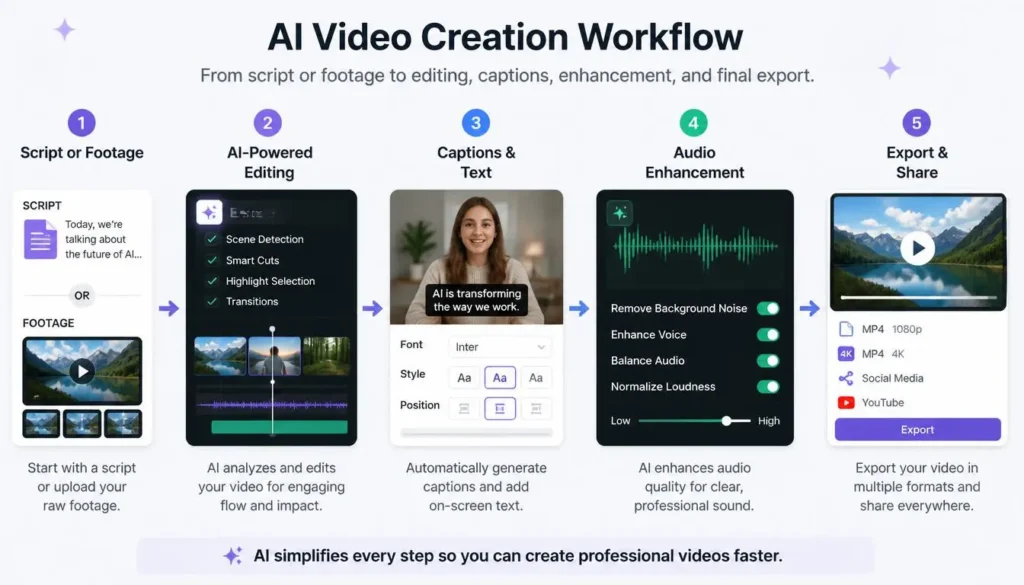
InVideo AI can generate complete videos from text prompts or scripts, making it useful for creators who prioritize speed.
Key Features
- Script-to-video
- AI voiceovers
- Media library
- Templates
- Automatic scene creation
Pros: Fast production, many templates, and an easy learning curve.
Cons: Advanced editing controls are limited, while premium exports require paid plans.
Best For: Small businesses, freelancers, marketers, and beginners.
7. VEED AI — Best Online Editor
VEED AI combines browser-based video editing with AI tools for subtitles, translation, audio cleanup, avatars, and screen recording.
Pros: Easy browser workflow, collaboration features, and strong subtitle generation.
Cons: Requires an internet connection, and some free exports have limitations.
Pricing: Free and paid plans.
Best For: Marketing teams, educators, remote businesses, and YouTubers.
8. Synthesia AI — Best for Business Videos
Synthesia focuses on AI avatar videos, allowing businesses to create presenter-style content without traditional filming.
Key Features
- AI presenters
- Text-to-video
- Multiple languages
- AI voiceovers
- Corporate templates
Pros: No camera required, professional avatars, and multilingual support.
Cons: Not designed for cinematic editing and uses premium pricing.
Best For: Businesses, HR teams, educators, and training organizations.
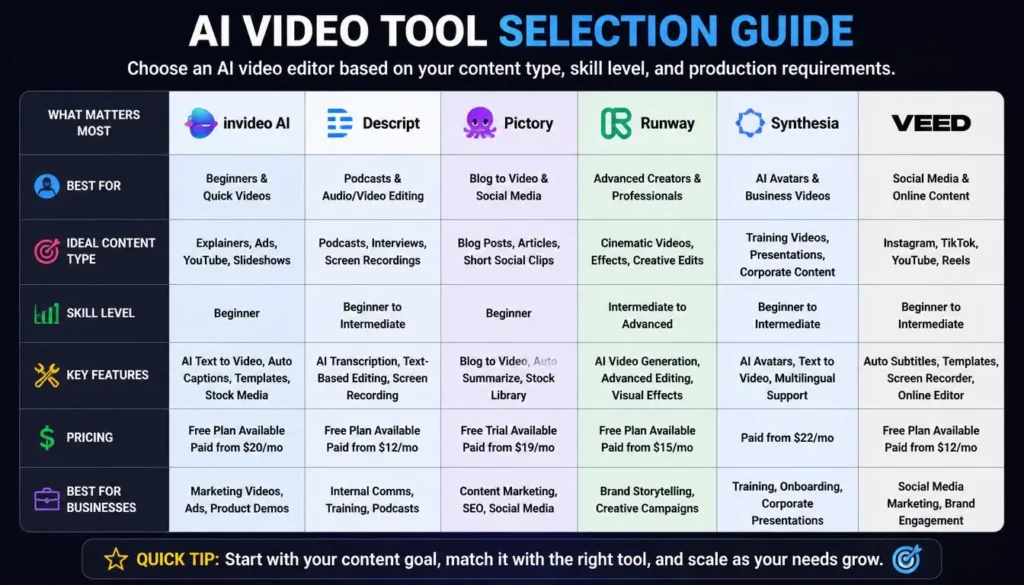
AI Video Editing Tools Comparison
| Tool | Best For | Free Plan | Paid Plan |
|---|---|---|---|
| Runway AI | Professional creators | Yes | Yes |
| CapCut AI | Social media | Yes | Yes |
| Adobe Premiere Pro | Professional editing | No | Yes |
| Descript | Podcasts & tutorials | Yes | Yes |
| Pictory AI | Blog-to-video | Trial | Yes |
| InVideo AI | Marketing videos | Yes | Yes |
| VEED AI | Online editing | Yes | Yes |
| Synthesia AI | Business training | No | Yes |
How to Choose the Best AI Video Editor
Choosing the right AI video editing software depends on your content goals and workflow.
- Identify your content type: Decide whether you’re creating Shorts, YouTube videos, tutorials, podcasts, or business content.
- Check AI features: Look for automatic captions, scene detection, audio enhancement, or text-to-video tools.
- Consider export quality: Professional projects may require HD or 4K output.
- Compare pricing: Free plans are useful for testing, while paid plans unlock more advanced features.
- Consider ease of use: Beginners should prioritize simple interfaces, while professionals may need detailed controls.
💡 Pro Tip: Don’t choose an AI editor only because it has the most features. Pick the platform that removes the most repetitive work from your particular workflow.
Can AI Video Editors Replace Professional Editors?
Not completely.
AI is excellent at repetitive tasks such as trimming footage, generating subtitles, cleaning audio, and creating rough edits. However, professional editors remain important for storytelling, pacing, color grading, sound design, visual effects, and creative decisions.
The strongest results usually come from combining AI automation with human creativity.
Frequently Asked Questions (FAQs)
What is the best free AI video editor?
CapCut AI and VEED AI are strong options for beginners and social media creators because both offer free plans.
Can AI edit videos automatically?
Yes. Many AI editors can trim footage, generate captions, enhance audio, and create videos from scripts with limited manual work.
Are AI video editors good for YouTube?
Yes. Runway AI, Adobe Premiere Pro, Descript, and InVideo AI can help YouTubers speed up production while maintaining creative control.
Which AI video editor is best for beginners?
CapCut AI and InVideo AI are among the easiest options because of their intuitive workflows.
Which AI video editor is best for businesses?
Synthesia AI is particularly suitable for training and instructional videos, while VEED AI and Adobe Premiere Pro are useful for broader business content.
Final Conclusion & Actionable Verdict
The best AI video editing tools in 2026 depend on the type of content you create.
For advanced creative work, Runway AI and Adobe Premiere Pro offer powerful capabilities. Beginners and social media creators can start with CapCut AI, while Descript is an excellent choice for podcasts and spoken-content videos. Bloggers can use Pictory AI to turn articles into videos, while InVideo AI focuses on fast script-to-video production.
For browser-based editing, VEED AI provides a convenient workflow, while Synthesia AI stands out for business training and presenter-style videos.
Instead of choosing the tool with the longest feature list, test the free options that match your workflow. The best AI video editor is ultimately the one that saves you time while still giving you enough creative control to produce content you’re proud to publish.
About the Author
Written by the NestAIHub Editorial Team, technology researchers and content editors specializing in artificial intelligence, video creation, and digital productivity. Our goal is to provide practical technology guidance that helps readers choose and use AI tools effectively.

1 Comment
15 Best AI Tools for YouTube Creators in 2026 - NestAIHub · August 6, 2026 at 1:07 pm
[…] channel, managing multiple clients as a freelancer, or growing an established brand, the right AI video tools can save hours of work every week while improving the quality of your content. Instead of spending […]