Introduction
Artificial intelligence has become a practical part of everyday work, education, research, and content creation. Among the leading AI assistants, Google Gemini stands out for its close connection with Google’s ecosystem and its ability to work with different types of information.
In this Google Gemini Review 2026, we’ll examine its major features, practical uses, pricing, advantages, limitations, and comparison with ChatGPT. By the end, you’ll have a clearer idea of whether Gemini is the right AI assistant for your needs.
⚠️ Educational Disclaimer: This article is for educational and informational purposes only. AI tools can sometimes provide inaccurate or outdated information, so important information should be independently verified before making academic, professional, financial, legal, or other important decisions.
Key Takeaways
| Key Aspect | Details |
|---|---|
| Best For | Google ecosystem users |
| Main Strength | Multimodal AI and Google integration |
| Useful For | Research, writing, coding, learning |
| Free Version | Available |
| Paid Options | Available |
| Best For Students | Research and study support |
| Main Limitation | Important information still needs verification |
What Is Google Gemini?
Google Gemini is Google’s AI assistant powered by the company’s Gemini family of AI models.
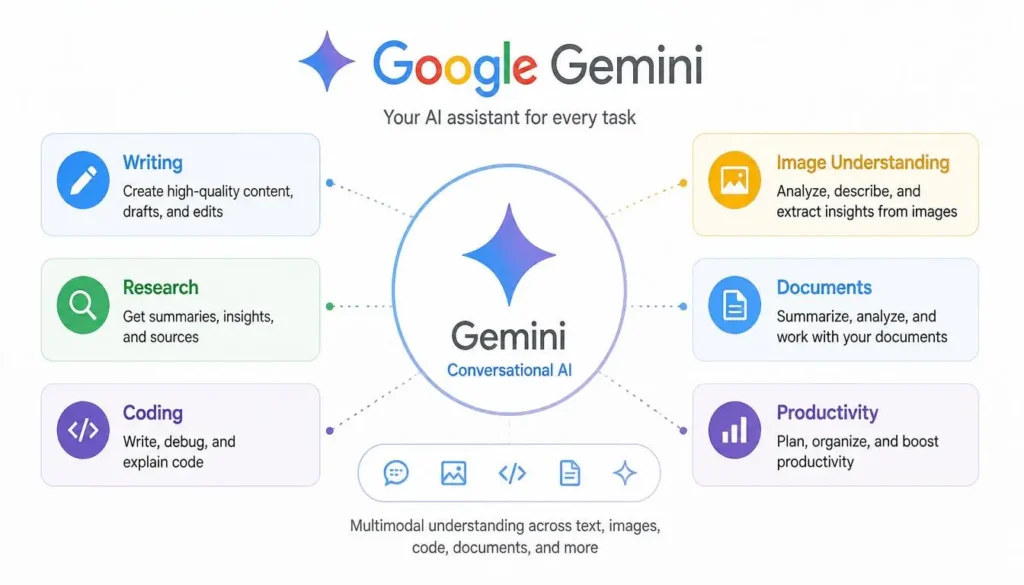
It can work with text, images, documents, code, and other information, making it a multimodal AI system rather than a traditional text-only chatbot.
Gemini can help users:
- Answer questions
- Write and edit content
- Analyze documents
- Assist with coding
- Research topics
- Organize information
- Improve productivity
Its connection with Google’s ecosystem makes it particularly useful for people who regularly use products such as Gmail, Google Docs, Drive, Sheets, and Slides.
Google Gemini Main Features
AI Conversations
Gemini supports natural conversations and can handle follow-up questions within the same discussion.
You can ask it to explain a difficult concept, brainstorm ideas, plan a project, or solve a technical problem.
Practical Example
A student could ask:
“Explain quantum computing in simple language.”
Gemini can provide a beginner-friendly explanation and then answer follow-up questions based on the same topic.
Text Generation
Gemini can assist with many types of writing, including:
- Blog outlines
- Emails
- Reports
- Marketing copy
- Product descriptions
- Social media captions
- Presentation drafts
The best results usually come when users provide clear instructions and then edit the output to add their own expertise and voice.
Image Understanding
One of Gemini’s useful capabilities is its ability to understand uploaded visual information.
It can help users:
- Describe photographs
- Explain diagrams
- Analyze charts
- Read screenshots
- Understand documents
- Identify objects
For example, a student can upload a science diagram and ask Gemini to explain each labeled component.
Research Assistance
Gemini can support the research process by helping users summarize information, compare concepts, generate questions, and organize notes.
However, AI-generated research should not automatically be treated as authoritative. For academic or professional work, always check important claims against reliable primary or official sources.
Coding Assistance
Gemini can help developers with popular programming languages such as:
- Python
- JavaScript
- Java
- C++
- SQL
- HTML
- CSS
Common uses include generating sample code, explaining errors, debugging, refactoring, and documenting existing code.
For complex applications, developers should still test and review every important piece of generated code.
Google Workspace Integration
This is one of Gemini’s biggest advantages.
Depending on the plan and available features, Gemini can work with Google’s productivity ecosystem, including:
- Gmail
- Google Docs
- Google Sheets
- Google Slides
- Google Drive
- Google Meet
This can help users draft emails, summarize documents, organize information, and prepare presentations without constantly switching between different applications.
Multimodal AI
Gemini is designed to work across multiple types of input.
Users may combine:
- Text
- Images
- PDFs
- Documents
- Tables
- Screenshots
This makes it useful for tasks that require understanding more than plain text.
How Students Can Use Google Gemini
Students can use Gemini as a learning assistant, rather than simply using it to generate answers.
Learning Assistance
Ask Gemini to simplify difficult subjects such as mathematics, biology, economics, or computer science.
Summarizing Notes
Long lecture notes or documents can be condensed into easier-to-review study material.
Research Support
Gemini can help students:
- Explain difficult concepts
- Compare theories
- Generate research questions
- Organize ideas
- Create assignment outlines
Students should still consult original academic sources and follow their institution’s AI and academic-integrity policies.
Study Planning
You can provide your exam dates, available study hours, and subjects and ask Gemini to create a structured study plan.
How Content Creators Can Use Gemini
Content creators can use Gemini to reduce repetitive work throughout the content-production process.
Content Ideas
Gemini can brainstorm:
- Blog topics
- YouTube ideas
- Podcast themes
- Newsletter topics
- Social media campaigns
Writing Assistance
It can help create:
- Article outlines
- Introductions
- Headlines
- Social captions
- Calls to action
- Rewritten paragraphs
Human editing is still important for maintaining originality, accuracy, and brand voice.
Research & Productivity
Creators can use Gemini to organize research, summarize material, compare ideas, and develop content plans before producing the final piece.
Google Gemini Pricing
Google offers both free and paid options, although available features and pricing can vary by country, account type, and Google’s current subscription structure.
Free Version
The free experience provides access to core Gemini capabilities suitable for:
- Casual users
- Students
- Beginners
- Basic writing
- General questions
- Everyday productivity
Paid Plans
Paid options can provide access to more advanced capabilities, higher usage limits, and additional Google ecosystem features.
Who Should Consider Premium?
Premium access makes the most sense for people who use AI heavily, including:
- Professional writers
- Developers
- Researchers
- Marketing professionals
- Businesses
- Frequent Google Workspace users
Important: Always check Google’s current pricing page before purchasing because subscription names, prices, and included features can change.
Google Gemini Pros & Cons
Pros
- Excellent Google integration
- Strong multimodal capabilities
- Useful for students and professionals
- Helpful coding assistance
- Natural conversational experience
- Easy to access
- Works well with Google’s productivity ecosystem
Cons
- Some advanced features require paid access
- AI responses still require fact-checking
- Performance can vary by task
- The value of premium plans depends heavily on your Google usage
- Writing style may not suit every user
💡 Pro Tip: If you already spend most of your day inside Gmail, Docs, Drive, and other Google services, Gemini can be more useful than an AI tool that operates separately from your existing workflow.
⚠️ Common Mistake: Don’t assume that Gemini’s connection to Google means every AI-generated answer is automatically accurate. Always verify important information.
Google Gemini vs ChatGPT
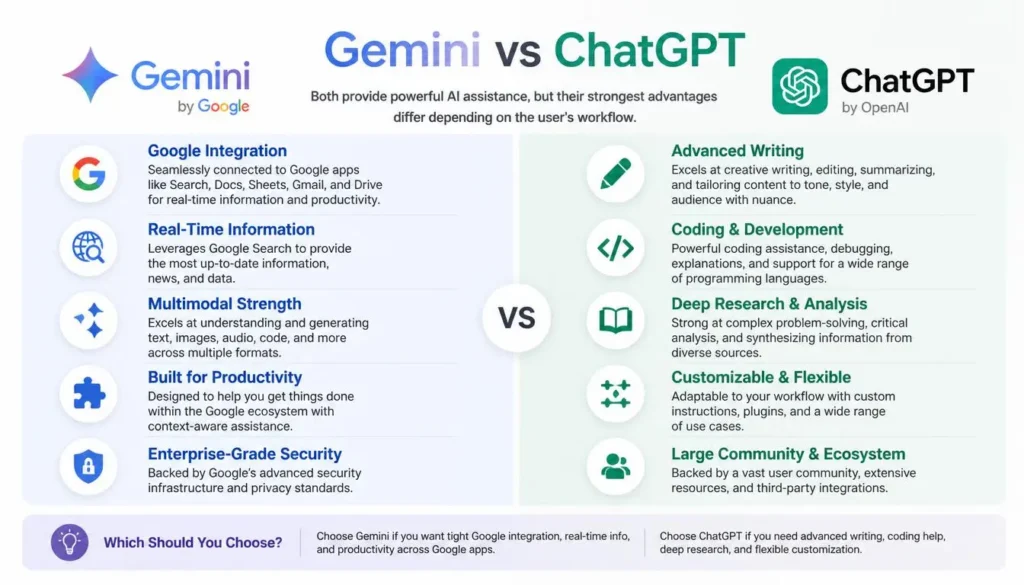
| Feature | Google Gemini | ChatGPT |
|---|---|---|
| AI Conversations | Excellent | Excellent |
| Writing | Very Good | Excellent |
| Research | Strong | Strong |
| Coding | Very Good | Excellent |
| Google Workspace | Excellent | Limited compared with Google |
| Multimodal AI | Excellent | Excellent |
| Best For | Google ecosystem | General AI productivity |
Which One Should You Choose?
Choose Google Gemini if you:
- Use Gmail and Google Docs regularly.
- Depend heavily on Google Drive and Workspace.
- Want AI assistance integrated into Google’s ecosystem.
- Frequently work with documents and other Google services.
Choose ChatGPT if you:
- Need a highly versatile general AI assistant.
- Focus heavily on writing or brainstorming.
- Want strong coding and problem-solving assistance.
- Use AI across many different workflows.
Frequently Asked Questions (FAQs)
Is Google Gemini free?
Yes. Google provides a free Gemini experience with core AI capabilities. Paid options provide access to additional features and capabilities.
Is Gemini better than ChatGPT?
Neither is universally better. Gemini is particularly attractive for Google ecosystem users, while ChatGPT is a strong choice for general-purpose AI assistance, writing, coding, and brainstorming.
Can Gemini analyze images?
Yes. Gemini can understand and analyze visual information such as images, screenshots, diagrams, and charts.
Who should use Google Gemini?
Gemini can be useful for students, teachers, researchers, developers, content creators, business professionals, and everyday users.
Is Gemini good for coding?
Yes. Gemini can generate code, explain programming concepts, identify potential bugs, and assist with debugging across multiple programming languages.
Does Gemini work with Google Docs?
Gemini has integration with supported Google Workspace applications, although exact features depend on the user’s account and subscription.
Final Conclusion & Actionable Verdict
After looking at its features, use cases, strengths, and limitations, Google Gemini is one of the strongest AI assistants for users already invested in Google’s ecosystem.
Its biggest advantages are multimodal capabilities, Google Workspace integration, research assistance, writing support, and coding help.
For students, Gemini can make studying and research more organized. Content creators can use it for brainstorming and drafting, while professionals can benefit from its connection with Google productivity tools.
If you’re new to Gemini, start with the free version and test whether it fits your workflow. Consider a paid plan only when you actually need its additional capabilities.
Final Verdict
Best for Google users: ⭐⭐⭐⭐⭐
Best for students: ⭐⭐⭐⭐½
Best for content creators: ⭐⭐⭐⭐½
Best for coding: ⭐⭐⭐⭐½
Best for Google Workspace: ⭐⭐⭐⭐⭐
Overall, this Google Gemini Review 2026 finds Gemini to be a capable and practical AI assistant. It isn’t automatically the best choice for everyone, but if your daily workflow revolves around Google services, it deserves serious consideration.
Our Rating
Google Gemini — 4.7/5 ⭐
Google Gemini is a highly capable AI assistant with strong performance across writing, research, coding, image generation, and everyday tasks. Its integration with Google services is a major advantage, while newer features such as Gemini 3.5, Gemini Omni, and agentic capabilities make it even more useful for advanced workflows.
About the Author
Written by the NestAIHub Editorial Team, technology researchers and content editors specializing in AI tools, digital productivity, and emerging technology. Our goal is to provide practical, easy-to-understand guides that help readers make informed technology decisions.

3 Comments
10 Best AI Tools for Students in 2026 (Free & Paid) - NestAIHub · August 5, 2026 at 10:30 pm
[…] 2. Google Gemini […]
Claude AI Review 2026: Features, Pricing, Pros & Cons · August 10, 2026 at 8:37 am
[…] For readers deciding between services, a detailed Claude AI vs ChatGPT comparison can be useful alongside our ChatGPT Review 2026 and Google Gemini Review 2026. […]
How to Use AI for Excel and Data Analysis in 2026 · August 27, 2026 at 1:24 pm
[…] Google Gemini Review 2026 […]