How to Make Money With AI Images in 2026: Complete Beginner Guide
Introduction
Artificial intelligence is transforming the creative industry, and AI image generators have become some of the most popular tools for designers, marketers, entrepreneurs, and content creators. In 2026, businesses need high-quality visuals for websites, social media, online stores, advertising campaigns, and digital products. AI makes creating these visuals faster and more accessible than ever before.
For beginners, this opens new opportunities to build valuable skills and offer creative services online. You no longer need years of professional design experience to create attractive graphics, illustrations, or marketing visuals. With the right AI tools, strong prompting skills, and a focus on quality, you can build a portfolio and offer services to businesses and creators.
However, AI is not a shortcut to instant income. Clients pay for creativity, consistency, and professional results—not simply for images generated with a single prompt. The most successful AI creators combine AI technology with design knowledge, editing skills, and an understanding of client needs.
In this guide, you’ll learn what AI-generated images are, explore the best AI image tools in 2026, and discover realistic ways to build an AI image business.
What Are AI Generated Images?
AI-generated images are digital visuals created using artificial intelligence. Instead of drawing or designing everything manually, users describe what they want through text prompts, and AI models generate original images based on those instructions.
Modern AI image generators have become much more advanced, allowing users to create artwork, marketing graphics, product mockups, concept art, illustrations, and realistic images within minutes.
How AI Image Generators Work
AI image generators are trained on large collections of images and patterns. When you enter a prompt, the AI analyzes your description and creates a new image that matches your request.
For example, a prompt like:
“A modern coffee shop interior with warm lighting, minimalist furniture, and customers working on laptops.”
can generate a unique image suitable for a blog post or marketing campaign.
The quality of the output often depends on how clear and detailed your prompt is.
AI Images vs. Traditional Design
Although AI can generate impressive visuals quickly, it doesn’t replace traditional design skills.
AI Images
AI helps users:
- Generate creative concepts
- Produce illustrations quickly
- Explore different styles
- Speed up brainstorming
- Create marketing visuals faster
Traditional Design
Professional designers still contribute by:
- Understanding branding
- Choosing typography
- Applying color theory
- Creating layouts
- Editing images
- Maintaining design consistency
The best results usually come from combining AI-generated visuals with human creativity and design expertise.
Why Businesses Need AI Visuals
Businesses create visual content every day.
Common uses include:
- Social media posts
- Blog graphics
- Website banners
- Product advertisements
- Email marketing
- Presentations
- E-commerce images
- YouTube thumbnails
AI helps businesses produce these visuals more efficiently while reducing production time. This growing demand creates opportunities for freelancers and creative professionals who know how to use AI image tools effectively.
Best AI Image Tools in 2026
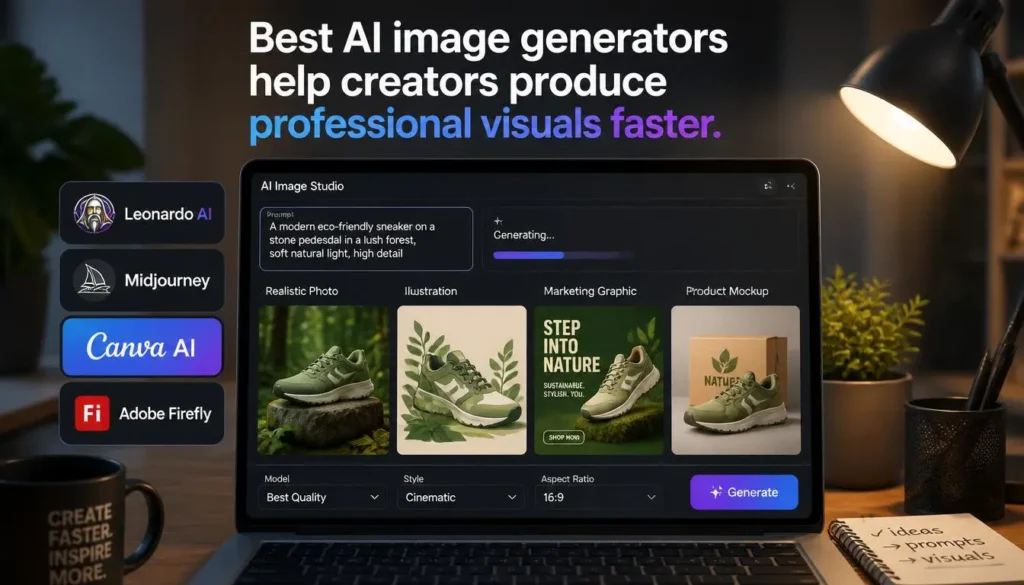
Choosing the right AI image generator depends on the type of projects you want to create. Some tools focus on artistic illustrations, while others are designed for marketing, branding, or business content.
1. Leonardo AI
Leonardo AI has become one of the most popular AI image generators for freelancers, marketers, and content creators. It offers high-quality image generation with flexible styles, making it suitable for both personal and commercial projects.
Key Features
- AI image generation
- Creative illustrations
- Product mockups
- Marketing graphics
- Character design
- Style customization
Best Use Cases
- Blog illustrations
- Social media graphics
- Advertising visuals
- Product images
- Website graphics
- Creative branding
Free or Paid?
Leonardo AI offers a free plan with daily image generation limits. Paid plans provide additional credits, faster generation, and more advanced features for frequent users.
Why Beginners Like It
- Easy-to-use interface
- High-quality results
- Suitable for commercial work
- Large variety of artistic styles
2. Midjourney
Midjourney is known for producing highly artistic and visually impressive images. Many professional artists, designers, and creative agencies use it for concept art, branding ideas, and premium illustrations.
While it has a learning curve, it rewards users who spend time improving their prompting skills.
Key Features
- Premium-quality artwork
- Artistic image generation
- Creative style options
- Detailed lighting and composition
- High-resolution outputs
Best Use Cases
- Digital artwork
- Book covers
- Game concept art
- Branding projects
- Posters
- Creative portfolios
Free or Paid?
Midjourney primarily operates as a paid subscription service, offering access to advanced image-generation capabilities and higher usage limits.
Why Professionals Choose It
- Exceptional artistic quality
- Rich visual details
- Wide creative possibilities
- Excellent for portfolio projects
3. Canva AI
Canva AI combines artificial intelligence with one of the world’s most popular graphic design platforms. It allows beginners to create professional marketing materials without needing advanced design software.
Instead of generating only standalone images, Canva AI helps users build complete visual designs using templates, AI-generated graphics, text, and branding tools.
Key Features
- AI image generation
- Magic Design
- Social media templates
- Presentation creator
- Background removal
- Brand kits
- AI writing assistance
Best Use Cases
- Instagram posts
- Facebook ads
- LinkedIn graphics
- Business presentations
- Marketing materials
- YouTube thumbnails
- Promotional content
Free or Paid?
Canva offers a generous free plan with many useful features. Canva Pro unlocks premium templates, additional AI tools, and advanced branding options.
Why It’s Great for Beginners
- Simple drag-and-drop editor
- Thousands of ready-made templates
- Fast content creation
- Excellent for freelancers and small businesses
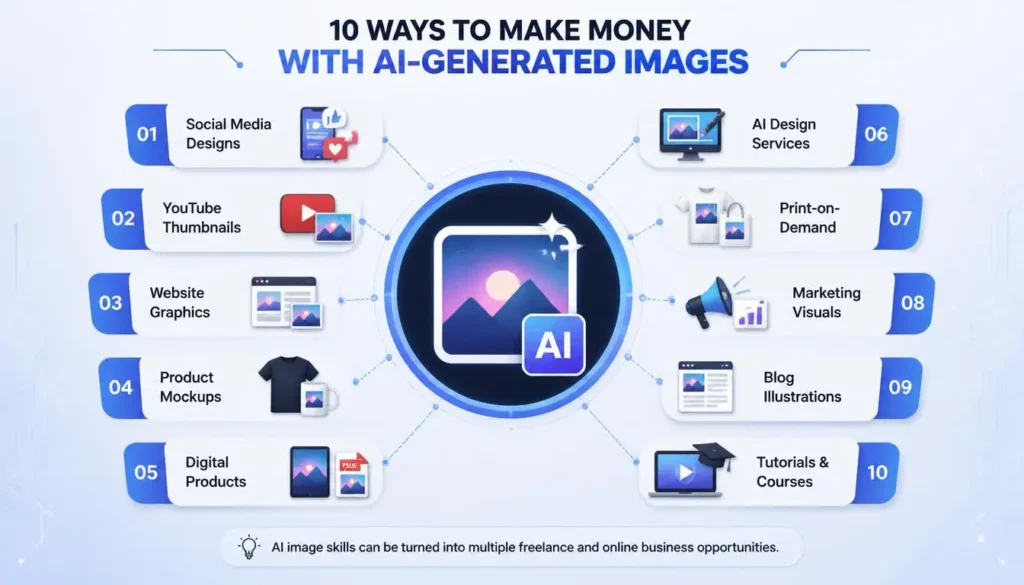
10 Ways to Make Money With AI Images
1. Creating Social Media Designs
Businesses constantly need fresh visuals for platforms like Instagram, Facebook, LinkedIn, Pinterest, and X. AI image generators can help you create eye-catching graphics much faster than traditional workflows.
Services You Can Offer
- Social media posts
- Carousel graphics
- Promotional banners
- Story templates
- Event announcements
- Seasonal campaigns
Example
A local restaurant may need daily promotional posts featuring menu items, special offers, and holiday campaigns. You can use AI-generated concepts, customize them in a design tool, and deliver branded graphics ready to publish.
2. Selling AI Artwork
Many people purchase digital artwork for personal use, office decoration, websites, presentations, or creative projects.
Instead of generating random images, focus on developing a recognizable style or serving a specific niche.
Popular Niches
- Fantasy art
- Nature scenes
- Abstract artwork
- Minimalist illustrations
- Business-themed graphics
- Inspirational wall art
Creating original collections often provides more value than selling individual, unrelated images.
3. Making YouTube Thumbnails
YouTube creators understand that thumbnails play an important role in attracting viewers. AI can help generate concepts, backgrounds, and visual elements that make thumbnails more engaging.
Services You Can Offer
- Gaming thumbnails
- Educational videos
- Business channels
- Podcast thumbnails
- Product review thumbnails
- Tutorial graphics
After generating visuals with AI, refine them by adding bold text, branding, and clear focal points to improve click-through potential.
4. Designing Website Images
Websites need high-quality visuals to improve user experience and communicate ideas effectively. AI-generated images can be customized for different industries and branding styles.
Examples
- Homepage banners
- Blog illustrations
- Service graphics
- Hero images
- Landing page visuals
- Feature illustrations
Businesses often appreciate unique visuals that reflect their brand rather than generic stock photos.
5. Creating Product Mockups
Product mockups help businesses visualize how products may look before production or marketing.
AI can assist with creating:
- Apparel mockups
- Packaging concepts
- Phone case designs
- Mug designs
- Book covers
- Business stationery
These visuals are especially useful for online stores, startups, and entrepreneurs who want professional-looking presentations without expensive photoshoots.
6. Offering AI Design Services
Many businesses want professional graphics but don’t have an in-house designer.
You can offer services such as:
- Marketing graphics
- Social media campaigns
- Business presentations
- Promotional banners
- Event graphics
- Brand visuals
Instead of selling AI images alone, provide complete design solutions tailored to each client’s needs.
7. Making Digital Products
Digital products can often be sold repeatedly without managing inventory.
Examples include:
- Printable planners
- Design templates
- Wall art
- Digital stickers
- Presentation templates
- Social media template packs
- Prompt collections
Focus on solving specific problems rather than creating generic designs.
8. Creating Print-on-Demand Designs
Print-on-demand businesses use artwork for physical products produced only after a customer places an order.
Popular products include:
- T-shirts
- Hoodies
- Tote bags
- Posters
- Phone cases
- Mugs
- Notebooks
AI can help generate creative concepts, but reviewing marketplace policies and intellectual property rules before selling designs is essential.
9. Helping Businesses With Marketing Visuals
Businesses regularly need visuals for advertising, websites, email campaigns, and social media.
Possible services include:
- Promotional graphics
- Email banners
- Website images
- Product advertisements
- Event promotions
- Infographics
Businesses value consistent branding, so understanding color palettes, typography, and marketing goals is just as important as using AI tools.
10. Creating AI Image Tutorials and Courses
As AI image generation becomes more popular, many beginners want to learn how to create better visuals.
If you gain practical experience, you can create educational content such as:
- Beginner tutorials
- Prompt-writing guides
- Video courses
- Blog posts
- Workshops
- Template collections
Teaching others can become another valuable part of an AI-focused business.
How to Start an AI Image Business Step by Step
Step 1: Learn AI Image Tools
Start with one or two platforms rather than trying every tool available.
Practice:
- Prompt writing
- Image generation
- Editing
- Different artistic styles
- Commercial workflows
Step 2: Practice Different Styles
Experiment with multiple design styles, including:
- Minimalist
- Realistic
- Cartoon
- Flat illustration
- 3D
- Watercolor
- Business graphics
Learning different styles allows you to serve a wider range of clients.
Step 3: Create a Portfolio
Before offering paid services, create sample work that demonstrates your skills.
Include examples such as:
- Social media graphics
- Website banners
- Product mockups
- Marketing campaigns
- Blog illustrations
- Thumbnail designs
A professional portfolio builds trust with potential clients.
Step 4: Choose a Service
Avoid trying to serve every possible customer.
Instead, specialize in one area, such as:
- YouTube thumbnails
- Social media graphics
- Website visuals
- Product mockups
- Marketing design
- Print-on-demand artwork
Specialization often makes it easier to attract the right clients.
Step 5: Find Clients
Start offering your services through:
- Fiverr
- Upwork
- Freelancer
- Your own website
- Social media communities
Focus on demonstrating your skills through examples instead of simply listing AI tools you use.
Step 6: Improve Your Skills
AI image generation changes quickly.
Continue learning:
- Better prompting
- Design fundamentals
- Branding
- Marketing
- Color theory
- Image editing
Your creative judgment becomes increasingly valuable as your experience grows.
Where to Find Clients
Fiverr
Create clear service packages with portfolio examples and detailed descriptions.
Upwork
Submit personalized proposals explaining how your designs can help each client’s goals.
Freelancer
Apply for projects related to graphic design, marketing, branding, and digital content.
Share your work, publish helpful design tips, and connect with business owners and marketing professionals.
Social Media
Build your personal brand by posting:
- Portfolio pieces
- Design tutorials
- Before-and-after edits
- Prompt-writing tips
- Creative case studies
Consistency helps build trust over time.
Tips to Create Better AI Images
Creating attractive AI-generated images requires more than entering a short prompt.
Write Detailed Prompts
Include details about:
- Subject
- Lighting
- Colors
- Style
- Camera angle
- Mood
- Background
- Composition
Specific prompts usually produce more consistent results.
Understand Composition
Learn basic design principles such as balance, spacing, contrast, and focal points to create visually appealing images.
Choose the Right Style
Different clients need different styles. Match your design approach to the brand and audience.
Edit and Improve Results
Don’t rely on the first image generated. Refine prompts, make adjustments, and use editing tools to improve the final result.
Understand Client Requirements
Always ask questions about:
- Branding
- Target audience
- Colors
- Goals
- Image dimensions
- Platform requirements
Meeting client expectations is more important than generating impressive-looking images.
Common Mistakes to Avoid
Many beginners make similar mistakes when starting an AI image business.
Avoid:
- Writing vague or low-quality prompts.
- Selling unedited AI-generated images.
- Ignoring copyright, licensing, or platform policies.
- Depending entirely on AI instead of learning design fundamentals.
- Creating generic images without understanding the client’s objectives.
- Focusing on quantity instead of quality.
Professional results come from combining AI with thoughtful editing and creative decision-making.
AI Image Tools Comparison Table
| Tool | Best For | Difficulty Level | Free Plan |
|---|---|---|---|
| Leonardo AI | Marketing visuals, creative graphics | Beginner | ✅ Yes |
| Midjourney | Artistic illustrations, concept art | Intermediate | ❌ No |
| Canva AI | Social media and marketing designs | Beginner | ✅ Yes |
| Adobe Firefly | Professional design workflow | Intermediate | ✅ Limited |
| DALL·E | General AI image creation | Beginner | Limited access |
Frequently Asked Questions (FAQs)
1. Can I make money with AI images?
Yes. Many creators use AI image skills to offer design services, create marketing visuals, develop digital products, or produce educational content. Success depends on the quality of your work, your marketing efforts, and your ability to meet client needs.
2. Which AI image tool is best?
There isn’t a single best tool for everyone. Leonardo AI is a strong choice for beginners, Midjourney excels at artistic images, Canva AI is ideal for marketing graphics, Adobe Firefly fits professional workflows, and DALL·E is versatile for many creative projects.
3. Are AI-generated images legal to sell?
In many situations they can be, but the answer depends on the tool’s terms of service, licensing rules, and local laws. Always review the commercial usage policy of the AI platform you use and avoid creating content that infringes on trademarks or copyrighted material.
4. Do I need design skills for AI images?
Basic design knowledge is highly beneficial. Understanding composition, color, typography, and branding helps you produce higher-quality results than relying on AI alone.
5. How can beginners learn AI image creation?
Start with one beginner-friendly AI image generator, practice writing prompts, study design fundamentals, build a portfolio, and improve through regular projects and feedback.
6. Can AI replace designers?
AI can automate parts of the design process, but human creativity, strategic thinking, branding expertise, and communication remain essential. Designers who use AI effectively can often work more efficiently rather than being replaced.
7. Where can I sell AI artwork?
Depending on the type of work you create and each platform’s policies, you can sell AI-assisted services through freelance marketplaces, your own website, social media, or digital product marketplaces that permit AI-generated content.
Final Verdict
AI image generators are opening new opportunities for freelancers, designers, entrepreneurs, and content creators in 2026. Whether you create social media graphics, website visuals, product mockups, digital products, or marketing materials, AI can help speed up your creative workflow and expand the range of services you offer.
At the same time, long-term success depends on much more than generating images with a single prompt. Clients and customers value originality, consistent quality, attention to detail, and designs that support real business goals. Learning prompt engineering, design principles, image editing, and branding will help you stand out in a competitive market.
If you’re just starting, focus on mastering one or two AI image tools, build a strong portfolio, and refine your work through practice and client feedback. By combining AI technology with creativity and professional skills, you can develop valuable services and create sustainable opportunities in the growing AI design industry.
0 Comments